I wonder if this is related to Plex’s reliance on MusicBrainz for matching. “The Complete Sonatas,” the 10-disc set, is listed as part of a release group of the same name on MusicBrainz. The other two albums in the release group are actually discs two and ten of the complete set.
I’m not sure how Plex Music scanner interacts with release groups on MusicBrainz; they sit between the artist and the release (album). This extra layer of abstraction may be causing issues. Or, Plex could just be getting confused that there are three separate releases listed for the same album.
With regard to tags, do you have the tracks tagged with disc numbers?
[Edited to add]
The nonsense above regarding releases vs. release groups was based on my misunderstanding of how MusicBrainz works (different releases of the same album being grouped). However, the organization of this specific album on MusicBrainz is still odd.
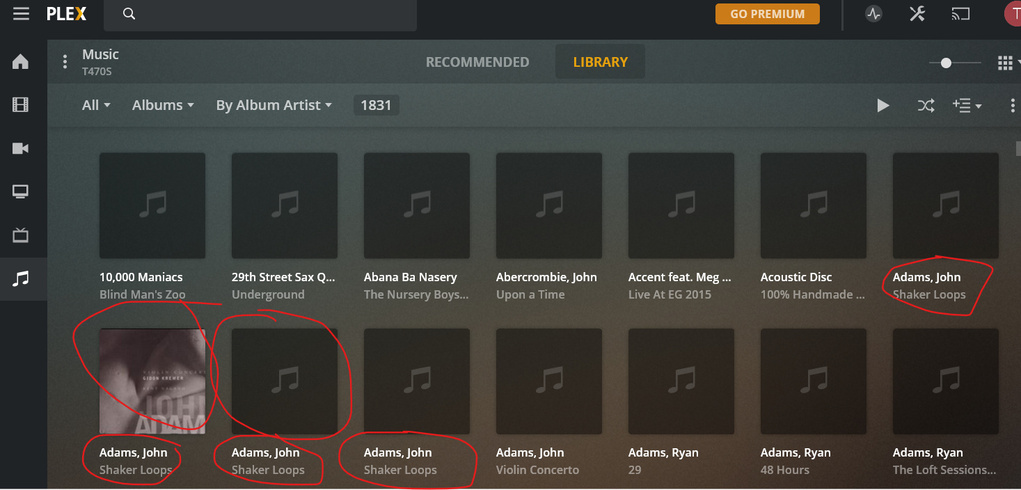
So I have done more fine-grained polishing of metatags, deleted the entire library in Plex, then reimported, and a pile of new problems arise. Some of the glitches are resolved - Plex recognizes all 10 albums in the Goode Beethoven set now - but many more still arise, like the fact that one of the albums in that set DOESN’T display the album cover, although all 9 other ones do (!).
There are tons of other album cover screw ups (as cited above). And many albums are broken into pieces despite IDENTICAL metatags in all the tracks of the album:
This is inane. Basically Plex is just f-ing with us and seems to have no interest in fixing its basic functionality. So disappointing from a company that seems to do so many other things well with their software. Any other software suggestions, dear friends?
After seeing huge numbers of albums (but not all!) where the cover image wasn’t loaded, even though the jpg cover image was identically named to the album, I manually updated mp3 metatags to explicitly reference the cover files. Then I “Refresh All Metadata” and once again “Scan Library Files” and STILL Plex isn’t using cover files or the wrong ones - and even inconsistently across a single, identically tagged set of files! One of many examples:
Problem 2: after updating metadata, neither of those refreshes (“Refresh All Metadata” and “Scan Library Files”) prompts Plex to correctly use the newly updated metatag information - album artist, artist, disc number, anything. The ONLY way to get Plex to use the correct metatags is to literally delete the entire library and then create it from scratch.
One note, deleting the library and reloading it did not work for me, I tried that again last night and 3% of my albums are missing cover art on the initial load but that art is found if I do what you demonstrated and play the media and refresh the individual item.
I’ve been trying that workaround for about a year on and off since it’s seems to work at first, but it just helps temporarily. Within a few days or week the problem gets worse again, the background metadata refresh causes albums to revert back to blank. Driving me crazy
So I expect my 3% missing will drift to 5% within a week or so. Each time I manually fix them it doesn’t stick for long (maybe a week).
On the other thread several people have had the same experience.
Yes, I meant searching meta on individual albums results with better results. And if it doesn’t match, your options would be to add to musicbrainz or use the personal media scanner on the individual album. Good write up. I am sure it will get better, I’ve noticed the movie scanner is better, TV has made some improvements, but the music scanner… maybe some issues with cross pollination with trying to integrate with meta from Tidal might be causing issue with the less “popular” music. I know a lot of my Hawaiian and New Zealand reggae gets wonky.
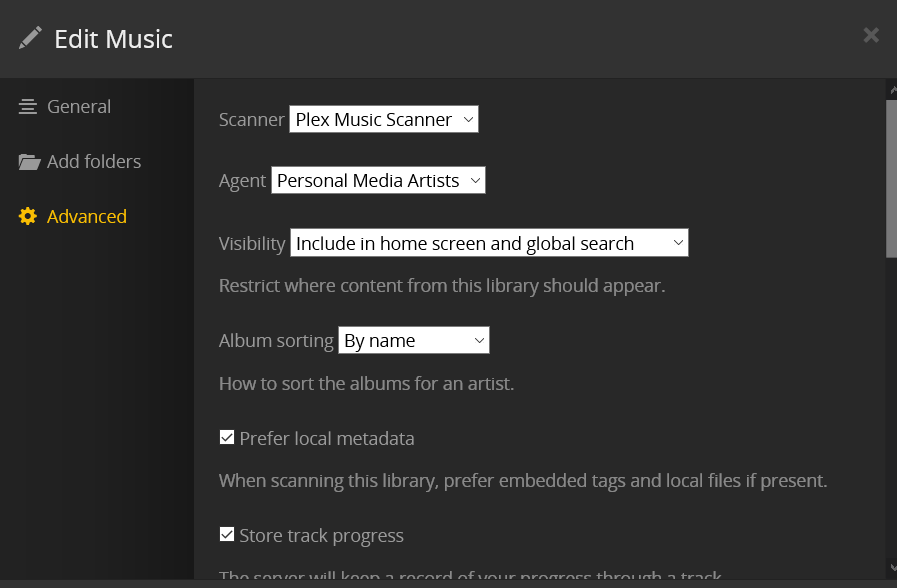
I had not tried setting the artist agent to “Personal Media Artists”, so today I’ve deleted all my libraries (1000’s of albums across about 10 libraries), I’m reloading them all with this option set to “Personal Media Artists”. I don’t care about artist images, I just care about my album images and using the correct (my) artist names. I like the lyrics feature but I can live without that too.
So far so good – everything is loading and 100% of the cover art is correct and is my cover art. It’s loading fast too! The matching nonsense slows down the process obviously.
Now the question is this: do you expect the matching process to still mess things up or should the matching process simply be ignored given that I’ve chosen “Personal Media Artists” and to prefer local metadata?
Fingers crossed that this workaround sticks. It’s not ideal but I consider all that Musicbrainz stuff to to be bloatware anyway, I know who these artists are and if I get confused about who, for example, The Beatles or The Cure are then I can google them!
I lost all my playlists once I deleted my libraries but I’m willing to rebuild those to get rid of the artist chaos Plex has caused and also to get the correct (my) cover art to show correctly and not disappear.
Please let us know how it works. I have mine set to “Personal Media Artists” and am still having all the problems cited above.
What I find so disappointing is zero comment from Plex. Even a simple “Yes, we’re aware and have Music Library issues in queue to be addressed” would be better than this radio silence. Support boards for other good tech companies don’t leave loyal, engaged users ignored like this.
The problem isn’t Plex’s ability to do correct matching, it’s not that it is not matching when processing albums in bulk, even though my manual triggering of individual album matching DOES work. Cover image is IN the directory and IDENTICALLY named. And even when the mp3 file metatags are manually updated to include confirmed reference to the cover image, bulk metadata refresh does. not. work.
Even something as basic as having 5 “Emmylou Harris” albums and 1 “Emmylou Harris & Rodney Crowell” messes up the logic. All 6 of these albums got reset to “Emmylou Harris & Rodney Crowell” then the cover art goes missing. This is not necessarily obscure situations that are getting screwed up, what I can’t understand is why the entire Plex music community is not having these sorts of nightmares with their libraries.
Anyway, my best bet right now is try to turn off all this intrusive matching by starting over and trying to set everything to avoid Plex doing any matching whatsoever.
Wow. I am now seeing what a mess Plex’s Music library handling really is. So I have polished more albums, manually linked the cover art, deleted the entire Music library, and then imported all my music files anew, fresh, de novo. But look at this craziness - now Plex has literally broken apart an album that it imported correctly last time, and is applying the cover art only to one of the disassembled tracks! I CHANGED NO SETTINGS. What kind of software behaves like this?!
Day 2 and everything is still working — 100% correct artists and cover art.
This, btw, helps confirm that folder / file organization has nothing to do with the bugs we are discussing here, since, absent of the Plex matching logic the system renders my library perfectly with MY metadata.
Twsf — I did notice one difference with your library config, for the the very last setting for Album Art I used “local files only”
I first deleted all my libraries and then rebuilt them with the new settings. I think the Album Art and Artist Agent settings are critical in avoiding the Plex matching logic from having an impact, thus avoiding the bugs.
I did run a couple “refresh metadata” processes randomly and they were not destructive, presumably because my settings steer it (finally) to only use my own metadata and cover art and the matching process is essentially harmless.
The background (evening) refresh metadata process runs every three days, so I will continue to check in to update on whether that process has wreaked havoc on my library or not. I think it’s the same logic as the manually invoked “refresh all metadata” but I’m not sure.
So far so good. And, btw, Plex seems much faster scrolling my libraries / loading / etc…
The first issue I see is this librarians’ attitude to artist names. Lastname, Firstname
Don’t do that. The name is John Adams. If you want to appear him under the letter J in your library, only change the ‘Sorting name’ to “Adams, John”.
The next issue I stumbled over above is that you’re apparently pointing the Plex music library at a “naked” drive letter. I cannot recommend it. Always create a folder. e.g. D:\Music in this case.
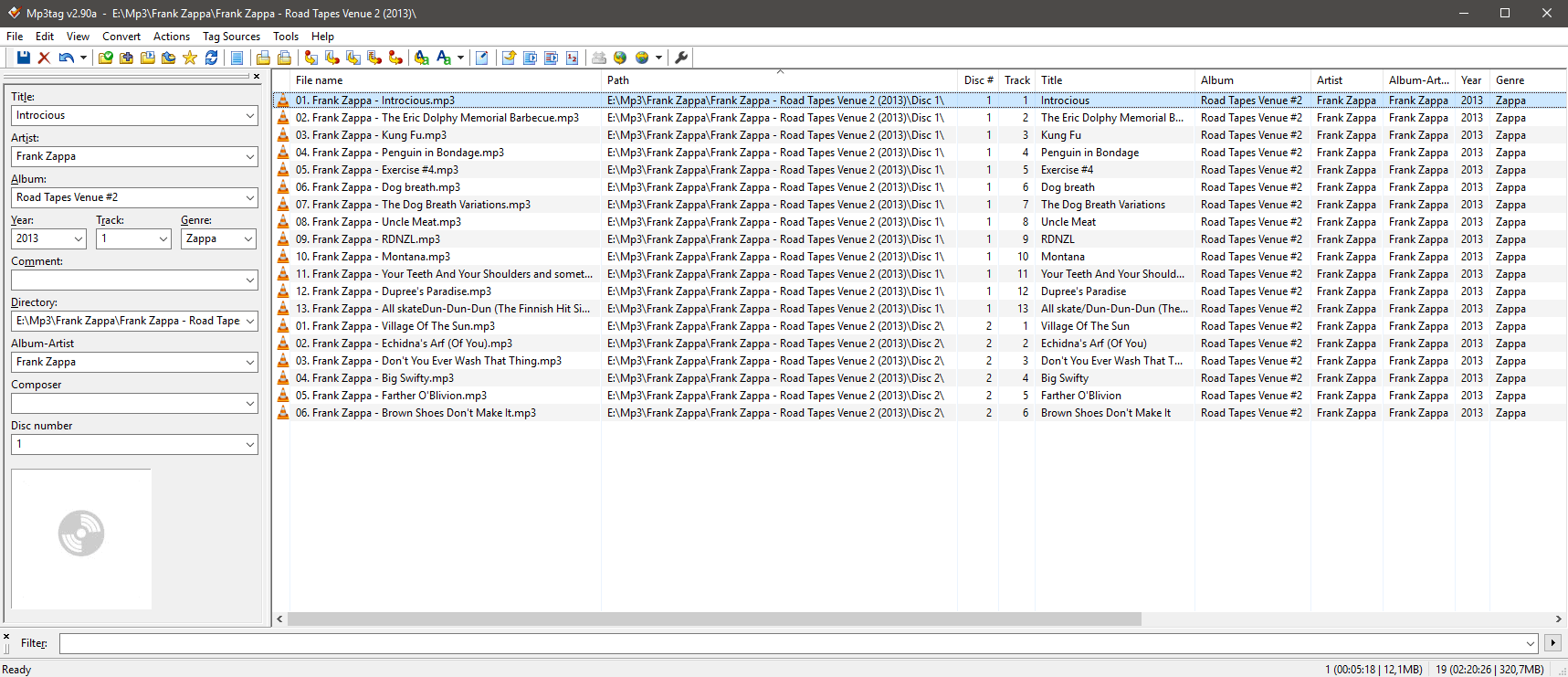
With the album in question, can you do something like this screenshot. Where one can see both the folder structure, the file names and the embedded meta tags? They all play an important role in successfully adding stuff to a Plex music library:
Could you also please look at the related posts I’ve made on other threads, all my forum posts have been a variation of this theme, especially cover art that mysteriously disappears. Many others are having the same issue. It happens with similarly named albums, like different editions, or the same album in different libraries with slightly different names. Rather than using local cover art, as configured, Plex goes blank on some of these — but not all — and it changes over time which is really curious. One day the cover art is there and the next day it is gone.
The “bugs” I’m referring to are those chaotic behaviors — one day 3% of my cover art is missing then the next day 5% is missing and some of the previous missing cover art that was missing is now displayed.
Right now I’m using only “local files” for the artist agent , so I have no artist matches, artist images are all blank. But by avoiding that artist matching I’m able to once again enjoy Plex because I see all my cover art and correct artist displayed for my album views which is my 99% use case.
That said, I would gladly provide you access to my library if it’s helpful in trying to uncover what’s wrong with similarly named albums in the case where artist matching is enabled (I suspect a caching problem).
I would ultimately like to use the artist info and lyrics features — to me they are a “nice to have” but not essential.
I would be glad to be helpful in anyway possible to work through these issues.
At this moment, I’ve deleted all my libraries and re-loaded with artist agent “local files” so I have no metadata problems at this moment , but I could create another library with the agent set to Plex to demonstrate the problematic behavior.
Thanks Otto - but how do we get Plex to update the library with new metadata? (Yes, deleted library and moved everything into a /music folder.)
I have made changes as you have suggested, but after trying every available manually triggered metadata refresh and library refresh, nothing changes in Plex for these albums - not Album Artist name, not Cover. Why? How can we get Plex to REFRESH actual information without deleting the whole library and starting over?
These mp3 files showed fine on the previous import, and they clearly EXIST. Why is Plex not recognizing them at all, despite proper metatags?
[time elapses]
So while waiting to see if we get a reply from Plex, I tried switching the scanner/agent, and the results are equally bizarre. Here are the new scan settings:
And now Plex adds ONE of the two individual mp3 files. No longer neither of them, but not both of them. This. Makes. No. Sense. What on earth is going on with Plex? How can this be fixed?!