Plex is not automatically updating TV show metadata. At all

Server Version#: 1.41.3.9314 (binhex)
Player Version#: Browser Player
<If providing server logs please do NOT turn on verbose logging, only debug logging should be enabled>

Noticed today that metadata wasn’t updating on some TV shows. Was only getting “Episode 1”, “Episode 2”, and such. Clicking on an episode and selecting “Refresh Metadata” fixes everything, but obviously I would like the correct metadata to apply in the first place. I ended up making a second library (leaving the first library be) and when adding data to the second library, now NONE of the tv shows have any metadata (slight correction below), even though they are in the exact same spot and named the exact same way as their correctly applied counterparts in the original library. Again, I can refresh the metadata and it pops up, but I’d rather not!

Files are placed for me by Sonarr and are labeled the exact way Plex wants and in the exact right folder structure. In the library settings, this is what I have:

Scanner: Plex TV Series
Agent: Plex Series
Episode Sorting: TheTVDB
Use Local Assets - Disabled
Prefer Local Metadata - Disabled

I should note that I only changed episode sorting after noticing it wasn’t auto appying metadata and reading up on things, so when that didn’t work, I create the new library with this episode sorting in the first place, and that is when none of the files updated. So then I created an even newer library with all the default options left as is, and still no metadata updating. It will say it is updating metadata, but it never applies it.

Something is obviously broken with my Plex Server when it comes to TV show metadata. It was working perfectly fine just yesterday and now not at all. Not really wanting to completely uninstall/reinstall the container. Please help?

Correction: Actually, in the brand new library I created that carries over all the defaults of a library, a couple seasons here and there do have metadata applied. For instance Veep season 3 has its correct metadata, but none of the other seasons.

Can you recreate the issue, let us know the file name and then give a copy of your server logs ? we might be able to see what is going on.

Yup I just created a new library and got the same result. I also updated a couple shows manually (which worked) and then refreshed the metadata for the entire library, which did not work.

Sure. Uploading the Media Server Log.
Plex Media Server.log (4.6 MB)

Reading this, I see a lot of things like this:

Jan 08, 2025 07:15:29.261 [23409064090424] DEBUG - Loaded metadata for Buy Beer (ID 18095) in 130ms
Jan 08, 2025 07:15:29.261 [23409064090424] DEBUG - Doing expensive tags write for 'Buy Beer' because something changed.
Jan 08, 2025 07:15:29.262 [23409072528184] DEBUG - Local media already exists (metadata://posters/tv.plex.agents.series_a7337ff09c414dc4edcc36224677d5bbd379b7db)
Jan 08, 2025 07:15:29.262 [23409072528184] DEBUG - Doing expensive tags write for 'Spanish Fry' because something changed.
Jan 08, 2025 07:15:29.262 [23409064090424] DEBUG - Doing expensive tags write for 'Buy Beer' because something changed.
Jan 08, 2025 07:15:29.263 [23409064090424] DEBUG - Doing expensive tags write for 'Buy Beer' because something changed.
Jan 08, 2025 07:15:29.264 [23409064090424] DEBUG - Doing expensive tags write for 'Buy Beer' because something changed.
Jan 08, 2025 07:15:29.265 [23409064090424] DEBUG - Doing expensive tags write for 'Buy Beer' because something changed.

When I refreshed the metadata manually and went to look for that log, I see something like this:

Jan 08, 2025 07:25:25.529 [23409069034296] DEBUG - [Req#5b1a6] Loaded metadata for Season 1 (ID 20737) in 3ms
Jan 08, 2025 07:25:25.529 [23409069034296] DEBUG - [Req#5b1a6] Doing expensive tags write for '' because something changed.
Jan 08, 2025 07:25:25.536 [23409069034296] DEBUG - [Req#5b1a6] Local media already exists (metadata://posters/tv.plex.agents.series_42eb332dc39de9f077e8fccbdbf9eb4064149cef)
Jan 08, 2025 07:25:25.536 [23409069034296] DEBUG - [Req#5b1a6] Doing expensive tags write for '' because something changed.
Jan 08, 2025 07:25:25.537 [23409069034296] DEBUG - [Req#5b1a6] There was a change for metadata item 20737 (Season 1), saving.
Jan 08, 2025 07:25:25.537 [23409069034296] DEBUG - [Req#5b1a6] Updating metadata item (save) () with ID 20737
Jan 08, 2025 07:25:25.540 [23409069034296] DEBUG - [Req#5b1a6] Done with metadata update for 20737
Jan 08, 2025 07:25:25.540 [23409059871544] DEBUG - [Req#5b1a6] Calculated media file path for path [metadata://posters/tv.plex.agents.series_42eb332dc39de9f077e8fccbdbf9eb4064149cef]: ["/config/Plex Media Server/Metadata/TV Shows/b/41f45fc8619fdabed9f1a016433179cb66e4048.bundle/Contents/_combined/posters/tv.plex.agents.series_42eb332dc39de9f077e8fccbdbf9eb4064149cef"]
Jan 08, 2025 07:25:25.542 [23409069034296] DEBUG - [Req#5b1a6] Season: episode 1 in season 1 has seen a guid change (local://20738 => plex://episode/5de8f81499d6fa001e56ed3d)
Jan 08, 2025 07:25:25.543 [23409069034296] DEBUG - [Req#5b1a6] Migrating metadata settings from local://20738 -> plex://episode/5de8f81499d6fa001e56ed3d
Jan 08, 2025 07:25:25.543 [23409069034296] DEBUG - [Req#5b1a6] Updating metadata item (save) () with ID 20738
Jan 08, 2025 07:25:25.553 [23409069034296] DEBUG - [Req#5b1a6] Loaded metadata for Chapter One: Make Your Mark (ID 20738) in 4ms
Jan 08, 2025 07:25:25.553 [23409069034296] DEBUG - [Req#5b1a6] Doing expensive tags write for 'Chapter One: Make Your Mark' because something changed.
Jan 08, 2025 07:25:25.554 [23409069034296] DEBUG - [Req#5b1a6] Doing expensive tags write for 'Chapter One: Make Your Mark' because something changed.
Jan 08, 2025 07:25:25.555 [23409069034296] DEBUG - [Req#5b1a6] Doing expensive tags write for 'Chapter One: Make Your Mark' because something changed.
Jan 08, 2025 07:25:25.564 [23409059871544] DEBUG - [Req#5b1a6] [UltraBlurProcessor] Generated for item 20737 in 23 ms.
Jan 08, 2025 07:25:25.567 [23409069034296] DEBUG - [Req#5b1a6] Doing expensive tags write for 'Chapter One: Make Your Mark' because something changed.
Jan 08, 2025 07:25:25.569 [23409069034296] DEBUG - [Req#5b1a6] Doing expensive tags write for 'Chapter One: Make Your Mark' because something changed.
Jan 08, 2025 07:25:25.574 [23409061980984] DEBUG - [Req#5b1a6] Calculated media file path for path [metadata://posters/tv.plex.agents.series_42eb332dc39de9f077e8fccbdbf9eb4064149cef]: ["/config/Plex Media Server/Metadata/TV Shows/b/41f45fc8619fdabed9f1a016433179cb66e4048.bundle/Contents/_combined/posters/tv.plex.agents.series_42eb332dc39de9f077e8fccbdbf9eb4064149cef"]
Jan 08, 2025 07:25:25.576 [23409069034296] DEBUG - [Req#5b1a6] Local media already exists (metadata://posters/tv.plex.agents.series_b2c416049342b70ab585ac243c35f2cc4f73362e)
Jan 08, 2025 07:25:25.576 [23409069034296] DEBUG - [Req#5b1a6] Doing expensive tags write for 'Chapter One: Make Your Mark' because something changed.
Jan 08, 2025 07:25:25.578 [23409069034296] DEBUG - [Req#5b1a6] Doing expensive tags write for 'Chapter One: Make Your Mark' because something changed.
Jan 08, 2025 07:25:25.580 [23409069034296] DEBUG - [Req#5b1a6] There was a change for metadata item 20738 (Chapter One: Make Your Mark), saving.
Jan 08, 2025 07:25:25.580 [23409069034296] DEBUG - [Req#5b1a6] Updating metadata item (save) (Chapter One: Make Your Mark) with ID 20738
Jan 08, 2025 07:25:25.585 [23409069034296] DEBUG - [Req#5b1a6] Done with metadata update for 20738
Jan 08, 2025 07:25:25.586 [23409039018808] DEBUG - [Req#5b1a6] Calculated media file path for path [metadata://posters/tv.plex.agents.series_b2c416049342b70ab585ac243c35f2cc4f73362e]: ["/config/Plex Media Server/Metadata/TV Shows/b/41f45fc8619fdabed9f1a016433179cb66e4048.bundle/Contents/_combined/posters/tv.plex.agents.series_b2c416049342b70ab585ac243c35f2cc4f73362e"]
Also, I should note that movie metadata loads fine. No issues with it automatically grabbing those.

That is a just one of the dozen or so files I was looking for in the server logs (see related article for how to create the needed zip) but before you try that, can you run GitHub - ChuckPa/PlexDBRepair: Database repair utility for Plex Media Server databases my spider sense is saying its either database corruption or optimization.

Yup, I can do that soon. Honestly I went nuclear and am just deleting the app and rebuilding the libraries. Will report soon but I don’t have high hopes.

make sure you delete the database files too. those are often left behind when plex is uninstalled.

I have deleted everyting in the appdata folder. It is scanning my folders now but as they come in, still no metadata…

Is it possible that Sonarr did something to my files to make them this way? I don’t understand how it can be happening even though I deleted everything in the appdata folder AND switched docker distros…

if you posted the server logs I might be able to see something.

Okay one sec. Sorry, got ahead of myself. I am going to try this on my Windows first to see if it even works there. I will post logs from there if it still does not work. Thanks for bearing with me.

Wait actually, I have them from my old database. Attaching them here.
Plex Media Server Logs_2025-01-08_07-28-42.zip (6.8 MB)

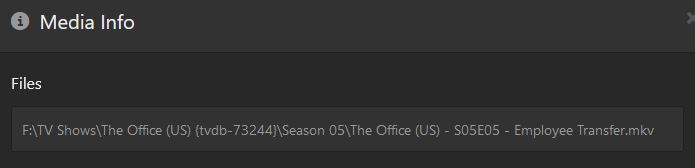
Do everyone (that’s trying to help you) a favor and post a screen shot of your folder/file name structure. Like so.

On the off chance you don’t know how to do this, hover your mouse over an episode of a TV show, click the “three dots”, then click " Get Info".

Plex is very picky about folder and file naming.

Yes sorry, I should have done that already. I appreciate you all trying to help me. This is very plexing (no pun intended). The file structure is as below. This is from my windows server test and I named the main folder in a rush, so the TV show library is pointed to the folder “plextest” as if it were named TV Shows, which is what it originally was.

Speaking of which, Plex on Windows also did not return any metadata, so it definitely isn’t something specific about Unraid. I am going to restore my media server database on my Unraid to return it to its former state before I went crazy deleting and rebuilding everything.

Something I’m just putting together is that Veep Season 3 is one of the only shows that automatically grabs its metadata. It is also the only season of a show I forgot to name in the way that (I thought?) was right. It looks like this:


So yeah, I guess something is off here and Sonarr has renamed the files, or something?

Got it!! Sonarr had its metadata settings enabled for Plex, which was creating a .plexmatch for each file. It only had “Series Plex Match File” enabled and not Episode Mappings. Once I disabled that and re-added a few test series to a new library, they immediately came up with their metadata. I really thought I was going insane. Thanks for everyone who was trying to help me.

Glad it all worked out for you. I tested your structure and Plex pulled metadata for me.

I think the only thing that would make it better would be to add the TVDB code in the main folder like so.

\Joe Pera Talks with You {tvdb-347590}\Season 03

Have you heard of FileBot? It’s a great way to rename files in mass that fit Plex’s folder and naming structure.

Yeah I used filebot when I ran my server on windows, but Sonarr does all that renaming for me now, its basically doing the same thing. I just hadn’t realized that by enabling the TVDB metadata in Sonarr that it was creating the .plexmatch files, and they were only enabled to match the series as whole and not the individual episodes, so that is why Plex defaulted to “Episode 1” and such. I guess I could re-enable it and map the individual episodes but it doesn’t really seem worthwhile now that Plex is picking them up automatically again.

And yeah I saw your example file structure with the TVDB ID and have enabled Sonarr to do that as well, though that is one thing I don’t think it can do to existing folders. Regardless, its all working now. Really felt like I was going mad there for a second. Thank you again!

1 Like

This topic was automatically closed 90 days after the last reply. New replies are no longer allowed.
