Server Version#:
Player Version#: 1.19.4.2935
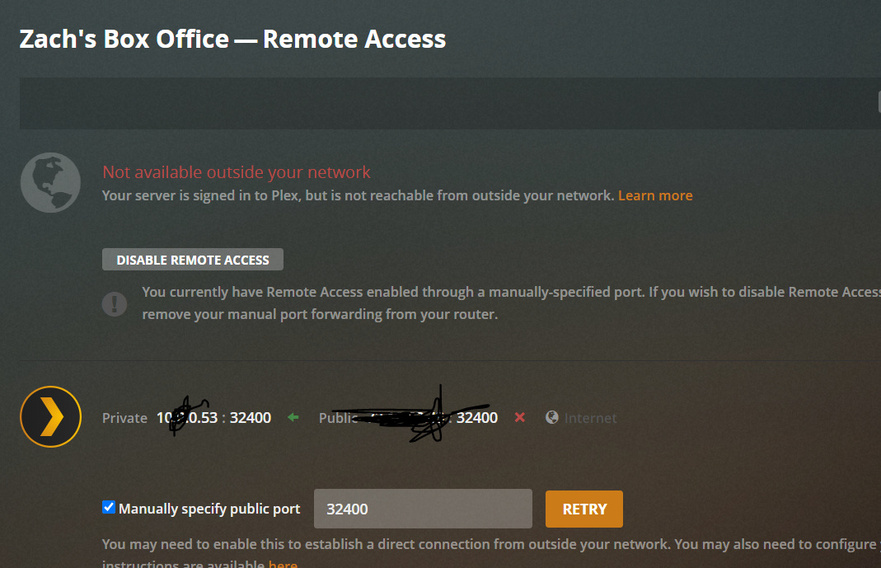
Plex is just flat out not connecting anymore. I have created and checked all necessary port forward protocols, made sure my firewall is down and all of that jazz. Please for the love of god, someone help me.
Plex Media Server Logs_2020-06-17_12-52-20.zip (1.9 MB)
Your logs show your server is using a WiFi connection. Is that right?
Jun 17, 2020 12:48:11.736 [8824] DEBUG - * 15 Wi-Fi {AB7E7509-5DFF-4C5A-A485-F91719789DD5} (10.0.0.53) (loopback: 0)
It seems to be having trouble communicating with other devices on that network.
Jun 17, 2020 12:48:11.736 [8824] DEBUG - NetworkInterface: ignoring adapter ‘Local Area Connection* 2’ (fe80::ccca:404e:763a:8f7%3,192.168.137.1) because it has no gateway
There is a wired connection, but it’s not being used since it’s already on WiFi.
See how that’s on a different network. I think something is wrong with your network setup.
Interesting…what do you think I should do? Should I reset my network settings perhaps?
And yes, I am using a wifi connection
Can you describe your network setup?
I use a xfinity ISP, connected through a mesh network router and have a port-forward protocol setup from my IP address to 32400 port. I have turned of Xfinity’s advanced security settingas well. I am a bit of a noob, so if there is other info you need please let me know
A server on a WiFi connection is a good way to insure that you have lots of problems. Servers should always run wired because WiFi has too many interruptions to insure a steady stream.
Clients are usually OK on WiFi because they can buffer ahead but servers do not have that luxury.
I do not even recommend clients using WiFi unless there is no alternative but servers using WiFi just introduces too much instability.
If you absolutely cannot use a wired connection then the 5ghz band is better unless there is a distance issue. If you must use 2.4 ghz then put your router on ch 11 or 1. They are usually mostly interference immune.
But, once again, wired is always better than wireless.
So you do have 2 networks. My guess is that you have your mesh using the same network subnet (10.0.0.x) as your xfinity router so there is a conflict when devices try to talk to each other.
The quick fix is to set your xfinity router to bridge mode.
So you think if I switch to a wired connection that it will clear up a lot of the issues I am having?
I may have mis-stated what I have. I am just using the router that was provided to me by xfinity. Do you think switching to a wired connection would help?
So you don’t have a mesh network?
Sure, that would make it better.
No I don’t, I just have the one router in my home
Do you want me to re-send logs?
Your logs showed a network issue, so unless you’ve change something, the logs won’t show anything different. If you did change something, then yes, new logs will help, but I’ll need to know what you changed.
No, I haven’t changed anything; I guess I’m just not clear on what the network issue is; if you could help clarify that, I would greatly appreciate it. When I get an Ethernet cable, will I have to set up a new port-forward rule?
To put it simply, it can’t hurt. I do not know if wired will fix any of your issues BUT I do know that servers should never ever be wireless. There is just too much that can go wrong.
If you do switch to wired remember that just connecting a wire does not mean your computer will use the wire. At a minimum a reboot is required and often it is necessary that you go into your computer’s settings and make sure that the wired connection is what the computer uses. I have even had a case, under an earlier version of Windows, where I had to turn off the computer’s wireless radio before it started using the wired connection.
As I understand port forwarding I believe you will have to make changes. Switching from wireless to wired or the other way around almost always results in a new IP address. In fact it is quite possible for a computer to have two IP addresses, one for wireless and one for wired. (Even that is not a limit as you can have more than one network card or port.)
The issue is that your server is on 10.0.0.53, but it can’t communicate with any other device on that 10.0.0.x range. To be clear, what is the actual issue you are having? PMS is running so it is working.
It keeps disconnecting from the network and saying that it’s not available outside my network.
Here’s my logs again, just to help.Plex Media Server Logs_2020-06-17_14-47-42.zip (1.6 MB)
Please let me know if you need any other info!