After rebooting CentOS 7 my Plex server came up with an entirely new page saying “We’ve discovered a server” and forcing me through what appeared to be setup pages for collections, etc.
After that I discovered it had lost several settings including the “Manually specified public port”.
What are those setup pages about? And how on Earth can it lose basic settings like that???
Version 1.16.6.1592
Edit
Discovered Plex had lost my friendly system name as well. Changed it back but now there are two servers listed with the same name - one is “unavailable”.
What data is kept with the server name? Like everyone’s recently watched and other important data, or what? That is, what will my family lose by the server “forgetting” it’s name and creating another one???
No offense but forced changes of system configuration is unacceptable. Do whatever with Plex but do not alter system-level configuration like someone’s password. That is a good way to alienate users and cause massive grief.
To be clear, I created user Plex for the use of the Plex service. All the media drives are mounted below and are owned by that user… I do not actually login to that account to admin the box.
However, it is a user login that I use when updating PMS and fiddling with the content. But it’s an inside box on a 10-net LAN behind another Linux firewall/gateway box that NATs to the PMS server through a custom iptables firewall. It is relatively secure as long as the Plex ports themselves cannot be hacked.
That said, I do understand your notion of randomizing the Plex user on remote PMS systems. But that ought to be configurable somehow. … … right, read your other post, if it exists don’t change it. That’s works.
The problem of my server creating a “new” server, as known by plex.tv for users to access, was solved by renaming the friendly name - although that might not be necessary - then logging out then doing a new login on each device with the Plex app. Local browsers with direct connections are not effected.
As far as I can tell only some settings were lost.
You have two servers with the same friendly name, just as you stated.
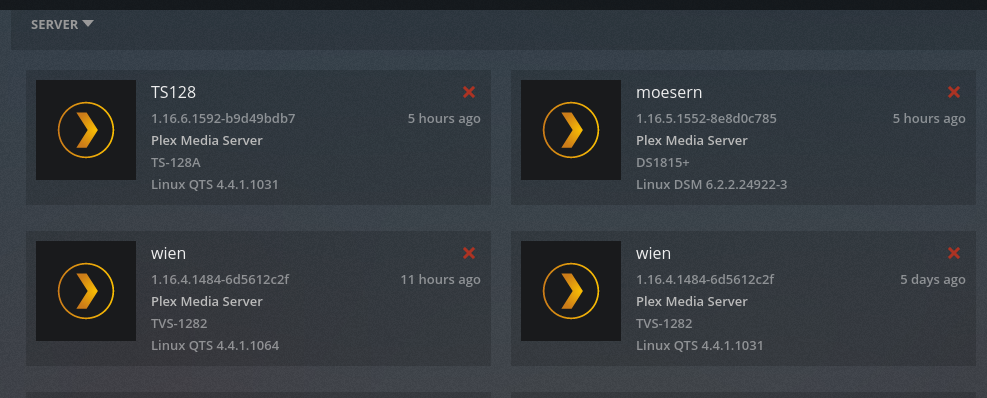
To first deconflict the naming, go to Settings - Authorized Devices - Servers (Upper left corner in Plex/Web)
You will see two servers. One is current (within the past 11 hours) and one from more than a year ago.
Delete the one from a year ago.
Restart the server and clients then run some basic tests to see how well this has deconflicted
To show you an example of the conflict, here is my machine (because I do so much development on it). Notice server “Wein”. I delete the older one (5 days ago) and restart the server and clients.
Addendum regarding the duplication of Server entries in “Authorized Devices” list.
A coworker and I just had a lengthy conversion about this. It looks like it’s actually possible for PMS to create multiple entries of itself at Plex.tv due to a race condition.
I am going to start investigating this. I will forward my findings to Engineering for corrective action.
When this happens and a “new” server is created be sure to go share your libraries with your users again. Luckily the users are not lost but all related setting are gone! So carefully check everything if this happens to you.