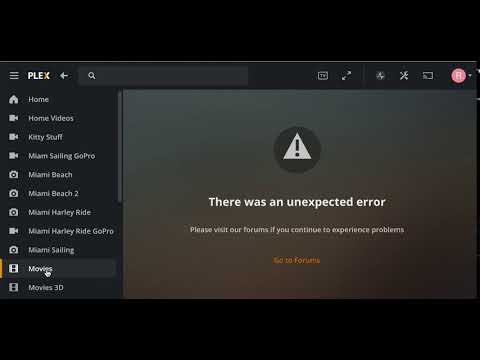
After trying to make a custom filter to reveal low resolution movies via Plex Media Player (Mac v4.29.2), I encountered an Unexpected Error! I restarted the server (also Mac) and I was able to look at the movies via the web client (Safari) but from another machine on the same LAN where I was trying to work with the Movie list and was trying to define. custom filter, somehow I broke it. So, how might I beat this Plex Media Player back into submission?
“type”: “log:message”, “level”: 0, “message”: “TypeError: Cannot read property ‘type’ of undefined\n at Hlt (file:///Applications/Plex%20Media%20Player.app/Contents/Resources/web-client/desktop/js/chunk-2-bf738567b035a8cf2ac0-plex-4.29.2-e50e175.js:9:2480133)\n at e (file:///Applications/Plex%20Media%20Player.app/Contents/Resources/web-client/desktop/js/chunk-2-bf738567b035a8cf2ac0-plex-4.29.2-e50e175.js:9:2480999)\n at Object (file:///Applications/Plex%20Media%20Player.app/Contents/Resources/web-client/desktop/js/chunk-2-bf738567b035a8cf2ac0-plex-4.29.2-e50e175.js:9:2481018)\n at file:///Applications/Plex%20Media%20Player.app/Contents/Resources/web-client/desktop/js/chunk-4-acfbbdf007ca368fee4f-plex-4.29.2-e50e175.js:59:128306\n at file:///Applications/Plex%20Media%20Player.app/Contents/Resources/web-client/desktop/js/chunk-4-acfbbdf007ca368fee4f-plex-4.29.2-e50e175.js:59:127729\n at file:///Applications/Plex%20Media%20Player.app/Contents/Resources/web-client/desktop/js/chunk-4-acfbbdf007ca368fee4f-plex-4.29.2-e50e175.js:59:128437\n at file:///Applications/Plex%20Media%20Player.app/Contents/Resources/web-client/desktop/js/chunk-4-acfbbdf007ca368fee4f-plex-4.29.2-e50e175.js:59:127729\n at file:///Applications/Plex%20Media%20Player.app/Contents/Resources/web-client/desktop/js/chunk-4-acfbbdf007ca368fee4f-plex-4.29.2-e50e175.js:59:128405\n at Function.mapToProps (file:///Applications/Plex%20Media%20Player.app/Contents/Resources/web-client/desktop/js/chunk-4-acfbbdf007ca368fee4f-plex-4.29.2-e50e175.js:59:127729)\n at r (file:///Applications/Plex%20Media%20Player.app/Contents/Resources/web-client/desktop/js/chunk-4-acfbbdf007ca368fee4f-plex-4.29.2-e50e175.js:10:13520)\n at Function.r.mapToProps (file:///Applications/Plex%20Media%20Player.app/Contents/Resources/web-client/desktop/js/chunk-4-acfbbdf007ca368fee4f-plex-4.29.2-e50e175.js:10:13656)\n at r (file:///Applications/Plex%20Media%20Player.app/Contents/Resources/web-client/desktop/js/chunk-4-acfbbdf007ca368fee4f-plex-4.29.2-e50e175.js:10:13520)\n at file:///Applications/Plex%20Media%20Player.app/Contents/Resources/web-client/desktop/js/chunk-4-acfbbdf007ca368fee4f-plex-4.29.2-e50e175.js:10:14875\n at file:///Applications/Plex%20Media%20Player.app/Contents/Resources/web-client/desktop/js/chunk-4-acfbbdf007ca368fee4f-plex-4.29.2-e50e175.js:10:11914\n at Object.useMemo (file:///Applications/Plex%20Media%20Player.app/Contents/Resources/web-client/desktop/js/chunk-4-acfbbdf007ca368fee4f-plex-4.29.2-e50e175.js:121:56493)\n at useMemo (file:///Applications/Plex%20Media%20Player.app/Contents/Resources/web-client/desktop/js/chunk-4-acfbbdf007ca368fee4f-plex-4.29.2-e50e175.js:106:5428)\n at d (file:///Applications/Plex%20Media%20Player.app/Contents/Resources/web-client/desktop/js/chunk-4-acfbbdf007ca368fee4f-plex-4.29.2-e50e175.js:10:11858)\n at Wi (file:///Applications/Plex%20Media%20Player.app/Contents/Resources/web-client/desktop/js/chunk-4-acfbbdf007ca368fee4f-plex-4.29.2-e50e175.js:121:52972)\n at xo (file:///Applications/Plex%20Media%20Player.app/Contents/Resources/web-client/desktop/js/chunk-4-acfbbdf007ca368fee4f-plex-4.29.2-e50e175.js:121:59723)\n at wo (file:///Applications/Plex%20Media%20Player.app/Contents/Resources/web-client/desktop/js/chunk-4-acfbbdf007ca368fee4f-plex-4.29.2-e50e175.js:121:59542)\n at bo (file:///Applications/Plex%20Media%20Player.app/Contents/Resources/web-client/desktop/js/chunk-4-acfbbdf007ca368fee4f-plex-4.29.2-e50e175.js:121:59261)\n at Co (file:///Applications/Plex%20Media%20Player.app/Contents/Resources/web-client/desktop/js/chunk-4-acfbbdf007ca368fee4f-plex-4.29.2-e50e175.js:121:68849)\n at Fa (file:///Applications/Plex%20Media%20Player.app/Contents/Resources/web-client/desktop/js/chunk-4-acfbbdf007ca368fee4f-plex-4.29.2-e50e175.js:121:90326)\n at Ua (file:///Applications/Plex%20Media%20Player.app/Contents/Resources/web-client/desktop/js/chunk-4-acfbbdf007ca368fee4f-plex-4.29.2-e50e175.js:121:90710)\n at Tu (file:///Applications/Plex%20Media%20Player.app/Contents/Resources/web-client/desktop/js/chunk-4-acfbbdf007ca368fee4f-plex-4.29.2-e50e175.js:121:97738)\n at mu (file:///Applications/Plex%20Media%20Player.app/Contents/Resources/web-client/desktop/js/chunk-4-acfbbdf007ca368fee4f-plex-4.29.2-e50e175.js:121:96103)\n at za (file:///Applications/Plex%20Media%20Player.app/Contents/Resources/web-client/desktop/js/chunk-4-acfbbdf007ca368fee4f-plex-4.29.2-e50e175.js:121:95006)\n at Du (file:///Applications/Plex%20Media%20Player.app/Contents/Resources/web-client/desktop/js/chunk-4-acfbbdf007ca368fee4f-plex-4.29.2-e50e175.js:121:99032)\n at ju (file:///Applications/Plex%20Media%20Player.app/Contents/Resources/web-client/desktop/js/chunk-4-acfbbdf007ca368fee4f-plex-4.29.2-e50e175.js:121:99086)\n at Iu.render (file:///Applications/Plex%20Media%20Player.app/Contents/Resources/web-client/desktop/js/chunk-4-acfbbdf007ca368fee4f-plex-4.29.2-e50e175.js:121:102884)\n at file:///Applications/Plex%20Media%20Player.app/Contents/Resources/web-client/desktop/js/chunk-4-acfbbdf007ca368fee4f-plex-4.29.2-e50e175.js:121:100904\n at Cu (file:///Applications/Plex%20Media%20Player.app/Contents/Resources/web-client/desktop/js/chunk-4-acfbbdf007ca368fee4f-plex-4.29.2-e50e175.js:121:98279)\n at Fu (file:///Applications/Plex%20Media%20Player.app/Contents/Resources/web-client/desktop/js/chunk-4-acfbbdf007ca368fee4f-plex-4.29.2-e50e175.js:121:100836)\n at Object.render (file:///Applications/Plex%20Media%20Player.app/Contents/Resources/web-client/desktop/js/chunk-4-acfbbdf007ca368fee4f-plex-4.29.2-e50e175.js:121:103900)\n at i.mountReact (file:///Applications/Plex%20Media%20Player.app/Contents/Resources/web-client/desktop/js/chunk-2-bf738567b035a8cf2ac0-plex-4.29.2-e50e175.js:9:922096)\n at i.onRender (file:///Applications/Plex%20Media%20Player.app/Contents/Resources/web-client/desktop/js/chunk-2-bf738567b035a8cf2ac0-plex-4.29.2-e50e175.js:9:922294)\n at i.triggerMethod (file:///Applications/Plex%20Media%20Player.app/Contents/Resources/web-client/desktop/js/chunk-2-bf738567b035a8cf2ac0-plex-4.29.2-e50e175.js:9:735)\n at i.render (file:///Applications/Plex%20Media%20Player.app/Contents/Resources/web-client/desktop/js/chunk-2-bf738567b035a8cf2ac0-plex-4.29.2-e50e175.js:9:9298)\n at i.render (file:///Applications/Plex%20Media%20Player.app/Contents/Resources/web-client/desktop/js/chunk-2-bf738567b035a8cf2ac0-plex-4.29.2-e50e175.js:9:15927)\n at i.show (file:///Applications/Plex%20Media%20Player.app/Contents/Resources/web-client/desktop/js/chunk-2-bf738567b035a8cf2ac0-plex-4.29.2-e50e175.js:9:3346)\n at i.show (file:///Applications/Plex%20Media%20Player.app/Contents/Resources/web-client/desktop/js/chunk-2-bf738567b035a8cf2ac0-plex-4.29.2-e50e175.js:9:556817)\n at i.showCustomRegion (file:///Applications/Plex%20Media%20Player.app/Contents/Resources/web-client/desktop/js/chunk-2-bf738567b035a8cf2ac0-plex-4.29.2-e50e175.js:9:2135867)\n at i.showView (file:///Applications/Plex%20Media%20Player.app/Contents/Resources/web-client/desktop/js/chunk-2-bf738567b035a8cf2ac0-plex-4.29.2-e50e175.js:9:2136160)\n at o (file:///Applications/Plex%20Media%20Player.app/Contents/Resources/web-client/desktop/js/chunk-2-bf738567b035a8cf2ac0-plex-4.29.2-e50e175.js:9:353304)\n at i.trigger (file:///Applications/Plex%20Media%20Player.app/Contents/Resources/web-client/desktop/js/chunk-2-bf738567b035a8cf2ac0-plex-4.29.2-e50e175.js:9:354435)\n at Object.populateMediaRouteView.then (file:///Applications/Plex%20Media%20Player.app/Contents/Resources/web-client/desktop/js/chunk-2-bf738567b035a8cf2ac0-plex-4.29.2-e50e175.js:9:2613449)\n at Object. (file:///Applications/Plex%20Media%20Player.app/Contents/Resources/web-client/desktop/js/chunk-4-acfbbdf007ca368fee4f-plex-4.29.2-e50e175.js:45:24185)\n at l (file:///Applications/Plex%20Media%20Player.app/Contents/Resources/web-client/desktop/js/chunk-4-acfbbdf007ca368fee4f-plex-4.29.2-e50e175.js:45:22815)\n at Object.add [as done] (file:///Applications/Plex%20Media%20Player.app/Contents/Resources/web-client/desktop/js/chunk-4-acfbbdf007ca368fee4f-plex-4.29.2-e50e175.js:45:23121)\n at Array. (file:///Applications/Plex%20Media%20Player.app/Contents/Resources/web-client/desktop/js/chunk-4-acfbbdf007ca368fee4f-plex-4.29.2-e50e175.js:45:24161)”,
“time”: “2020-09-30T06:50:25.474Z”
Here’s a video that shows the error condition. Notice how the flash of the movie thumbnails started to draw and then–ERROR. When you create a custom filter for movies, where is this stored? I think this is the culprit, a poorly written filter.
Quit Plex.app.
In the Finder, Go menu -> Go to Folder...
Go to the folder: “~/Library/Application Support/Plex”
Rename “plex.ini” to “plex.ini.bak”.
Launch Plex.app.
@Volts I tried quitting the “Plex Media Player.app” (Mac). Then I was not able to follow your suggestion since the file to be renamed does not exist on my system. See the screenshot.
I think 4.29.2 is the version # from the Web Client component inside PMP. I’m pretty sure it means you have Plex Media Player 2.58 or so.
And I can instantly replicate your error when I try to create a custom filter. I think that functionality is broken in this version!
Quit Plex Media Player
In the Finder, Go menu -> Go to Folder...
Go to the folder: “~/Library/Application Support/Plex Media Player”
Rename “storage.json” to “storage.json.bak”
Launch Plex Media Player
@Volts Fantastic solution–THANKS! I love that you were able to duplicate the problem. How did you identify this solution? I would not have known that the JSON file would have been rebuilt like a preference…
BTW: in the process, I was prompted to download Plex.app and some mention of the desktop features of Plex Media Player.app going away in the future. I’ll have to research what the differences are between Plex.app and Plex Media Player.app.
I already knew the Plex apps keep their “stuff” in “~/Library/Application Support/Plex*”. I didn’t know in advance which files would contain the UI preferences or where a custom filter would be stored.
I copied what you did - created a custom filter in the Plex app GUI - and I typed a unique phrase, “searchforthis”, in the custom filter text field.
Then I went to the Application Support directory and searched for files containing “searchforthis”.
I renamed the file, relaunched the app, and made sure it opened again.
I considered editing the .ini and .json files to surgically remove the saved filter, but it looked complicated and fragile. It seemed like it would be easier to just rename them and log in again.