Plex Media Scanner / Agent is a mess! Can't find anything

Server Version#: 1.32.5.7349

Hi,

I have the issue that the “new” and “better” Plex Movie / Plex TV scanner/agent that can’t find anything or at least only 50% of the time.

I changed the file and folder names to include tmdb as explained in https://support.plex.tv/articles/naming-and-organizing-your-movie-media-files/ but:

  1. it’s annoying to see {tmdb-8493843} in the title
  2. it’s even more annoying that Plex is “forcing” me to upgrade to “Plex Movie”
  3. “Plex Scanner + TMDB agent” worked flawless.

Is there any possibility to either turn off the notification to “upgrade” to this “better” Plex Movie/TV scanner or to fix it and remove the {} in the title?

The logs don’t show anything except for some “date seems wrong”.

See:
Imgur
Imgur
Imgur
Imgur

DEBUG Logs “which seem a mess” please ?

I am having the same issues. I do see this message in my logs:
[Req#297c6c] Error broadcasting message: send_to: Permission denied [system:13 at /data/jenkins/server/3477409937/build/dependencies/plex-media-server/standard-x86_64-pc-freebsd/boost/include/boost/asio/detail/reactive_socket_service.hpp:261:33 in function ‘send_to’]

Is there a port that needs to be opened? I just wish there was a detailed article about all the ports that need to be opened. I have my firewall pretty locked down on the media server so I would really like to know if there are any other ports required by the server and what direction the ports need to be incoming/outgoing so that I can set the firewall accordingly. I am running Plex Media Server Version 1.32.5.7210. It is the latest available for my FreeBSD operating system. Any further info would be much appreciated. Thanks.

Controlling outbound ports is rather poinless because outbound port number on the host is random.

Controlling destination host & port is meaningful - provided it’s not too controlled.

implies to me the host itself is over controlled but wtihout seeing the logs, it is impossible to be definitive

Send_to is used for the notification messages. It’s controlled in the Settings - Server - Extras. Maybe best to turn it off ?

Hi Chuck,

Thanks for the prompt response. I have allowed all outbound traffic on the server and this error no longer appears. I do still have error finding the agent and error response when searching for a match. Logs are attached showing the behavior when switching from the old plex agent to the new one and attempting to match a couple of movies.
Plex Media Server Logs_2023-08-13_14-21-48.zip (5.1 MB)

Thank you,
Clint

Ok in my case I fixed it by wiping Plex and redo the docker part.

@clint.street

Thanks for the logs.

From what I see, your problem is media naming & structuring.

The standard is:

Show Name/
  Season xx/
   Show Name -  SxxEyy - Optional Title.ext

What you have here is:

Aug 13, 2023 11:42:33.333 [0x808fc0f00] DEBUG -  -> Searching down into Black.Mirror/Black.Mirror.S01-S02-S03.720p.WEB.DL.x264-ITSat
Aug 13, 2023 11:42:33.333 [0x808fc0f00] DEBUG - Checking descendants of Black.Mirror/Black.Mirror.S01-S02-S03.720p.WEB.DL.x264-ITSat
Aug 13, 2023 11:42:33.333 [0x808fc0f00] DEBUG -  -> Searching down into Black.Mirror/Black.Mirror.S01-S02-S03.720p.WEB.DL.x264-ITSat/S03
Aug 13, 2023 11:42:33.333 [0x808fc0f00] DEBUG - Checking descendants of Black.Mirror/Black.Mirror.S01-S02-S03.720p.WEB.DL.x264-ITSat/S03
Aug 13, 2023 11:42:33.334 [0x808fc0f00] DEBUG -  -> FOUND metadata item (show)
Aug 13, 2023 11:42:33.334 [0x808fc0f00] DEBUG -  -> We found a local media item with rooted metadata in Black.Mirror/Black.Mirror.S01-S02-S03.720p.WEB.DL.x264-ITSat/S03
Aug 13, 2023 11:42:33.334 [0x808fc0f00] WARN - Scanner [Plex TV Series]: unable to find cloud match for item file '/mnt/raid/complete/tv/Black.Mirror/Black.Mirror.S01-S02-S03.720p.WEB.DL.x264-ITSat/S02/Black.Mirror.S02E01.720p.WEB.DL.x264-ITSat.mkv'
  1. Incorrect structure
    – Extra directory layer
    – Use of S02 not Season 02

  2. Junk in names. (over use of punctation)

Combine the two and there is a failure to match

Aug 13, 2023 11:42:33.333 [0x808fc0f00] DEBUG -  -> Searching down into Black.Mirror/Black.Mirror.S01-S02-S03.720p.WEB.DL.x264-ITSat
Aug 13, 2023 11:42:33.333 [0x808fc0f00] DEBUG - Checking descendants of Black.Mirror/Black.Mirror.S01-S02-S03.720p.WEB.DL.x264-ITSat
Aug 13, 2023 11:42:33.333 [0x808fc0f00] DEBUG -  -> Searching down into Black.Mirror/Black.Mirror.S01-S02-S03.720p.WEB.DL.x264-ITSat/S03
Aug 13, 2023 11:42:33.333 [0x808fc0f00] DEBUG - Checking descendants of Black.Mirror/Black.Mirror.S01-S02-S03.720p.WEB.DL.x264-ITSat/S03
Aug 13, 2023 11:42:33.334 [0x808fc0f00] DEBUG -  -> FOUND metadata item (show)
Aug 13, 2023 11:42:33.334 [0x808fc0f00] DEBUG -  -> We found a local media item with rooted metadata in Black.Mirror/Black.Mirror.S01-S02-S03.720p.WEB.DL.x264-ITSat/S03
Aug 13, 2023 11:42:33.334 [0x808fc0f00] WARN - Scanner [Plex TV Series]: unable to find cloud match for item file '/mnt/raid/complete/tv/Black.Mirror/Black.Mirror.S01-S02-S03.720p.WEB.DL.x264-ITSat/S02/Black.Mirror.S02E01.720p.WEB.DL.x264-ITSat.mkv'

This should be named & structured as:

Black Mirror/
  Season 02/
    Black Mirror - S02E01.mkv    

You can hide the .720p.WEB.DL.x264-ITSat from the scanner by encasing using
[720p.WEB.DL.x264-ITSat]

Do you have any of the free media renaming tools ?
They will serve you will here.

I suspect you don’t like dealing with the spaces ?? :slight_smile:
auto-complete in the shell handles that -or- a renaming tool as you process the media

What you end up with is something like this which never fails.

[chuck@lizum tv2.2000]$ cd Warehouse\ 13/
[chuck@lizum Warehouse 13.2001]$ ls -la
total 20
drwxr-xr-x  7 chuck chuck  115 Aug  3  2019 ./
drwxrwxr-x 53 chuck chuck 4096 Aug  1 00:19 ../
drwxr-xr-x  2 chuck chuck 4096 Jan 29  2021 Season 01/
drwxr-xr-x  2 chuck chuck 4096 Jan 29  2021 Season 02/
drwxr-xr-x  2 chuck chuck 4096 Jan 29  2021 Season 03/
drwxr-xr-x  2 chuck chuck 4096 Jan 29  2021 Season 04/
drwxr-xr-x  2 chuck chuck  333 Jan 29  2021 Season 05/
[chuck@lizum Warehouse 13.2002]$ ls -la *01
total 46966440
drwxr-xr-x 2 chuck chuck       4096 Jan 29  2021 ./
drwxr-xr-x 7 chuck chuck        115 Aug  3  2019 ../
-rw-r--r-- 1 chuck chuck 2347585544 Apr  5  2021 Warehouse 13 - S01E01-E02 - Pilot & Resonance.mkv
-rw-r--r-- 1 chuck chuck 7042974497 Apr  5  2021 Warehouse 13 - S01E01 - Pilot.mkv
-rw-r--r-- 1 chuck chuck 3517385076 Apr  5  2021 Warehouse 13 - S01E02 - Resonance.mkv
-rw-r--r-- 1 chuck chuck 3519017880 Apr  5  2021 Warehouse 13 - S01E03 - Magnetism.mkv
-rw-r--r-- 1 chuck chuck 3518225400 Apr  5  2021 Warehouse 13 - S01E04 - Claudia.mkv
-rw-r--r-- 1 chuck chuck 3519119775 Apr  5  2021 Warehouse 13 - S01E05 - Elements.mkv
-rw-r--r-- 1 chuck chuck 3519504815 Apr  5  2021 Warehouse 13 - S01E06 - Burnout.mkv
-rw-r--r-- 1 chuck chuck 3518085228 Apr  5  2021 Warehouse 13 - S01E07 - Implosion.mkv
-rw-r--r-- 1 chuck chuck 3518546757 Apr  5  2021 Warehouse 13 - S01E08 - Duped.mkv
-rw-r--r-- 1 chuck chuck 3518318094 Apr  5  2021 Warehouse 13 - S01E09 - Regrets.mkv
-rw-r--r-- 1 chuck chuck 3517841128 Apr  5  2021 Warehouse 13 - S01E10 - Breakdown.mkv
-rw-r--r-- 1 chuck chuck 3518078808 Apr  5  2021 Warehouse 13 - S01E11 - Nevermore.mkv
-rw-r--r-- 1 chuck chuck 3518915906 Apr  5  2021 Warehouse 13 - S01E12 - MacPherson.mkv
[chuck@lizum Warehouse 13.2003]$

Hi Chuck,

I suppose I could rename things, however I am not having issues with TV shows. It is the movies section that is an issue. Did you see the error that I referenced in my previous post.
The server is not even able to find an agent. So even a manual search doesn’t work.

Thanks,
Clint

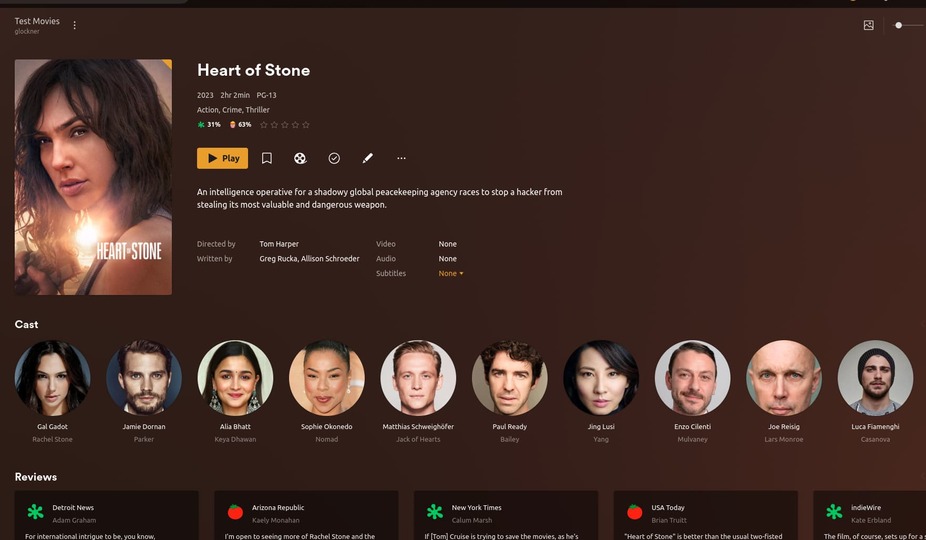
I just created a test movie (dummy file) without the TMDB reference and was an instant match.

[chuck@lizum ~.1998]$ make-movie 'Heart of Stone (2023)'
Making "Heart of Stone (2023)"
Done
[chuck@lizum ~.1999]$ ls -la /glock/plex/qa/movies/Heart\ of\ Stone\ \(2023\)/
total 16
drwxr-xr-x  2 chuck chuck   47 Aug 14 12:15 ./
drwxr-xr-x 75 chuck chuck 8192 Aug 14 12:15 ../
-rw-r--r--  1 chuck chuck  290 Aug 14 12:15 Heart of Stone (2023).mkv
[chuck@lizum ~.2000]$

would you mind trying the following?

  1. Move the movie away from where monitored
  2. Scan files, Empty Trash, Clean bundles (so PMS completely forgets it)
  3. Rename it and remove the {tmdb-724209} and/or rename to {tmdb: 724209}
    (the doc shows it one way but we originally created it with the colon character)

Are you able to reproduce the agent is missing error? I never had any issues prior to updating the plex media server. Again I am using a slighly older version of PMS. Just wondering if this issue has something to do with that?

I’m using 1.32.5.7210.

[chuck@lizum ~.2000]$ dpkg -l | grep plexm
ii  plexmediaserver                       1.32.5.7210-77f7f99fa                   amd64        Plex organizes all of your personal media so you can easily access and enjoy it.
[chuck@lizum ~.2001]$

If you wants to jump to that and confirm you’re working, we can use that as a launch point.

Hi Chuck,

plexservice:/ # pkg info plexmediaserver-plexpass plexmediaserver-plexpass-1.32.5.7210 Name : plexmediaserver-plexpass Version : 1.32.5.7210 Installed on : Wed Aug 9 07:56:07 2023 MDT

I think I got it working. I had to restart the server and all the metadata came through. I will try to get my download managers to rename things.

This topic was automatically closed 90 days after the last reply. New replies are no longer allowed.