"Plex Media Server.exe" vanishes every time there's an update

Server Version#: Version 1.41.0.8994
Player Version#: N/A
This has been happening for a good while, and a reinstall over the top just fixes it, but I’ve got hacked off now, so I want to fix it!

I’ve pulled the logs from when it happened last night, and looking at “Plex Update Service Launcher.log” the issue seems pretty clear:

Sep 30, 2024 02:04:41.799 [8384] DEBUG - Closing Plex Media Server Processes
Sep 30, 2024 02:04:41.823 [8384] DEBUG - (PID: 17772) Closing Plex Media Server.exe
Sep 30, 2024 02:04:42.349 [8384] DEBUG - (PID: 17772) Closed
Sep 30, 2024 02:04:42.361 [8384] DEBUG - Ask Update Service to install the bundle
Sep 30, 2024 02:05:02.475 [8384] DEBUG - Bundle Exit Code: 5
Sep 30, 2024 02:05:02.475 [8384] DEBUG - Install Error Code: 30002
Sep 30, 2024 02:05:02.475 [8384] DEBUG - Completed all calls to Update Service
Sep 30, 2024 02:05:02.475 [8384] DEBUG - Starting PMS
Sep 30, 2024 02:05:02.475 [8384] DEBUG - Starting PMS Process: Create Process Error
Sep 30, 2024 02:05:02.475 [8384] DEBUG - Win32 Error: 2 The system cannot find the file specified.
Sep 30, 2024 02:05:02.475 [8384] ERROR - Install: Failure
Sep 30, 2024 02:05:02.475 [8384] ERROR - Bundle Exit Code: 5 - Access is denied.
Sep 30, 2024 02:05:02.475 [8384] ERROR - PMS Startup: Failure
Sep 30, 2024 02:05:02.476 [8384] DEBUG - Return value: 30002,

then the log ends.
To my not very experienced eye this looks like a permissions error - odd, as my account has admin…

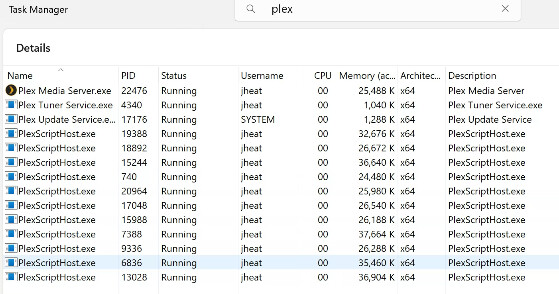
Looking in task manager:
image
It would seem that the update service is running under a different account.
Is that normal? It seems reasonable.

I can avoid this by switching off autoupdates I guess, but that seems like a bodge - does anyone have any insight by any chance?
Thanks,
James
Under which folder path is your currently running version of the server .exe located?

Hi Otto - where it normally installs I think -
C:\Program Files\Plex\Plex Media Server

Ok, that is the 64 bit version.

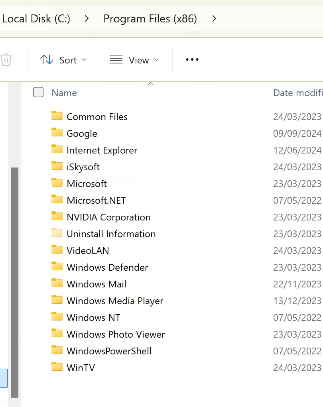
Do you also have an .exe under
C:\Program Files (x86)\Plex\Plex Media Server
?

I see where you’re going, but I’m afraid I don’t:
image

Try this:

  • Stop/quit/end Plex Server with the tray icon
  • deinstall Plex Server with the regular ‘Apps’ control panel of Windows
    (do not use 3rd party ‘Uninstaller’ software like Revo etc.
    do not use “Registry Cleaner/optimizer” software like CCleaner et al)
  • for safety, reboot Windows
  • download the installation exe of the newest server version and install it

After starting it, open the context menu of the Plex task tray icon and verify that it is set to automatically start.

OK thanks - I’ll give that a go. I’d just like to confirm first though that my database will stay intact throughout that process? (I don’t want to lose my watched/unwatched states etc etc etc). Then I’ll need to wait for the next update and see what happens!!

Arg - hang on - I’m an idiot.
I’ve had issues in the past with PMS crashing. To Resolve those, I added PMS.exe to “Restart On Crash” which I was already using for another wayward app.
Of course, this restarts PMS.exe before the upgrader has time to replace PMS.exe, and the installer can’t then replace it because it’s running. This has got to be the issue.
image
Apologies - it was my bad.
I just need to solve the crashes, if they still happen…

Maybe you could give it some more time, before the automatic restart occurs?

Good plan - I’ve set it to give 10 mins grace, but I’m also going to do the next update manually, so I can see whether it errors!

This topic was automatically closed 90 days after the last reply. New replies are no longer allowed.
