Server Version#: 1.23.1.4528
Player Version#: Edge / Chrome
Dear all,
I’m a Plex user with lifetime membership and enjoyed my PLEX experience on my Synology NAS.
I’ve moved recently to a Intel NUC 11 (Tiger Lake) to be able to make some hardware transcoding with my HEVC movies. The choice seems to be good as it integrated recent Intel Xe CPU with Quick Sync capable of encode/decode HEVC.
The server is running on W10 computer and I’ve toggled the “hardware acceleration” On.
When it comes to play a HEVC movie, it shows Hardware encoding but doesn’t really uses GPU. The video stops very often.
I’ve made a test using a 4K HEVC movie and transcode it to 1080P/H264 (10Mbits).
On Plex I barrely have 15% of GPU usage, the video stops every 5 seconds and my CPU is highly used.

For the test I’ve made a comparison with Jellyfin to understand if my hardware was faulty and it seems that everything runs smoothly as expected with the same settings (High GPU, Low CPU)
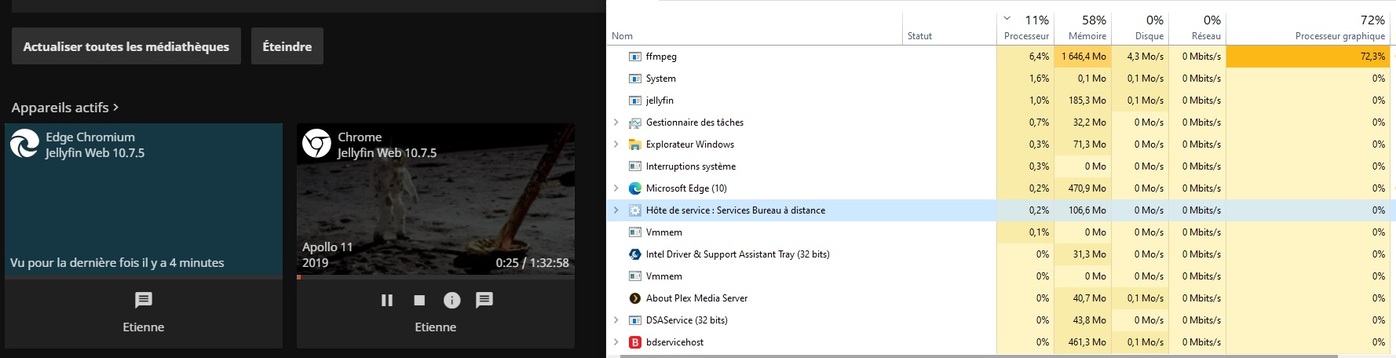
Have I made something wrong on my configuration or do I need to wait for new release ?
Thanks for your help !
Etienne
Here’s a sample of transcoder log
Variant id=“ed087a51-9925-4e12-a66e-7c9043ffdb81” targetBitrate=“30953” context=“streaming” sourceVideoCodec=“hevc” sourceAudioCodec=“dca” videoDecision=“transcode” audioDecision=“transcode” protocol=“dash” container=“mp4” videoCodec=“h264” audioCodec=“aac” audioChannels=“2” transcodeHwRequested=“1” transcodeHwDecoding=“dxva2” transcodeHwEncoding=“qsv” transcodeHwDecodingTitle=“Windows (DXVA2)” transcodeHwEncodingTitle=“Intel (QuickSync)” transcodeHwFullPipeline=“1”>

