Plex not using GPU for Transcoding media (HW Acceleration is enabled)

Server Version#: 4.51.1
Player Version#: 8.7.1.20931 (Android App)

I’m hosing a Plex Server on my old ASUS Laptop with Windows Server 2019 and i can’t seem to make it Transcode media using GPU. See below for my Server-acting-Laptop’s specs:

ASUS X555LD
Intel Core i5-6200U (Supports Intel Quick Sync Video)
8GB DDR3 RAM
GPU0: Intel HD Graphics 520 (N/A, Display)
GPU1: Nvidia GeForce 940M (2GB, Render)

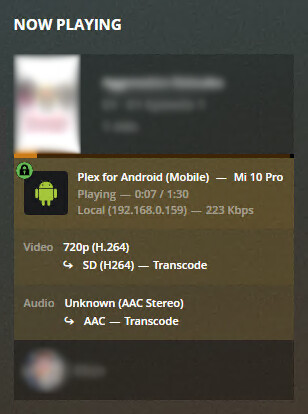
Everytime any of my devices stream a media, it transcode them via the CPU and completely ignoring both GPUs:
image

Also, I am subscribed to a Plex Pass so HW Acceleration should be completely enabled. I have tried below changes for reference:

  • Forced Plex Media Server and Plex Transcoder executables to use the High Performance card (GT940M) in System > Display > Graphics Settings:

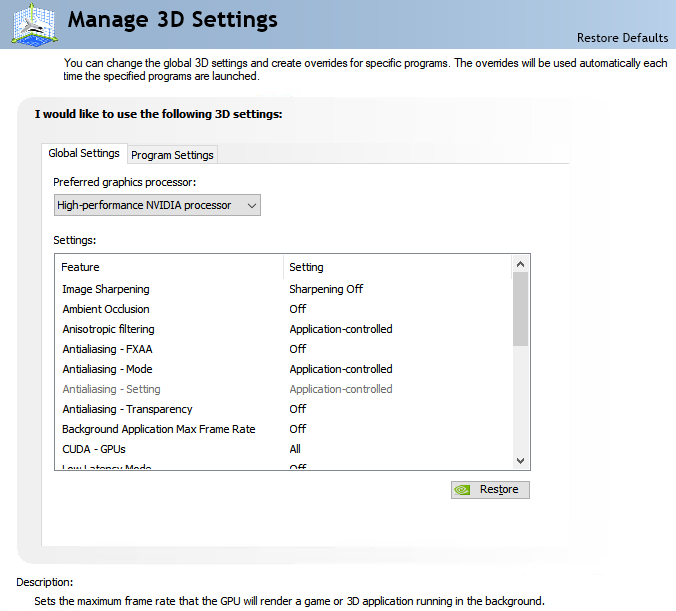
  • Set High-performance NVIDIA processor as the Preferred graphics processor in NVIDIA Control Panel:
    image

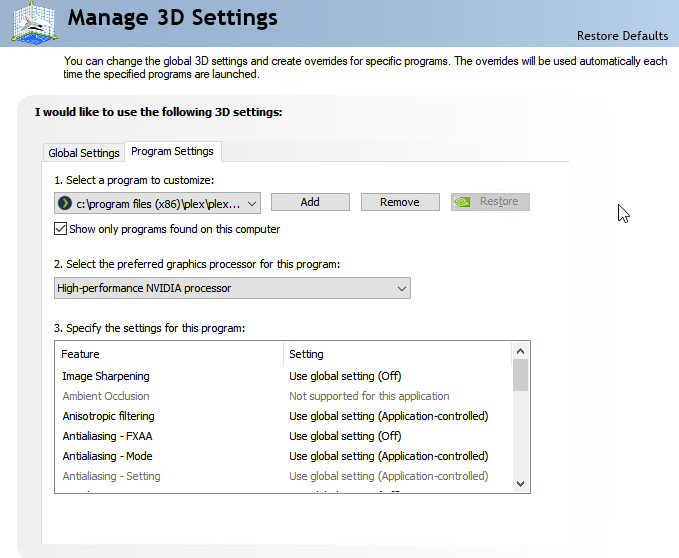
  • Set High-performance NVIDIA processor as the Preferred graphics processor for both Plex Media Server and Plex Transcoder executables in NVIDIA Control Panel:
    image

However, even with these settings forced, Plex still transcode media files via the CPU which causes a hilarious amount of utilization %. See below images for reference:

  • Windows Task Manager (High CPU Utilization but almost 0% on both GPU0 and GPU1):
    image

  • HWMonitor (same reading as Windows Task Manager):
    image

Am i missing something? or Plex doesn’t support devices with Dual GPU such as Laptops?

Thanks.

Neither of your GPU supports HEVC transcoding. Have you tried transcoding a h.264 file ?

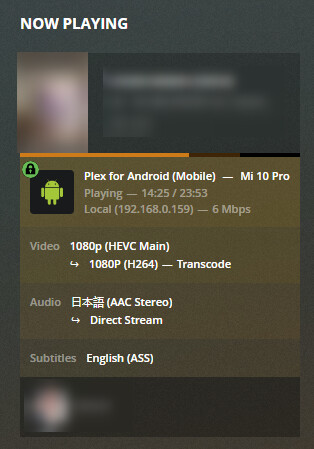
Yes, it also didn’t appear to transcode via HW.

image image

Your discrete graphics card may not support NVENC NVENC encoding on 940MX - General Topics and Other SDKs - NVIDIA Developer Forums

The Quicksync unit in your CPU only supports baseline HEVC (i.e. without any of the more advanced features like 10 bit color etc)
I think it’s time to upgrade your server hardware. (or avoid HEVC video files)
You might also be better off removing/disabling the discrete GPU.

Have you ever stopped and restarted your Plex server after buying the Plex Pass subscription?

Hi, thanks for that.

Well actually, i bought a used HPe ProLiant ML310e Gen8 v2 here with Intel Xeon E3-1220-v3 which i’ll start setting up in a week or so (as soon as i receive the parts i ordered online). Would you say this can work better with my current setup?

I understand that Xeon processors don’t support Intel’s QuickSync Video but later down the road i’ll be buying a GTX 1050 for GPU Transcoding, would that be a good idea?

I don’t have much audience with my Plex Setup now so i hope it wouldn’t hurt the CPU that bad. Just me and a girl some 6,000 km away from me.

Here’s what my initial and final Build will be:

Initial Build:
CPU: Intel Xeon E3-1220-v3 (3.1ghz~3.5ghz)
GPU: -Not Available-
RAM: 4GB DDR3 1600mhz
SSD: -Not Available-
HDD: 1x 1TB, 1x 750GB

Final Build:
CPU: Intel Xeon E3-1270-v3 (3.5ghz-3.9ghz)
GPU: Nvidia GTX 1050 Ti (or AMD Radeon RX 570)
RAM: 32GB DDR3 1600mhz
SSD: 256GB NVM.e via PCI-e Adapter
HDD: 4x 8TB on RAID5 setup

Do you think my build is more than enough for an ideal starting setup? or is there anything i should change.

Also, is there any easy way i can identify which codecs a certain CPU supports for transcoding?

Thank.s

I’d still prefer a relatively modern core i7 over a Xeon.

i mean there’s only so much this aging ML310e Server PC can support. and i don’t really have neither the $$$ nor the knowledge in setting up Home Servers (this HPe ProLiant ML310e Gen8 V2 Server PC is actually my first)
This topic was automatically closed 90 days after the last reply. New replies are no longer allowed.