yea mine no longer sleeps. of course nothing changed in plex nor windows settings wise. At some point after updates plex just stopped letting windows sleep.
If i completley power down my nvidia shields it will so something with the plex client there is causing windows to not sleep.
I did try all these solutions and none of them worked.I narrowed it down to my Xbox one plex app as if I use my mobile app or windows plex media player PC goes to sleep normally but if I open the xbox plex app and even after shutting down the xbox PC remains awake .this whole thing started recently after the new update though .it was just fine before that
It works on executing the run command as well from task scheduler. I’ll set a time 5 minutes from now and let it run and it shuts down. But I have to say it doesn’t always work for the daily schedule I’ve set and I’m not sure why.
Tried all suggestions in this thread and I’m having the same issue. This did not happen previously but I dont know when it started. It’s been a while since I messed around with my server.
my pc should be sleeping automatically. it does not, as powercfg shows plex media server.exe preventing it from doing so.
If i turn off my nvidia shields completely, the process disappears and they sleep properly.
Same result best I can tell if i close them entirely on the nvidia shields (not exiting them, not going back to the home screen - litereally force ending the process) allows sleep.
it will stay that way until someone uses plex on the shield(s) again.
for some reason that does not drop its connection with the server when your done using the app.
such a nightmare. Ive spent days on this toggling everything under the sun. I dont believe its fixable without some intervention from plex staff with code or a setting to cirvumvent whatever behavior is keeping the connection going.
I’ve found that it’s not only the main exe to blame, but one of the other various processes that run along side it. Till this gets fixed, my solution is to run this script that kills all Plex-related processes, then starts the server back up again (without the issue coming back up right away, in my experience). You guys can see if it works for you and copy/paste this into a shortcut to run when it starts acting up:
Hi, I too am frustrated by the inability of getting my PC to sleep after using Plex
.
I have tried suggestions: 1. Enable DLNA Server - Unchecked 2. Support away mode when preventing system sleep - Unchecked 3. Run a partial scan when changes are detected - Unchecked 4. Update my library automatically - unchecked 5. Update my library periodically - 12 hours (if you go any less like 6 hours, the computer will wake up after a few minutes)
and also turned of Plex update service and also played around with
Network/Enable local network discovery- unchecked.
From my experience if I manually shut down Plex server once computer has booted and then restart it then all good
the" cmd : powercfg /requests"
does not show Plex being an issue.
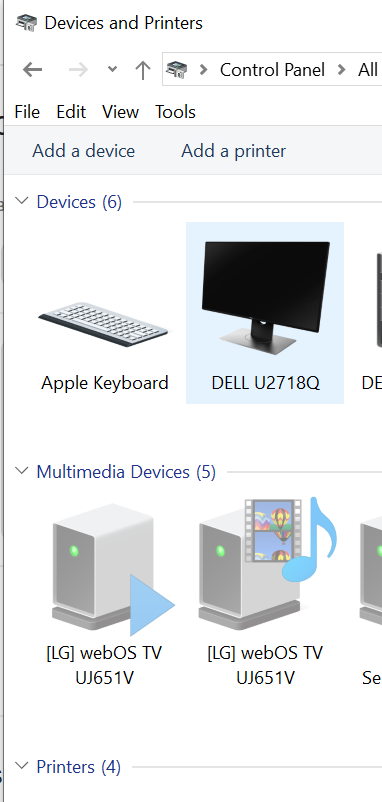
The same if I reboot my computer, still not an issue and this does not seem to vary whatever tabs are checked or unchecked above. Unfortunately once you start accessing Plex server from either smart TV ( LG smart TV in my case) or thru Nvidia Shield device (again in my experience) on home network and then despite stopping playback with the client from the server it is like the server will not release the handshake. Even rebooting server computer with Plex server on it the cmd : powercfg /requests will show that Plex is still preventing shutdown, again does not seem to matter what optional tabs are used as above.
So not a solution but a bit more information about the problem. I am not sure if there is a better way to stop playback to client from Plex server computer but I have tried various different things including rebooting TV and nvidia shield device but once Plex has been “activated” to play a file on network ( and likely over internet) it will not allow the server PC to sleep.
A newish issue over the last few weeks as slept fine before that.
Any help appreciated.
Regards
Russ
Hi, after a bit of playing around the cause for my sleep issue is now more clear cut. In my case it seems that once my windows PMS is accessed by certain clients it will not allow the hosting pc to sleep even when clients on local network are closed down correctly. Specifically once I have accessed PMS on hosting PC by LG smart TVs Plex app and also with my Nvidia shield android plex client device on LAN the PC which hosts PMS will then not close. This is despite exiting LGs TV Plex app or in the case of Nvidia Shield, rebooting the shield device,in each case the devices were still making some demand on Plex media server and the PC would not close. The powercfg /requests would always show Plex as being the culprit stopping sleep. In my case closing PMS on hosting PC and then restarting did not fix problem and I had to physicially remove Lan cable from devices before powercfg /requests command gave all clear.
On the plus side my Apple tv devices Plex software works fine. If you close the plex app on it after accessing files on PC/ PMS host then the hosting PC will still close down without issues.
So to summarise, there is an issue with current Plex client software on LG TVs operating system and Nvidia shield client which if used to access PMS on a PC will subsequently stop the hosting PC from sleeping even if client software is closed in the correct way. I would be interested to hear if this is a problem others are having. Hopefully a fix coming!
Hi Delbruck, I was not being ironic, Plex upgrades have sorted my problems out. I am not sure what client you are using to access your PMS but LG tv webos version and Nvidia sheild versions no longer hang the pc server and it willl happily go to sleep once clients have stopped accessing it. That was driving me crazy and the problem was only solved with latest updates.
Hope you get your issues sorted.
All-in-all seems that it’s NVidia Shield and LG Plex clients and Mac Clien in the same LAN that prevent PC Plex Server from allowing host PC machine to sleep. Am I right?