PLEX & Networking Mystery

Server Version#: 1.105.2.269-12a32491
Player Version#:10.24.1.2319

Plex Pass holder

Major Network Issue and not sure where to post it. Will put on UNIFI and PLEX Forums and maybe cross post on REDDIT.

Here’s the scenario. Installed several UNIFI networking components with the idea of separating my networking into 3 zones. A Main zone for PC’s NAS, etc., an IOT zone for Alexa and smart devices etc., and Guest zone for Visitors.
That was done via UNIF Cloud Gateway Ultra and two UNIFI FLEX Switches. Also in the network is a TPLINK Router in AP mode that hangs off the Ultra and connects to all wired devices in the office – generally PC’s, NAS, Printer. Off one of the Switches in the Home Theater Rack is a Tenda 16 port dumb switch that provides wired connections to the HT components – Apple TV, Nvidia Shield TV Pro, Panny 4K player and Denon AVR.

There are several WIFI Networks, but there are divided into the 3 Zones as mentioned above.

Did the install over the weekend with the idea to let everything sit for a week or two. I added NO FIREWALL or TRAFFIC Rules, so anything done was done via the UNIFI defaults as ports on the UNIFI components are tagged to a VLAN as well as the WiFi networks.

When I was playing some Media content via PLEX on the NVIDIA I saw that the DENON was indicating that the input signal was 2 channels (Stereo), even though I know (and confirmed via MEDIAINFO) the content was 5.1 or 7.1. I’m baffled and started going crazy running test after test.

Today I tried to get a bit more organized about this issue. Can’t be the media, since I was using several different files, I have had for years, many I ripped from disc myself. Could it be the Denon – not likely since I could play a UHD disc on the Panny and Denon saw 7.1 TrueHD / Atmos.

So, was it the Nvidia, or PLEX (client?). Tried to work thru that. I had to find a another Nvidia App that could play TrueHD content. I struggled to do so, finally ran some KODI via streaming and saw a reasonable 5.1 recognized by Denon- but this was not my local content.

Tried to get Kodi to parse one of my NAS folders – IT COULD NOT SEE THE FOLDER… hmmm NAS is on Main Network, Kodi/Nvidia is on IOT Network. Could it be… yes, after moving NVIDIA SHIELD to the MAIN network, I get 5.1 and 7.1 as expected from the same files that showed as two channels.

OK – WHY??? I would have thought if there was an issue reaching the Server & Data on MAIN, PLEX Client would choke – “cannot play – or find – media”. What and how does it play video (transcoded video and audio). And as I sit here – I thought maybe this was coming via remote network access, but turned that off and still got same two channel transcoding – Video (to 1080P) and Audio (to OPUS). SO WHY???

Racking my brain trying to understand and also evaluate the value and need to segregate the media players from the main network. I’m sure I can draw up some crazy FW rules to allow these to access only the Server, but I also need to make sure I can control them via Harmony remotes and their APPs.

Because your Shield TV is on a different logical network PMS will, by default, treat it (for purposes of bandwidth management) as a non-local client. This means it will apply any configured streaming bandwidth restrictions, either from the server or the client itself.

If you’re set on having the devices on different networks, you’ll need to adjust your PMS network settings to recognize the foreign network as being on your local LAN.

In your Plex Media Server settings, navigate to Settings → [select your server] → Network (Show Advanced). Find the “LAN Networks” setting and specify any networks which should be considered to be local. Be sure to include the network the server is on, too.

For example, if you native network is 192.168.1.0/24 (the Unifi default) and your IoT network is 192.168.2.0/24, you would enter the following:

192.168.1.0/24,192.168.2.0/24

Ensure there are no spaces anywhere in the string!

Be sure to click Save when done. You should not have to restart the server, but I’d recommend doing it anyway.

After making this configuration change, PMS will treat clients on the configured network(s) as being local.

1 Like

OK, that now makes perfect sense. I have moved the Nvidia and Apple TV’s that drive my two prime media locations content to the main network. But I think I’ll do this for the various GoogleTV and Firesticks that are hanging off other TV’s though they are all limited to 2 channel anyway and would get transcoded content. :smiley:

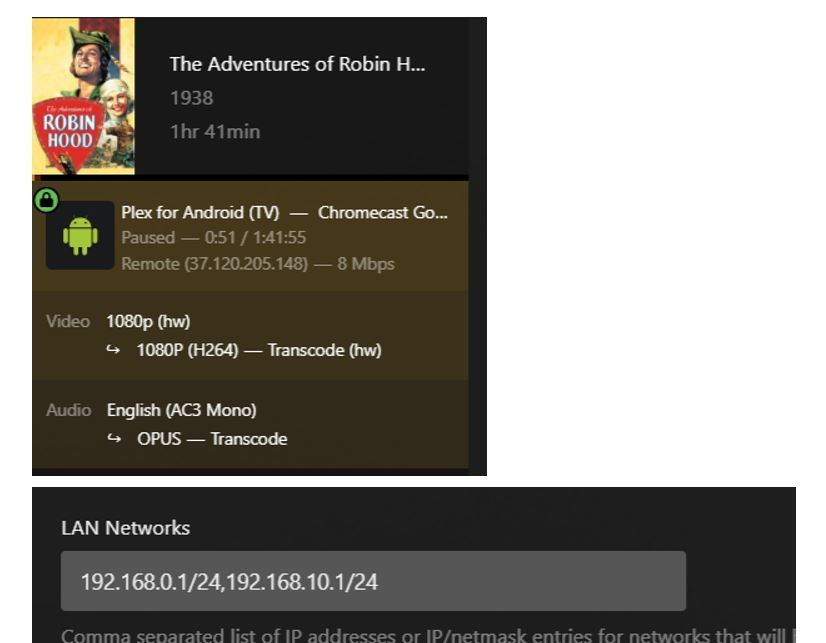
Well, thought I did everything right. But according to Dashboard, my plex client on VLAN10 is playing as if remote as indicated here:

The PMS PC is on 192.168.0.199; the Client (a Chromecast for GoogeTV 4K) is on 192.168.10.57

Am I missing something else?

What are you using as a gateway? I am wondering if the traffic is bouncing off the router/modem and it is advertising the external IP.

Networking is not my strongest skill in IT, so I could be going down the wrong path here.

Unifi Cloud Gateway Ultra. My networking background is midlevel at best. At this point there should be no firewall rules in place between the address spaces, but clearly PLEX is doing something.

this is me just thinking out loud, but to me it is as if something is blocking plex player talking directly to the server (or vice versa) and is having to go via your modem to get back to it.

If it were me, just to test, I would keep the IP of your server and player the same as they are now but move them to the same VLAN ports and give both a /20 subnet (255.255.240.0) and see if it still thinks it is external.

I have about 10 different PLEX Clients, and while I could put the Plex Server in the IOT as a dedicated PC, the backup PMS runs on the Synology NAS, which I can’t. I just removed the external port forwarding and set the LAN Networks to 192.168.0.0/16 and yet I still get the IOT network showing as remote. I also put the IOT network alone 192.168.10.1 as LAN Network - still remote.

Appreciate the advice, something just doesn’t add up. The whole thing will get worse when FW rules are added so I will have a different problem to solve which will make this all moot. But I’m still bothered by this. I’m going to open up the FW rules that where generated by the network configs and see if there’s something in there.

Well, I put my PC on the IOT network, started up a Web client, it ran as local with a 192.168.10 address. Then I ran the WINDOWS APP and used the Web instance for the Dashboard, the Windows APP ran as local (still on same 192.168.10 address). I wonder if this is something perculiar to the client device. I do see notes in the advice about PLEX access w/o Internet and “some devices” require Internet access.

Additionally, I fired up the native PLEX app on my LG TV, that is on the IOT Network, when played, the Dashboard shows it as Local, with the 192.168.10.x address. So now I believe this is not a Plex or router config, but something specific to the GoogleTV device. I will have to test a Firestick (my other clients are currently all the on the Main network).

OK, after running around and testing an Apple TV, Firestick and two other Google TV devices, all on the IOT network, all played as LOCAL and Direct, I went back to the original device and it has now decided to place as Local!! WHY - can’t say. I had rebooted the TV and attached Google device several times and made no other changes since the last failure… So apparently all devices on IOT are working fine and now I can write some firewall rules and screw things up knowing that everything worked fine before!

This topic was automatically closed 90 days after the last reply. New replies are no longer allowed.
