but it’s interesting your tv must show you also (besides NAS) other servers as Plex etc.

No, it’s not 
ok waiting VLC
VLC running → content folders showing up → access do request NAS-login-information → put in → not working to get access damn it
I changed the PWD already, too, but still not getting access to folders 
What a crap to get it done
ok this other problem of authorization of network protocol
but we’ll be back to the plex problem
Plex works but with buffering
Can you install app for speed mesure on your tv
ANALITI for example
Now I picked the NAS within VLC and the set folders are showing up
I am able to see the content-folders now and the included media-files (within each folder), too
I have just picked one media-file and now black screen → I think TV is now loading the file but after 2 minutes, still black TV screen
need your internet tv speed
can you see spinning symbol of VLC during black screen ?
TV-internet-speed acc. to FritzBox-overview is …

Yes, spinning VLC-logo once I have clicked a file but after approx. 2 minutes it is saying: ‘… content not able to be played!’
content = 1080p-file with 4,5GB of size
I have tried four more files, but same message …
i think you try to play not media file
and i need not this speed
install app Analiti to your tv
what is the extension of media file?

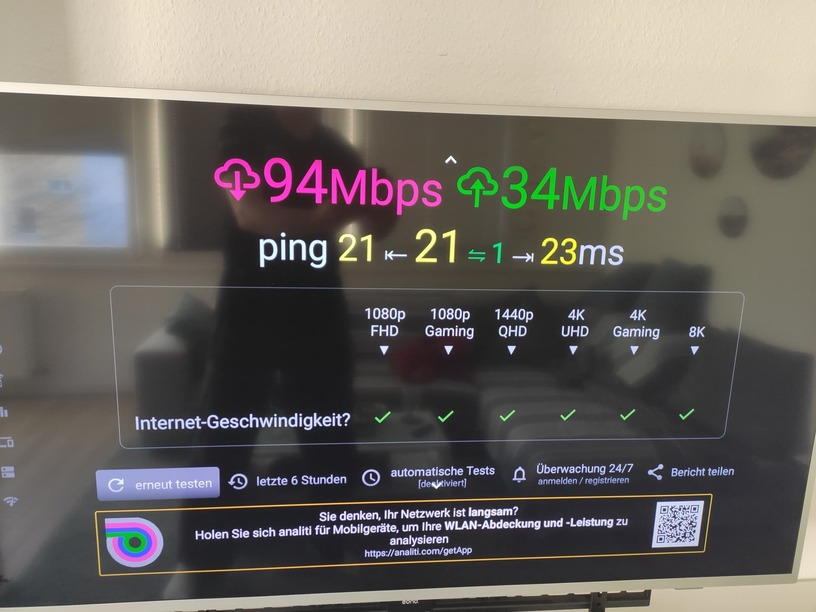
speed is good
what is the extension of media file?
already wrote: all are mkv
strange
can you install VLC on your smartphone
and do the same try to play mkv file from nas
Or write mkv file to usb stick, put in to tv and try to play via VLC
VLC on mobile = working well (after login-data has been keyed in) but if I am skipping some minutes (10+) VLC-logo will start spinning for ‘years’
Do have to revise it → working well
It is not working well as every ‘jump’ within a file ‘skip minutes, …’ will end in ‘login-window-popup’
Try the same via usb
We need to exclude nas as device that not work
running via USB
