Plex not finding shows brought in by Sonarr

I have two series of shows that Plex can’t find even with Sonarr bringing them in, making folders and naming them. here is a one…
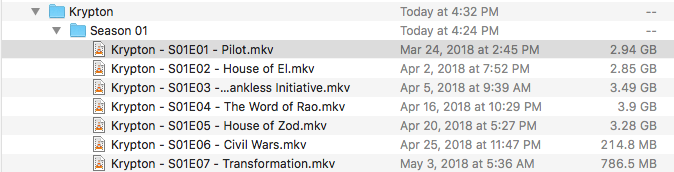
Folder - Krypton
Sub folder - Season 1
Files - Krypton - S01E01 - Pilot.mkv

I even tried using Filebot which wanted to changed to Krypton 1X01 - Pilot.mkv neither worked and was found by plex. All other shows I have used sonarr with have been brought in perfectly but now sure why this is not working. I have tried playing the shows and they play and are not corrupted. Anyone have an idea?

and the movies do play fine using VLC so I know they are there.

Is Swattion a season in some other language and is that supported by Plex.

Personnally i prefer to name my seasons folders S01, S02 ans so on. Never an issue like that.

Also “Krypton - S01E01 - Pilot” is better than " Krypton 1X01 - Pilot"

Anyone? Help please?

@Ismelda said:
Is Swattion a season in some other language and is that supported by Plex.

Personnally i prefer to name my seasons folders S01, S02 ans so on. Never an issue like that.

Also “Krypton - S01E01 - Pilot” is better than " Krypton 1X01 - Pilot"

Hilarious… Plex Ninja promoting non-compliant Season Folder.
Call Ripley.

@“Kelvin Davis” said:
Anyone? Help please?

Adjust Filebot once - it remembers.
Edit Format to Plex Standard Naming:

Note:
Mine is further customized thusly:
{ny} - {s00e00} - {t}
The small ‘y’ producing:
Krypton (2018)
…Season 01/
…Krypton (2018) - S01E01 - Episode Title.xxx

Note 2:
Even if you get a match (after a Plex Dance) you’ll still probably come up with a blank poster due to a hitch in the Plex/TVDB get-along - not much for Non-Plex-Passers to do about that.

The Plex Dance®:

  1. remove show/movie from library
  2. rescan library files
  3. empty trash
  4. clean bundles
    https://support.plex.tv/hc/en-us/articles/200392106-Library-Actions <— scan library files, empty trash, clean bundles
  5. bring names and structures into compliance/Move LMA/etc
  6. replace corrected show/movie into library
  7. rescan library files

All Steps. In Order. No Shortcuts.

@“Kelvin Davis” said:
I have two series of shows that Plex can’t find even with Sonarr bringing them in, making folders and naming them. here is a one…
Folder - Krypton
Sub folder - Season 1
Files - Krypton - S01E01 - Pilot.mkv

I even tried using Filebot which wanted to changed to Krypton 1X01 - Pilot.mkv neither worked and was found by plex. All other shows I have used sonarr with have been brought in perfectly but now sure why this is not working. I have tried playing the shows and they play and are not corrupted. Anyone have an idea?

I have that exact same naming for that exact same show pulled in the exact same way and no issues

Can we see a picture of the folder structure?

If he tried to match a bad file name/folder structure first, then changed the name/structure without doing The Plex Dance - it’ll never change a thing. The bundle is populated with bogus information and the ONLY way to clear it is The Plex Dance.

Very important to set Filebot to Plex Standard Naming/Structuring first - then FileBot ‘Pre-matches’, renames and the first bundle Plex writes is a good one.

36%20PM

This is the what it is listed. I

What folder is added to your TV library settings?

The Krypton Folder is under TV Shows, the same as all the other tv shows. But for some reason Krypton and Westworld don’t show up in the library 13%20PM

I would do this with your krypton folder The Plex Dance ™

I have done the plex dance three times now with same results. It doesn’t find the shows.

strange. would like to take a look a scanner logs then

OK not sure how to do that. Not a huge techie LOL

In Settings>Server>Help in web browser app you can download logs.

Plex Media Server Logs_2018-07-11_19-00-45.zip (4.2 MB)

Ok here is the logs. Thanks

although I just downloaded another movie and it didn’t see it either. So something else must be going on that I am not aware of. It had added new episodes from other shows that I have in my collection today. But not adding anything new that wasn’t already started.

unfortunately you appear to have some database corruption.

Jul 11, 2018 18:47:42.191 [0x7fffa0215380] ERROR - SQLITE3:0x7ffee3e78000, 11, database corruption at line 59437 of [fc49f556e4]
Jul 11, 2018 18:47:42.191 [0x7fffa0215380] ERROR - SQLITE3:0x7ffee3e78000, 11, database corruption at line 59479 of [fc49f556e4]
Jul 11, 2018 18:47:42.191 [0x7fffa0215380] ERROR - SQLITE3:0x7ffee3e78000, 11, statement aborts at 4: [] database disk image is malformed
Jul 11, 2018 18:47:42.191 [0x7fffa0215380] ERROR - SQLITE3:0x7ffee3e78000, 11, statement aborts at 172: [update metadata_items set guid=?,hash=? where id=?] database disk image is malformed
Jul 11, 2018 18:47:42.191 [0x7fffa0215380] ERROR - Exception inside transaction (inside=1) (../Library/MetadataItem.cpp:961): sqlite3_statement_backend::loadOne: database disk image is malformed
Jul 11, 2018 18:47:42.191 [0x7fffa0215380] ERROR - Exception inside transaction (inside=1) (../Library/Episode.cpp:187): sqlite3_statement_backend::loadOne: database disk image is malformed
Jul 11, 2018 18:47:42.191 [0x7fffa0215380] ERROR - Exception inside transaction (inside=1) (../Library/MetadataItem.cpp:3049): sqlite3_statement_backend::loadOne: database disk image is malformed
Jul 11, 2018 18:47:42.191 [0x7fffa0215380] ERROR - Exception assimilating media item in Krypton/Season 01: sqlite3_statement_backend::loadOne: database disk image is malformed

You can try to restore a back up ( hopefully the back ups were not made when already corrupt)

or try to repair database file

Thanks, the repair did not work, but did a restore from backup, it had most of everything. Imported the new movies, still running the library scan but seems to be working. Thanks so much.

2 Likes

My problem with “Krypton” is that PLEX is seeing it as a completely different TV series. I’ve tried removing and changing naming several times and every time it sees it as another show.