Plex not finding some seasons of shows after struggling with it for a while

So I decided trying Plex after a friend talked to me about it. He told me it was great so I got the Plex Pass and I must admit I’m experiencing buyers remorse. The experience so far has been terrible. First, it took ages for Plex to find all the metadata (even when recognizing the shows, had to force refresh metadata on some of them, some of them would appear alone, etc.) This took two days. My naming scheme was /video/TV/Showname/Showname - 01x02 - Epname - Quality.ext
This worked for most of the shows but not all. One example is Fleabag. It only finds the first season of fleabag. So after reading about how strict it is with the naming convention (which I find silly because I have no trouble with other software, just Plex) I decided to bite the bullet and use Sonarr to rename my files. Now my naming convention is the following, for an episode of the first and second season:
/video/TV/Fleabag/Season 01/Fleabag - S01E01 - Episode 1 WEBDL-2160p.mkv
/video/TV/Fleabag/Season 02/Fleabag - S02E01 - Episode 1 WEBDL-2160p.mkv

Renamed, did the Plex Dance (which I find silly it is even an official thing), still nothing. DS Video(VideoStation), Sonarr and every other media software I have in my NAS successfully recognizes both seasons without trouble at all. Any help? Honestly, I’m leaning towards accepting I wasted my money, lesson learned and move on from Plex, but maybe I’m doing something really stupid?

EDIT: Extra info, running on Synology DS2415+, everything updated to the latest version. One other issue I had was that in more than the 24hs I left it for it to download metadata and everything, I couldn’t access my settings, had to restart it before it’d work.
Thanks in advance,
Manuel

Does this similar issue apply to your situation?

At any rate, given that your naming appears to be fine, it is most likely a permissions issue. Ensure that the Plex user has (at least) read access to the shares where your media is stored.

I wouldn’t think that would be the issue because 1)it looks like PMS has the permissions it needs, Season 01 has the same permissions Season 02 has, but S02 is not detected while S01 is. Also, even before renaming to the strict Plex naming convention, all files where on the same folder and Plex still only found the first season. So no, I don’t think that issue applies to me. Also, the issue there is that Plex doesn’t see anything on that share, which is definitely not my case.

EDIT: (Again, I know) I’m not going to mess with my current share which works perfectly with virtually all the software I use and set up all my permissions for those again just because Plex won’t find a season in some shows. Really really don’t think that’s the issue here.

Fair enough. The likely next step here is to grab some logs a couple of minutes after a scan attempt for that library. The logs should have Debug enabled and Verbose disabled to be useful (that is the default, and can be checked under Settings -> (SETTINGS) General in the web client). Download the logs from Settings -> Troubleshooting.

@ChuckPa may have some ideas as well.

Plex Media Server Logs_2020-03-25_20-24-47.zip (5.2 MB) So I removed the Fleabag Folder outside of the TV folder, updated library, moved the Fleabag folder again to the TV folder, updated library again and then downloaded the log with the settings you asked.
Was going through them but couldn’t find anything interesting. Still, maybe you guys can see something I don’t.
Again, thanks for your help philipsw!

It seemed to have visibility into the folder where season 2 is stored earlier:

Mar 25, 2020 18:27:17.953 [0x7fe5f0567700] INFO - Library section 2 (TV Shows) will be updated because of a change in '"/volume1/video/TV/Fleabag/Season 02"/Fleabag - S2E06 - Episode 6 WEBDL-2160p.mkv'

At least it did for that particular file. I don’t see any similar notifications for other episodes from that season, if they are present. Also, the naming is slightly off; that should be “S02E06” in there. Your season 1 stuff seems to have it right:

Mar 25, 2020 18:34:31.256 [0x7fe5f0567700] DEBUG - [Notify] Now watching "/volume1/video/TV/Fleabag/Season 01/@eaDir/Fleabag - S01E03 - Episode 3 WEBDL-2160p.mkv"

I’m not certain that small an inconsistency would throw off the matching logic, but that’s all I see immediately. Also, that appears to be for an earlier scan. For the most recent one, it doesn’t look as though the scanner sees anything under Season 02:

Mar 25, 2020 20:24:05.831 [0x7f1da3513740] DEBUG -  -> Searching down into Fleabag/Season 02
Mar 25, 2020 20:24:05.831 [0x7f1da3513740] DEBUG - Checking descendants of Fleabag/Season 02
Mar 25, 2020 20:24:06.227 [0x7f1da3513740] DEBUG -  -> Searching down into Fleabag/Season 02
Mar 25, 2020 20:24:06.227 [0x7f1da3513740] DEBUG - Checking descendants of Fleabag/Season 02
Mar 25, 2020 20:24:06.422 [0x7f1da3513740] DEBUG -  -> Searching down into Fleabag/Season 02
Mar 25, 2020 20:24:06.422 [0x7f1da3513740] DEBUG - Checking descendants of Fleabag/Season 02
Mar 25, 2020 20:24:06.601 [0x7f1da3513740] DEBUG -  -> Searching down into Fleabag/Season 02
Mar 25, 2020 20:24:06.601 [0x7f1da3513740] DEBUG - Checking descendants of Fleabag/Season 02
Mar 25, 2020 20:24:06.673 [0x7f1da3513740] DEBUG -  -> Searching down into Fleabag/Season 02
Mar 25, 2020 20:24:06.673 [0x7f1da3513740] DEBUG - Checking descendants of Fleabag/Season 02
Mar 25, 2020 20:24:06.697 [0x7f1da3513740] DEBUG -  -> Searching down into Fleabag/Season 02
Mar 25, 2020 20:24:06.697 [0x7f1da3513740] DEBUG - Checking descendants of Fleabag/Season 02
Mar 25, 2020 20:24:07.086 [0x7f1da3513740] DEBUG - Scanner: Processing directory /volume1/video/TV/Fleabag/Season 02 (parent: yes)
Mar 25, 2020 20:24:07.089 [0x7f1da3513740] DEBUG - Skipping over directory 'Fleabag/Season 02', as nothing has changed; removing 0 media items from map.

I’d expect it to look more like Season 01:

Mar 25, 2020 20:24:05.765 [0x7f1da3513740] DEBUG - Scanner: Processing directory /volume1/video/TV/Fleabag/Season 01 (parent: yes)
Mar 25, 2020 20:24:05.799 [0x7f1da3513740] DEBUG - Looking for path match for [/volume1/video/TV/Fleabag/Season 01/Fleabag - S01E01 - Episode 1 WEBDL-2160p.mkv]
Mar 25, 2020 20:24:05.832 [0x7f1da3513740] DEBUG -  -> Searching down into Fleabag/Season 01
Mar 25, 2020 20:24:05.832 [0x7f1da3513740] DEBUG - Checking descendants of Fleabag/Season 01
Mar 25, 2020 20:24:06.224 [0x7f1da3513740] DEBUG - Looking for path match for [/volume1/video/TV/Fleabag/Season 01/Fleabag - S01E02 - Episode 2 WEBDL-2160p.mkv]
Mar 25, 2020 20:24:06.228 [0x7f1da3513740] DEBUG -  -> Searching down into Fleabag/Season 01
Mar 25, 2020 20:24:06.228 [0x7f1da3513740] DEBUG - Checking descendants of Fleabag/Season 01

Can you show a screenshot of what the Add Folders looks like if you edit your TV library, and navigate all the way down to Fleabag season 2? Similar to the below:
Screen Shot 2020-03-25 at 8.11.59 PM

(Don’t actually try to add that folder, you should only add the top-level TV folder. I just want to see if Plex can see the files within)

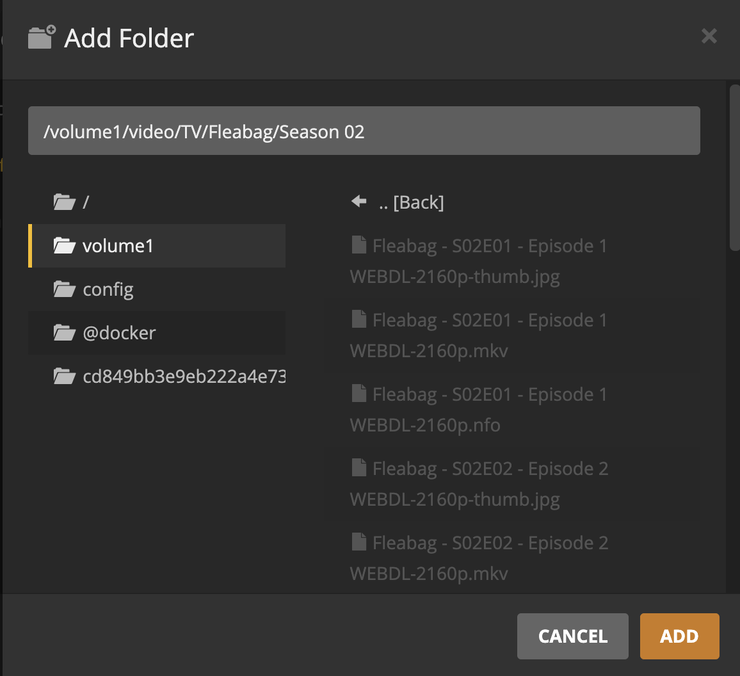
Yeah, I misrenamed it the first time to SxExx and re renamed it inmediately when I realized (did the whole thing again, moving it out, moving it in, plex dance, renaming, etc) to SXXEXX you can see in the logs that season 1 shows as S01E01. I did both seasons at the same time with Sonarr. It is weird that, when misrenaming, Plex found that one file just once and didn’t even do anything about it. There’s nothing about S02 in the latest attempts. Uploading the screenshots for the Fleabag folder, season 01 and season 02. There’s nothing about season 02 in the latest attempts. Again, can’t see anything weird with it.

just wanted to check in here. I’m a bit up to my ***** in alligators right now with TMDB.
I’ll jump back first chance I get.

Weird. And the actual folder you’re adding to your library is /volume1/video/TV, correct?

It is.

So yeah, after fiddling with it for a while, I gave up on it, it’s definitely not worth the time or hassle. Pretty disappointed to have to take the L on the one-payment Plex Pass but you got to know when to move on. I do appreciate the help though.

This topic was automatically closed 90 days after the last reply. New replies are no longer allowed.
