Plex not fully matching movies despite naming convention on files with imdb id

Server Version#: 1.32.5.7349
Player Version#: N/A

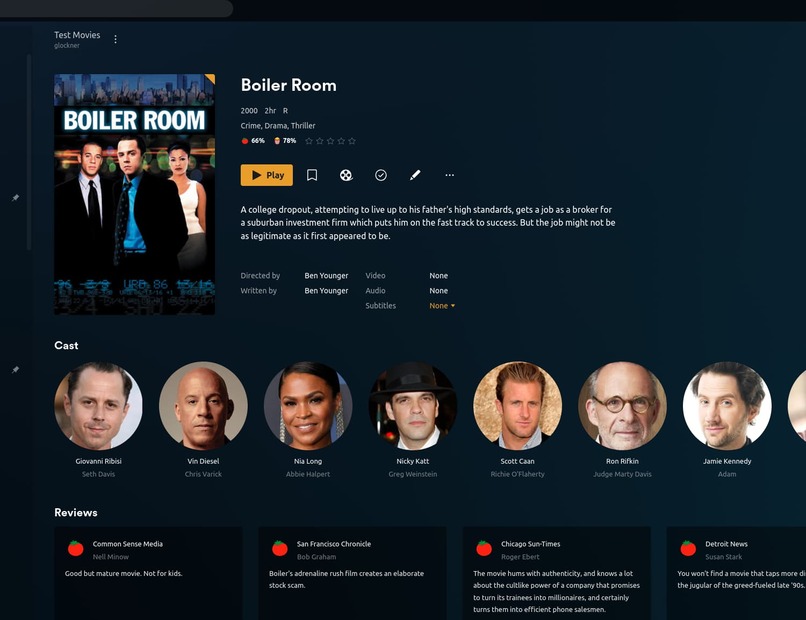
Just recently, I changed the agent of Moves to use the current “Plex Movie” Scanner/Agent. It upgraded the library, and all seemed okay, but I started noticing several movies that didn’t have posters, but instead just a warped thumbnail shot of a frame from the movie. Using Boiler Room as an example

My naming convention is as follows:
image

The Movie is still in plex, and it’s playable, and it has some data, but as you can see the “Refresh Metadata” is greyed out.

If I choose the “Fix Match…” option, then it’s correctly finding the movie

And after selecting it, then it properly refreshes all data, including pulling in the local poster.jpg. The other way I noticed it’s properly matched/scraped within Plex is the trailer button is now showing, whereas before it wasn’t.

I’ve already done both a “Scan Library Files” and “Refresh All Metadata” at the library level, neither one helped with these … partially unmatched movies (no other term for it). I’ve got to Movies, then selected “Unmatched”, but it just tells me “The active filter has no matches”, so Plex obviously thinks they’re matched when they’re not fully.

Not all movies are affected, only some of them, but I have no way of knowing which aren’t fully matched, and since the entire library is named by imdb id, is there anyway to tell Plex to do a force fix match on the entire library?

Did you rename the directory or file AFTER it was placed and PMS scanned it?

I just created a test

[chuck@lizum ~.1999]$ make-movie "Boiler Room (2000)"
Making "Boiler Room (2000)"
Done
[chuck@lizum ~.2000]$ 

and PMS had found it before I even moved to my browser

the directories were renamed before switching the scanner to the new agent.
After directories were renamed, Plex did a quick scan, and relinked all of the existing movies in the library to the new folder names.

@Zxurian

Once Plex scans the files, the identification is done.
PMS keeps a fingerprint of the file. It’s that fingerprint which gets in the way.

I recommend:

  1. Move the move out from where Plex sees it
  2. Scan files & empty trash & clean bundles (make it completely go away)
  3. Move the correctly named directory and file back in.
  4. you should find it matches correctly and immediately just as mine did without any assist

so a few things.

  1. This isn’t just one movie, this is many movies, but I have no way of identifying which ones are partial matches
  2. If I move them out, and make it completely go away, won’t that also obliterate watch histories & plays for users?

Take a look at the Plex media info XML of a few affected movies.
Look for the first occurrence of the XML property guid="...
Copy its content (between the quotation marks) and post it here.

Do also determine which metadata agent is currently selected for the Plex library, where the affected movies are stored in.
Simply edit the properties of the library and go to the “Advanced” tab. https://support.plex.tv/articles/200289266-editing-libraries/

What you can use is Radarr. Have it scan in your movie library, then set the naming convention. Once set, have it go through and-auto rename your movies to match the criteria that PLEX prefers. There have been very few odd occasions that PLEX would not find the correct match after this process. Typically though, Radarr will rename correctly and then put in the folder, so that PLEX sees it named correctly from the start.

1 Like

Here’s the first occurrence on one of the affected movies
guid="com.plexapp.agents.xbmcnfo://298618?lang=xn"

I was previously using the XBMCnfoMoviesImporter.bundle plugin to handle movie info since I already had offline nfo files, but since Plex is no longer supporting plugins, decided to switch the library agent to Plex’s fully supported “Plex Movie” agent. I updated the library to it and let it fully scan and refresh.

After utilizing “Fix Match…” on the same movie, the guid changes to
guid="plex://movie/5d776b34ad5437001f797675"

so… is there a way to mass update guids to a null value to have them re-match without blasting away the entry itself and losing watch information?

There is a way when going from the old official Plex agents to Plex movie. It simply requires Refresh Metadata on the whole library.
However, that might not work when going from a 3rd party agent.
Still worth a try though.

It doesn’t work, that’s why I’m looking for help to be able to mass update it. I’ve already done both a “Scan Library Files” and “Refresh All Metadata” at the library level, neither one helped.

Then there is unfortunately no way (that I know of) to mass-update the agent.

For future people that might end up here. I couldn’t find a native way to “mass fix” movies so I put a php script together using Plex CURL APIs to issue a “fix match” to every movie who’s GUID wasn’t made using the Plex Agent. At a high level, it will

  • Pull the entire movie library
  • Go through each movie and look for any entry where the GUID doesn’t start with plex
  • For each entry that doesn’t start with plex
    • Issue a “search for matches” against that entry
    • Issue a “fix match” against that entry, with the first result from the “search for matches”
  • Output everything in real time as to whether it’s a plex guid, or it’s issued a match command.

Script Link: <?php$plexServerAPI = ''; // Ex: https://1-2-3-4.acd6f5b1c65bf1a.plex.direct - Pastebin.com

Important to note
Although Plex says the new Plex Agent will match against the filename with scraper hints https://support.plex.tv/articles/naming-and-organizing-your-movie-media-files/, it does not do this when you utilize the “fix match” command. It only matches against title & year, and this is not full proof. This is why I added a line to the output where it also compares the existing title & year, against the new matched title & year, and outputs if there’s a mismatch.
Examples:
This entry did not have a plex GUID, so it ran the fix match and updated it.

-!!-   The Time Machine (2002)                              /library/metadata/41923          com.plexapp.agents.xbmcnfo://2135?lang=xn            MATCHES: 20      
--->   The Time Machine (2002)                                                               plex://movie/5d78b9aa0c18f5001f16ac2e                UPDATED

This entry did not have a plex GUID, but after matching, the new title was different from the old one. In this case it’s not an issue since the actual movie is the same, there’s just disagreement between IMDB & TMDB

-!!-   Tom Clancys Without Remorse (2021)                   /library/metadata/44972          tt0499097                                            MATCHES: 20      
--->   Without Remorse (2021)                                                                plex://movie/5d777086dd931c001e38eac0                MOVIE DETAILS MISMATCH!!!!   UPDATED

In this example, again GUID mismatch, however the matched entry was not the correct movie, a result of plex’s searching only using existing title & year, and not the filename imdb hint. In this case, I had to use plex’s native “Fix Match” through the app in order to manually select the right movie.

-!!-   The Mother (2023)                                    /library/metadata/42417          com.plexapp.agents.xbmcnfo://552688?lang=xn          MATCHES: 20      
--->   My Mother’s Mother (2022)                                                           plex://movie/647670cd842929eb9e1b5eb6                MOVIE DETAILS MISMATCH!!!!   UPDATED

So after the output, you have to scan the results for any MOVIE DETAILS MISMATCH!!!! and just manually make sure it matched against the right movie.

This topic was automatically closed 90 days after the last reply. New replies are no longer allowed.