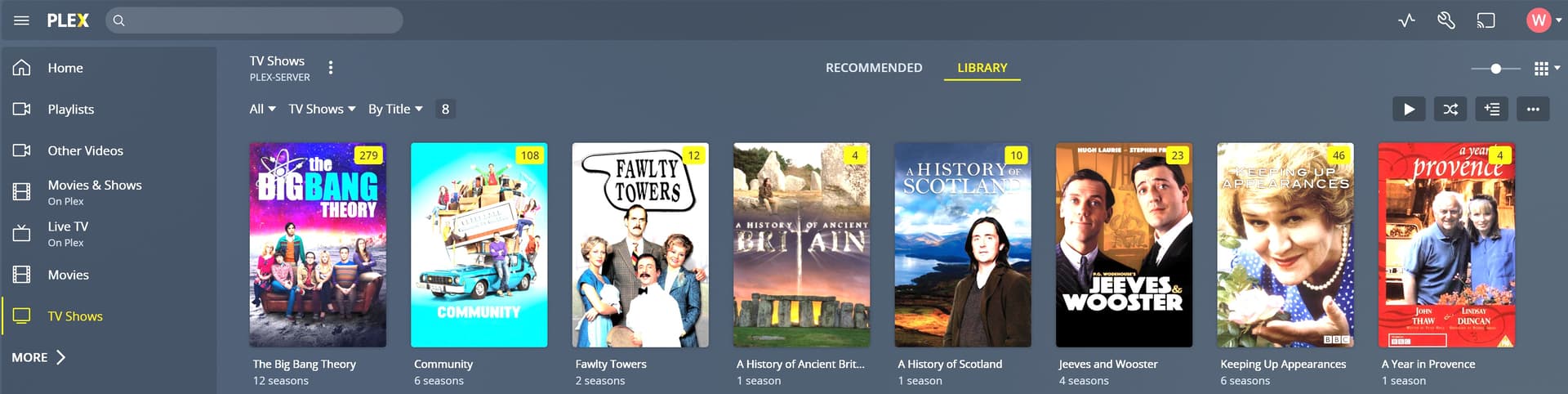
TV Show naming is correct. Even use TVDB ID numbers. Put all TV Shows in “Staging” Folder on QNAP HD. When I added only TV Show 1 to “TV Show” library it was accessed and seasons and episodes were appropriately placed in the library. However, when I added TV Show 2 to the “TV Show” library, it was incorrectly placed in the previously entered TV Show 1. That is, TV Show 1 was the only TV show that was in the library, but it now had extra seasons which corresponded to TV Show 2! I would appreciate someone explaining how this would occur and how to remedy the problem. Note: I have been using this Plex - QNAP NAS for the last 5 years without any problems.
looking at the logs I see two probable issues: Multimedia/TV Shows/Comedy/Fawlty Towers/Fawlty Towers s01e05.mp4
Im betting that your library points to: Multimedia/TV Shows
Having an intermediate directory of Comedy confuses the scanner
The show name does not include either a year or tvdb id. (and those that do include the tvdb id have it in the file name and not folder name)
this will cause the scanner to not match properly
ideally it would be Multimedia/TV Shows/Fawlty Towers (1975) {tvdb-75932}/Fawlty Towers s01e05.mp4
Thanks, dbirch, I will give your suggestion a try. However, in the QNAP NAS the folder “TV Shows” is subcategorized as you can see in this screen shot: 2) Fawlty Towers Episodes|690x362
Previously, Plex was able to accommodate these subcategories without problems. Has there been a change wherein all TV shows are now clumped into one folder (TV Shows) without categories? Or is there another way that I can group these TV shows into categories, such as, Comedy, Documentary, Drama, Horror, Music, Mystery, Sci-Fi, and Thriller?
Thanks! Your suggestions have worked perfectly. I now have all my TV shows in the Plex TV Shows library. Just one more question. I would like to subcategorize the TV shows by genre (Comedy, Drama, etc.) Is there a good way to do this within Plex?
You guys are the best!
Thanks, dane22. The Genre tab works fine. But now another problem. Got an email from Plex that said I need to come up with a unique user name (not email address). I did this and used it to log into Plex successfully. However, now all of my media thumbnails are black. I refreshed metadata twice, but no change. Is there something else I should do to get the thumbnails back?