~/Library/Preferences/

https://support.plex.tv/articles/201539237-backing-up-plex-media-server-data/

But also here

~/Library/Application Support/Plex Media Server/

https://support.plex.tv/articles/202915258-where-is-the-plex-media-server-data-directory-located/


So that’s 4 different places!!!!!
~/Library/Application Support/Plex Media Server/ Base path for storing parts of plex
~/Library/Application Support/Plex Media Server/Plug-in Support/Databases Path where Plex stores its database files and database file backups
~/Library/Application Support/Plex Media Server/Backups isnt a normal path
~/Library/Application Support/Plex Media Server/Logs the standard location Plex uses for troubleshooting/operational logs
~/Library/Preferences/ has the com.plexapp.plexmediaserver.plist file which is the macOS version of preferences.xml or the Windows Registry, contains some server ID values and server config settings.
I can explain more about how plex stores its data, but my bigger question for this thread, is what are you trying to achieve?
AFAIR, if you just clean out this input field and Save Changes, Plex will default back to putting the backups into the same folder as the main DB files.
In this case you are best off duplicating the whole plex data folder onto the new computer. Because the DB backup doesn’t even contain all metadata, let alone the results of the various analysis tasks.
Odds are you changed the Backup database every three days and/or the Backup directory in the scheduled task section of your library. OR as I have asked now for the third time your plex server logs as plex failing to create those backups is often a sign of a corrupt database.
Last month I changed the Database backup location to the desktop. However after more than three days. Plex still did not save any files there. So I changed it back to what Plex recommended which was
~/Library/Application Support/Plex Media Server/ but it’s been 5 days and it’s still not saving files there.
Ok I am not seeing a startup sequence in your logs (not the end of the world, but server startup is where I often look for issues)
There is a tool called Webtools-NG that is for Releases · WebTools-NG/WebTools-NG · GitHub In that tool is Plex Media Server => Butler Scheduled Tasks where you can manually run a database backup. Lets see if that creates a backup for you/
EDIT: Feb 06, 2025 01:04:44.056 [0x70000ac80000] ERROR - Butler: Database backup path '~/Applications/PLEXBACKUP' does not exist, skipping.
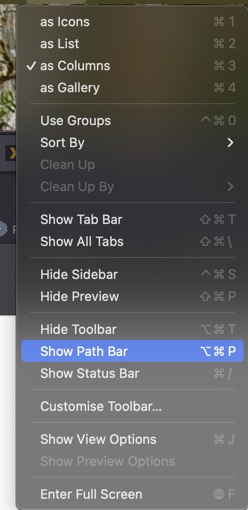
You can change your path location as I discussed earlier. If you wish to create a Backup Folder, you can. It works for me without issue. I do advice you use the Path bar from View menu whilst using the Finder to get it correct.
Backup directory path does not regenerate or at least not on MacOS as far as I know like previously mentioned.
I’m glad you have resolved your issue and have a better understanding of the Home Directory and the Application support folder for Plex Media Server.
Some advice though, this Home Directory is hidden for a reason. Be cautious you can do some serious harm to your MacOS instillation.
Thanks. I did try to make a folder in applications. To make it easier to get these backup files. The folder did exist but I guess Plex was too lazy to look for it.
I have changed it back to ~/Library/Application Support/Plex Media Server/Plug-in Support/Databases