I am not sure if this is the correct forum, but we are experiencing problems with Plex playing certain media. Having searched, I cannot even reliably find if Plex is still supporting the Plex for Kodi add-on or not. I have attached log files, hoping they can provide a starting point.
It should be noted that we have tried with both Kodi 17 and 18 and have experienced the same problem. However, if I mount the directory containing the media onto one of the Kodi boxes and allow Kodi to play the media that way, it works, or use DLNA, it works that way as well. I even have connected to the Plex server via DLNA from Kodi and playback works fine.
Can someone point me in the right direction as to what the problem may be, or point out if I am missing something.
Just to provide a little more information, here is the XML metadata for one of the files in question (and the attached log files are referring to this episode as well). s7e1.txt (3.3 KB)
Is there any way to manually download the codecs and install them? I thought that this may have been the problem and I temporarily connected the server to internet and attempted to watch the video again and still could not play the video. I will have to double check to ensure that when I connected the server to the internet it was signed in.
But being able to download all the required codecs and install them manually would be ideal for us, if possible.
I guess I can follow the link in the log file then go to the link the xml that is returned to download the specific library, but is it possible to download all the codecs and install them manually? Also, while I have not looked yet,.but the library that is returned, where should that be copied too? libacc_decoder.so is what was ultimately returned and downloaded.
Nowhere have I read that Plex requires a persistent connection to be used. The features that require a persistent connection, like Plex Home, or any of the Plex Pass features are not being used. In this instance, having a persistent connection is not an option.
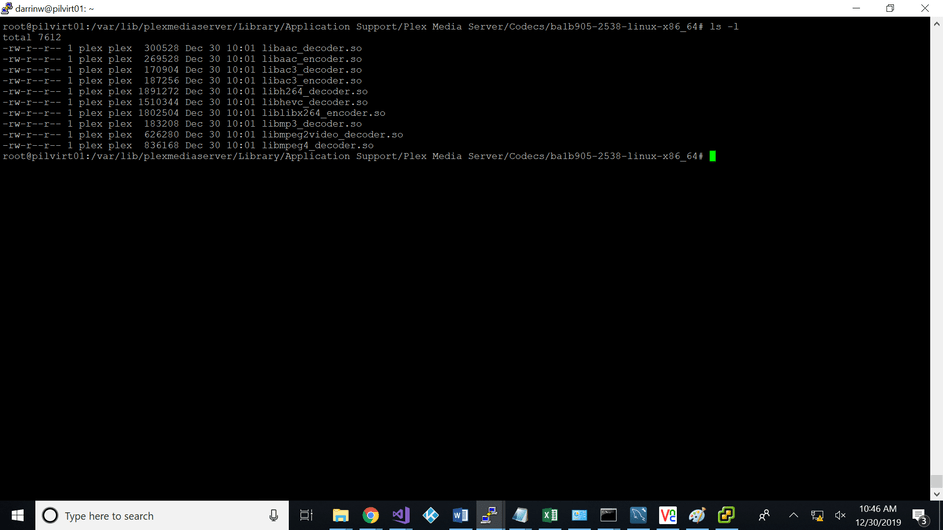
Futher, looking in /var/lib/plexmediaserver/Library/Application Support/Plex Media Server/Codecs there are codecs there, specifically the aac_decooder.
There has to be ways, when persistent internet connections are not available, to download in advance all required codecs. There are a lot of reasons why this device cannot have a constant connection, the primary one being where this server is located, the only internet available is a metered satellite connection, or the hotspot from a cellular device which is limited and extremely slow. I’ve read all the arguments and rationale and the only other option we would have would be to move to Emby, where we are not seeing these problems.
I understand your concerns and have had this same discussion with engineering years ago when it was first starting. The answer then was “No” and it will be again, I’m afraid.
This is how they want it.
Engineering needs to listen to users, and not put their needs or wants ahead of everyone elses. Believe me, I understand what it is like being an engineer myself (both network engineer and software engineer). But I also know that you have to listen to what is best for the userbase, and while it may seem like a good idea to one person, its the many that count. Especially seeing so many posts about forcing plex to download codecs and problems, this should be a feature. It wouldn’t take much to create a tarball of all the codecs for a given release and put them available for download and allow people whoa re in situations like we find outselves in with this setup, a solution.
Even when I connected the box to the internet and tried to view the media in question, the required codec wasn’t downloaded. However, I don’t believe the Plex server was signed in. Once I get back to this location I will investigate more.\
Just a little bit more information, I was able to resolve the issue, and as you pointed out it was a codec problem, but not the codec that we thought was the culprit. I don’t know why the log showed the problem with the aac_decoder, because as I pointed out before, the libacc_decoder.so was present in the correct directory (/var/lib/plexmediaserver/Library/Application Support/Plex Media Server/Codecs/8bf330d-2818-linux-x86_64). The missing codec library was liblibx264_encoder.so. I watched the Plex Media Server.log while attempting to view the video in question, and this is the library that was downloaded, and this is the only file that has changed in the Codecs directory. After this was downloaded, everything worked as expected.
I am going to assign a task to someone to try playing each of the 2,437 TV Episodes to ensure all play with no issues, and any that do not work, make note, so I can ensure the proper codecs are installed.