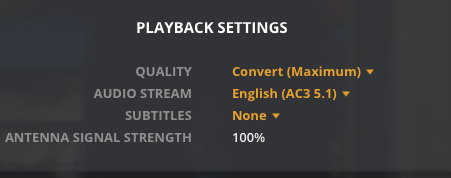
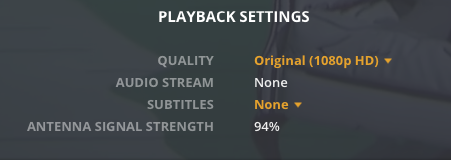
My plex server recently stopped recording/playing back audio on Seattle’s NBC (5.1 and 16.1). Using HDHomeRun for each silicondust box I know audio is being received by the antenna on these channels.
I’m thinking I’m missing some PLEX specific setting or a new bug is preventing these two specific channels from audio regardless of the playback device (Web, AppleTV, Apple IOS App)
I’ve deleted the DVR, Rescanned the channels on both the SilconDust boxes, added them back and scanned again… same results with these two channels.
In Web Viewer : Channel that works
in Web Viewer: Channels that don’t work
I can really use your help!
Setup:
Plex Media Server: Version 1.21.1.3830
MacOS Version: 10.15.7
HDHomeRun CONNECT QUATRO Model: HDHR5-4US Firmware: 20200907
HDHomeRun CONNECT 4K Model: HDHR5-4K Firmware: 20201030
Synology NAS (Shouldn’t matter here… others channels working)
Since the Web player doesn’t support mpeg2, check that the station hasn’t started experimenting with AVC. Check the channel list on http://my.hdhomerun.com , you should see HD or nothing on the far right side.
What does the dashboard say when tuning one of these channels? Expecting to see
Video
1080i (MPEG2VIDEO) (hw)
1080P (H264)—Transcode (hw)
Audio
English (AC3 5.1)
MP3—Transcode)
If you don’t see HW after the from/to lines then would need to dig into that. Without it the CPU in the NAS could be overloaded.
Suggestion:
For the Web player, go to settings - player - quality and make sure that “Automatically adjust quality (Beta)” is unchecked.
You could use the open source tool curl to record a short snippet (~1 minute) of the full data stream from these transponders.
Then feed this into https://mediaarea.net/en/MediaInfo and see what you got.
Replace the URL with the URL which you can see in the Channel Lineup of the configuration menu of your HDHomerun. (right click on the number and “copy link address”)
The path behind the > is the storage location for the sample file. Adapt it to your system.
Curl is available on every Linux system and MacOS.
There are also builds for Windows available: https://curl.se/windows/
Thanks for helping and making it easy to share details… I’m new to troubelshooting PLEX (its been working fine for over a year!)
the the my.hdhomerun.com “channel lineup” Both working and non-working (5.1, 7.1, 16.1) have “HEVC, HD” so no difference between a working and non-working channel.
When I tune to the non-working channel the Dashboard output looks like this: (i didn’t see the audio in the dashboard like you describe… help here if there is a setting i need to enable)
Examples of When i tune to a working channel the dashboard output is this:
As far as the NAS CPU: The NAS is only for storage… the Plex is running from Mac Mini late 2014 : 2.6 Ghz Dual Core Intel Core i5, 8GB Ram
looking forward to fixing this! Thanks again for your assist.
Totally missed that you had a HDHR5-4K. Many threads about how Plex can’t handle the audio that is in the HEVC stream. On top of that the Web client can’t direct play HEVC and your processor isn’t able to keep up transcoding.
You can disable the HEVC channels on the 4K or just drop it out of Plex altogether till they add support.
removing the HDHR5-4K worked… can you direct me to a specific thread that i can follow to understand when i can add it back? I have a full household and they all love to use plex… so the additional tuners were welcomed… also strange that it worked up to a few days ago…
It probably worked until the broadcaster started transmitting in the new ATSC3 standard which transmits the video in HEVC and the Audio in AC-4. Plex uses FFmpeg for the transcoder and FFmpeg is not currently handling the AC-4 audio. Plex won’t be able to work with the new ATSC3 stations until FFmpeg is updated. One other potential solution would be to just disable the new HEVC listed channels on the HDHR5-4K tuner. To do that just double click on the star beside the channels in the my.hdhomerun.com screenshot you had above, the second click should put a Red X beside the channel as shown below.