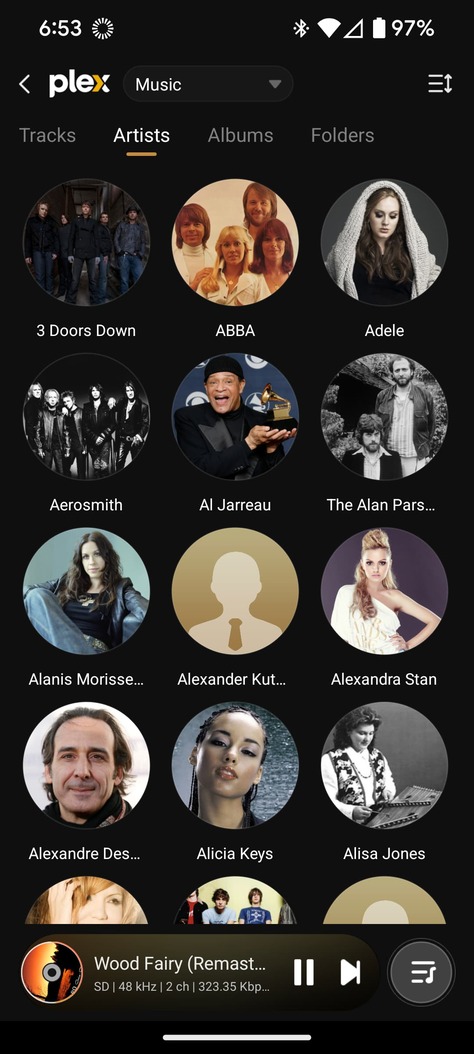
I just got an Eversolo DMP-A8 and it has a Plex (beta) app on it. For the most part it works just fine, but I cannot find my playlists. Is this in the works, and/or am I looking in the wrong place?
Thank you all!
-Brian
I just got an Eversolo DMP-A8 and it has a Plex (beta) app on it. For the most part it works just fine, but I cannot find my playlists. Is this in the works, and/or am I looking in the wrong place?
Thank you all!
-Brian
I’m not familiar with those DMPs and I’m not sure what the app is, actually. Does it allow casting to it?
Thanks for the reply!
As far as I can tell, it does not allow casting to it. It does have an HDMI port so I might try plugging in my old ChromeCast. Not sure what that’ll mean for audio quality.
I thought perhaps the “Plex (beta)” app was something the Plex folks were working on with/for them. It has the same UI.
The DMP-A8 looks like it’s an android device with a seriously-good DAC and pre-amp. It includes a bunch of streaming services built-in, including this beta Plex app.
Thanks!
-Brian n8wrl
hmm, can you send screenshots of the app?
Good morning!
The A8 is an android device that comes with some apps installed. Here’s how the Plex app icon looks:
I tried to find something with version or author. It has a tab to show artists, tracks, albums, just like the other Plex apps (I use it on my PC and my Sony smart TV). But I can’t find collections or playlists:
I am just now learning about PlexAmp. I installed it on my phone to test and it does what I want. Except…
I have to enter my full username and password to login. I don’t know my passwords because I use a password manager, and if I side-load PlexAmp onto the DMP-A8 I won’t have access to it. My password is probably a 32 character random thingie I’d have no luck typing.
When I first ran Plex (beta) on this device it logged in the same way Plex on my TV did - it displayed a short code for me to type into a web browser elsewhere and it was happy. Sure would be nice if PlexAmp did the same!
I was able to install PlexAmp on the Eversolo DMP-A8 and it does what I want with playlists, etc.
Aside from difficult login, all is well!
in terms of the Plex app on there, that’s all them, we don’t have anything to do with it and they’re likely in violation of some of our ToS around using our name and logo and. asking it look official without any blessing or review from us.
Glad you got Plexamp up and running!
That is really interesting. I assumed it was yours because it worked just like yours, including the login experience.
Which is something maybe I can ask about since I have your ear…
When I log into Plex on my Google TV and this “Plex (beta)” thingie, both of them show me a 4 digit+character code and tell me to go to an activate page on plex.tv. When I do, something is blessed and the login continues.
That’s not how PlexAmp works - it wants the username (email) and password.
That’s a problem for me because I don’t know my passwords. I use a password manager and copy+paste passwords into the forms to log into things. That’s fine on most devices, but not the Eversolo. It is an android device but there’s no copy+paste and, even if there were, there’s no access to my password manager.
Can you ask the powers-that-be to support the same kind of “activation code” login in PlexAmp that Plex uses?
Thanks for your help!
Take care,
-Brian
I am the powers that be, but there’s not a lot of demand for that sort of login, since usually you have access via mobile platform to passwords, soft keyboard, etc. It an interesting suggestion, and we’ll consider it in the future.
Please do think about it. Security best-practices and even your password rules dictate minimum passwords, mix of characters, etc. All very good, essential advice. I am not at all suggesting dumbing down passwords. It’s just hard to type them on tiny keyboards on these devices. Or, huge keyboards without a touch-screen on a TV! Many of the other apps I use do this “enter a code into a browser” because the assumption is the browser is logged in, probably with a strong password! Netflix, Paramount+, Hulu, Disney+, ESPN, etc. They all do it.
Another option is security keys. That wouldn’t help with the A8 but it is an excellent way to boost password security without demanding more length/entropy. Plus, it’s a form of 2FA since I have to have the key to use it.
Thanks for letting me get that off my chest!
Take care
-Brian
One more thing - you already offer that kind of login on the “regular” Plex app, so you don’t have to invent anything new! Yay!

-Brian
totally different code base and we don’t offer that in the mobile version, do we?
I don’t understand your question…
I run Plex on my Google TV which is an android device. I haven’t tried, but I assume I could install PlexAmp.
I ran Plex on my Android phone to figure out what was different between it and the Plex (beta) running on my DMP-A8, which is also Android.
And before I tried PlexAmp on the A8, I installed it on my phone.
So I’m not sure what you mean by “we don’t offer that in the mobile version, do we?”
I do understand the different code-base problem. Retired developer here…
I have a Eversolo DMP-A8 and I’m trying to get PlexAmp on it ,can you tell me ,set by set, how you did it .
I tried the google store. but i don’t know how to put it on my devices list.
how do i side load it, ?
any help would be great
Go to the Zido/Eversolo forum thread here:
Scroll down to the 4rd message (from Bergholdt). Those instructions work for any other app you’d like to install. Go to apkpure.com to find the .apk file for FlexAmp.
Be careful of the apps you install this way. The app stores aren’t great but they do some level of vetting to make sure you’re not installing spyware or worse.
Good luck!
Your photos didn’t make it.
When you say “it can’t find my SSD” do you mean PlexAmp cannot see your SSD? or your A8 can’t?
I’m pretty new at this, but I don’t think PlexAmp will serve up local files. I think PlexAmp wants to connect to a Plex server on your network. You’d still use your A8’s media player to play the files on your SSD.,
just PlexAmp cannot see your SSD?
[/quote]
I see you posted the same question on the Zidoo/Eversolo DMP-A8 forum - hopefully someone can help you there.
I am really confused by your question because your photos didn’t make it and it seems like you’re trying to use PlexAmp to play music on an SSD you’ve installed in your A8. I don’t think it will do that, and you don’t need PlexAmp to do that. The A8 has its own music library functionality for that.
Do you have a Plex server elsewhere on your network? If so, then you need to sign into it. PlexAmp will prompt you for your username and password to access your Plex server. Once done, you’ll see the music library on your Plex server.
Other than that, I’m not sure how else to help you.
Good luck