Server Version#: 1.19.1.2935 (at time of post the latest)
Player Version#: Many / N/A
To start some information that may or may not be relevant.
One morning the computer was off (normally it is left on all night.) When I attempted to turn it on the boot drive would not function, long story short used another drive to get up and running again.
After all my programs were installed I tried to save the metadata from plex in the end it was lost. I rebuild the server and it automatically got a new name, after I made everything good I cloned my new boot drive and went back to how the set up was before. At this time I already had plex on its drive not related to the boot drive in any way, more below.
When installing the latest version of plex there did not seem to be a way to set metadata to a separate drive, failing to find one and failing to have an old version work with the missing option I uninstall and wiped everything related to plex other than the videos in a separate drive that make up all the content.
Installing it on its own SSD drive (that was once working fine for just metadata and the rest on the boot sad) I rebuild everything once again. it worked and then I switched boot drives and did not work. wiping and starting again also is not working. when launching it nothing happens on the desktop or the program ara in the bottom right, the only thing that seems to happen is it is listed in task manager and nothing more.
I would love some help with this. First, I just want it working again and 2nd I want to understand what is happening to not have it happen again.
You tried too many things. I lost track, whether you still have the old plex data somewhere available or not.
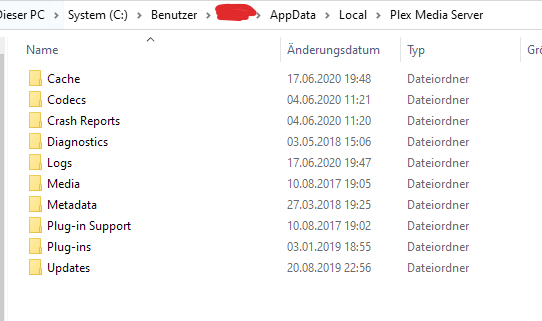
Is there still a folder on your SSD drive which looks like this inside?
If there is, make a note of its drive letter and folder path.
(It’d be better if it were not directly in the root folder of the drive.
e.g. F:\Plexdata\Plex Media Server would be preferable over F:\Plex Media Server or even F:\.)
Make sure that your current Windows user account has full “read/write” privileges in this folder and all its subfolders.
Install Windows on your regular C: drive.
Install Plex Server into the default location on drive C:
I do still have right now it IS G:\Plex Media Server
I can delete everything and start again however i do want / need it on its own drive as the latest version and even older versions are not letting me set the meta data location. It will have its own 1tb ssd separate from my boot drive.
After removeing everything from the last in stall and doing a new install back on the boot drive (c drive) it still wont show anything more then a line in the task manager
I don’t understand what you mean by that.
If you have to re-install your C: drive, you also have to reinstall Plex server. Having previously installed the program files onto a different drive will not change this.
And you still have to edit the registry to point plex to the data folder on the other drive, because the registry is stored on the system drive (which got wiped out during the reinstallation of Windows).
So nothing is gained.
If plex is on say drive M and the C drive crashes or corrupted, plex is left uneffected, that i why i prefer this way. As it seems i cant fix this i am just trying to do everything you say.
No, right now I am focusing on the deleting everything, starting fresh and making a small test sever
It is sufficient if the Plex data folder is on drive M. All your own data are in there.
All that remains on drive C is easily restored by installing Plex server, followed by editing the registry. You’ll have to do that anyway, after installing Windows.
This is what i thought but i could not connect to my old server it came up with a new name and no mater what I did, i could not use the already set up one, so i lost all the users and such. Also if its all in the separate drive i dont have to be concerned with editing the registry at all, not to mention easier backup and restores.
I just want the easiest way to get my server back up and running with the best way to ensure if more issues happen I can fix it easier then all this.
That information is stored in the registry. Including the unique server ID, which is used to attach the shared users. This cannot be moved to a different drive.
Once you have a backup, it will be in the form of a .reg file. All you need to do is to double-click it to import it into your current Windows installation.
So the order of restoring your Plex installation is:
I do not care about the old server, I DO NOT WANT TO TOUCH THE REGISTRY, unless i have to threes even a warning on the instructions, i just want this to work i would prefer it on its own drive the main thing about right now is to make it working again and then do what ever is best to make it easy to back up and fix (anything involving the registry is automatically not easy)
I already recommended you the, in my opinion, optimal method.
Editing the registry is what it takes, there is no way around it. If you take care while doing it, there is no real danger.
You just need to be aware of what branch of the Registry you are in and commit only changes after checking and re-checking them.