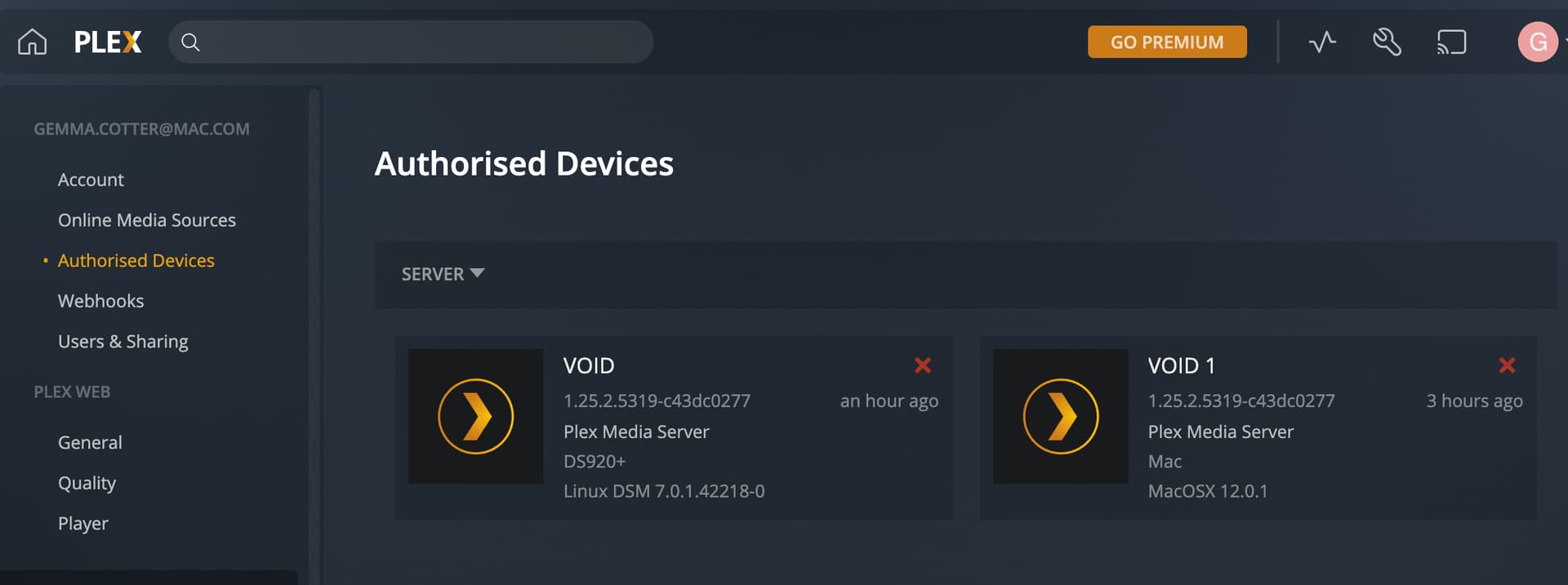
wait i might have worked it out,
Do i delete one of these, aka VOID 1
Now you can tell the difference 
Do you want to keep the Mac server around , just in case ?
You don’t need to delete it. You can leave it shut down
Were you able to set the Preferred Server to “VOID” (the Syno) ?
Synology keeps all your media on the RAID “volume” . First in the system is /volume1
Right?
Oh yes true okay it’s there my bad hahaha thank you so much I think we have finally done it.
Thanks for your patience with me!!
I’m playing content on my tv and my computer is asleep so I think we have a win hahah.
Very grateful to have your help!
I enjoyed your conversation with @GemmaC and I am happy that the issue is resolved. I am also a new user and I have a question about your comment above. Does this mean Mac will not wake from sleep to do a scheduled server maintenance? Will I have to keep Mac awake all the time?
PMS doesn’t wake up the host because it doesn’t have that level of privilege in the host operating system. (Some systems have self-wake on a timer capability. Plex isn’t that privileged).
We all run our servers 24/7. For this reason, most of our servers are headless.