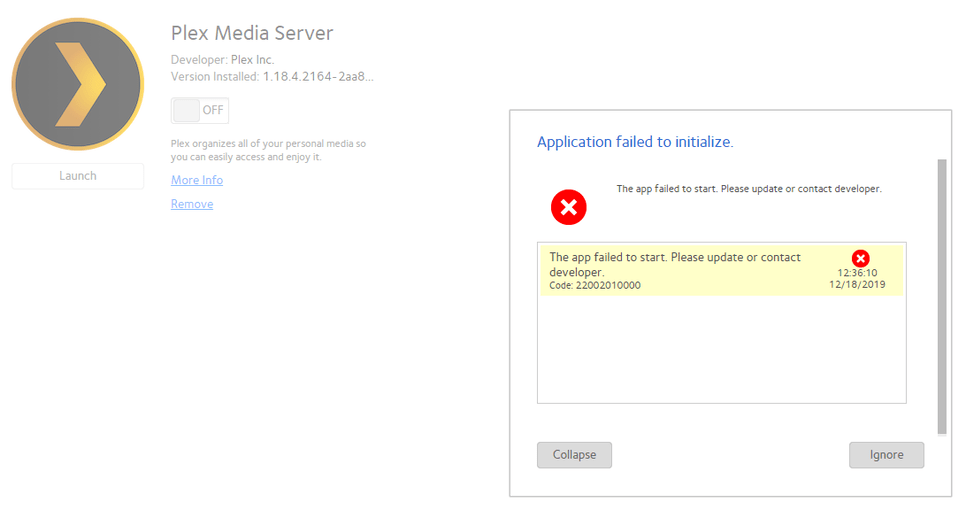
I just recommended to a friend to purchase a ReadyNAS 104 as the tech specs listed Plex as pre-installed, after we received the unit and it has the latest firmware and does not list Plex as installed in the applications. i tried to download plex for ReadyNAS Arm but it fails to install.
Especially take a look at the community updated NAS list at the bottom
Due to the slow CPU the 104 won’t be able to transcode video or remux audio. So your videos will need to be in a format and quality that your Plex client can play and you will need sufficient bandwidth on your network to be able to stream these files.
Personally for use with PMS I would recommend using a NAS with an Intel CPU
I use a netgear readynas 104. Its okay, lightweight and fast enough if you use it as a file server. But the readynas 104 is arm driven. So no transcoding is possible. If i would have the choice again i would choose a readynas 304.
I think it would work better on a Netgear ReadyNAS Ultra 2 but not for transcoding, especially when i see core duo 2 is the minimum advised on desktop :)
Anyway, i don't manage to install Plex on this readynas as it refused the 2 lastest packages available and it seems there is no plex support or help for this, so for the next nas, i will choose a ve-hotech having plex like app included from start.
The Ultra 2 would be faster than the 104 but the Ultra 2 would still be quite limited in what it could transcode. Take a look at the Plex FAQ entry I linked to earlier in the thread. There is a community NAS list linked to at the bottom of that page which summarises what different models can and can’t do.
Thanks you mdgm, i will read this thread just after.
Yep, FAQ mentions that the nas needs the same cpu power than the desktop, so a core duo 2, so that also answer my question about having a readynas ultra 6 plus (as its cpu is double core while ultra 2 is single core) which will not be enough either. Only the very last NAS based on core i3 would be enough.
Thanks for the NAS support/compatability list, that were my next question.
EDIT : The FAQ mentions Core duo 2 is needed for transcoding while the NAS list mentions some nas supporting transcoding with an atom d2700 cpu or even some d525 so i wonder if a readynas ultra 6 plus would be enough finally (the list says yes...)
It depends what quality video you wish to transcode. The 104 won’t transcode anything, while the Ultra 2 would transcode some video perhaps, but not HD video
I am actually running PLEX on a Windows 7 system and trascoding seems to work perfectly.
However, since my data are growing a lot, I was thinking to buy a ReadyNAS RN10400, but... I stopped reading your posts :)
Question: may I evaluate to buy the NAS 104 "only" to store the data with RAID protection, but continuing using the PLEX on WIndows system, just changing the source directories.
Is it correct?
My priorities are now 2: have more space and keep everything secured (backed-up / RAID).
I was very happy with my ReadyNAS 104 until the latest release of Plex…It does not work. The new version of Plex was recommended on the NAS, so I downloaded it. It removed the old version of Plex and then failed to work with the new version. Plex said it was a known issue. After posting on the boards, no solution. I have given up on running PMS on my 104, and instead put PMS as a service on an I7 based server and linked it to the 104. Very disappointed in Netgear and Plex, they allowed PMS to recommend and upgrade that breaks your system, and then would not provide the older version of Plex as a fix. Shame.
I am experiencing the exact same problem as CabotJohn.
Even reinstalling the old version, which is provided by the netgear appstore doesn’t work.
It shows the message: “Ein Problem mit einer Kernkomponente des Plex Media Servers wurde entdeckt. ## Bitte besuche das Forum und stelle deine Logdateien, wie hierbeschrieben zur Verfügung.”
It appears right after logging into the plex server and is happening during intern setup, which is why I can’t even provide logfiles.
I have manually updated to Plex Media Server 1.18.4.2164 (I chose the ARMv7 file, as I’m pretty sure that the NAS doesn’t have an Intel 64 bit chip, or a ARMv7 RN2xx chip).
My NAS is running the latest firmware (6.10.2).
Any suggestions?
Edit: I am testing the ARMv7 RN2xx file now.
Edit#2: Nope, Same issue, just with a different App title.
Edit#3: The RN2xx version would not uninstall after testing. And the ARMv7 version continued to not start. Am in the process of wiping the entire plex folder from the [NAS]\data.apps directory.
Edit#4: No joy with a fresh installation. Now I a Plex screen wanting to create a new server, but it cannot progress, and refers me to the forums.
Edit#5: A few minutes later and now I get the wizard to allocate new source folders. Maybe it was just taking ages to load?!
After a few days of letting it think about it, the ReadyNAS 104, despite having the Plex app showing as installed (at the 1.18.4.2164 version), still will not toggle the Plex app on. The error tells me to contact the app developer.