My recently update 2019 iMac to Big Sur causes Plex to stop connecting to my Apple TV. Plex keeps running, its like the machine sleeps as when I wake it the Apple TV can see it again however all sleep modes are off in Big Sur. Its only started doing this since I updated to Big Sur, prior to this Plex, MacOS and Apple TV have been rock solid for years.
3 posts were split to a new topic: Plex Media Server not working after update to Big Sur
You say it’s like the machine sleeps, and when I wake it it works again, so - is the machine sleeping?
Can you share a screenshot of the Energy Saver and sleep settings? I only have a laptop in front of me to compare with.
Hi Volts
Sleep settings are all off, screenshot attached. @tom80H, not sure what you mean or why mentioning the AppleTV is an issue.
@Volts Plex doesn’t work after the update to Big Sur, unlocking the iMac and opening the Plex dashboard from the running server from the MacOS Taskbar triggers something and the AppleTV can see the server again. If I start to watch a movie sometimes the movie will stop after while and the process needs to be repeated again. As I mentioned “Its like it sleeps” and I confirmed the settings are not set to sleep.
Happy to supply logs if needed, please provide instructions on how to collect/enable log capture, thanks
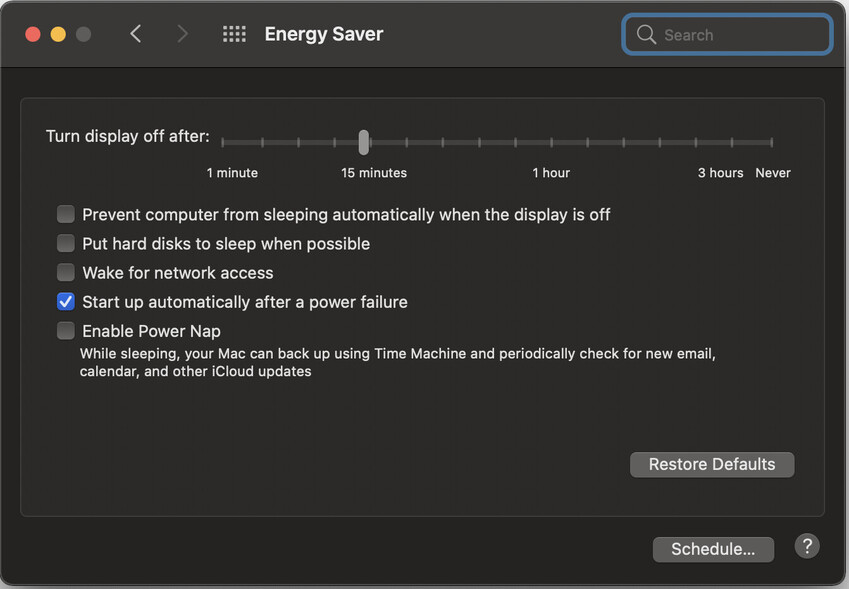
I believe Prevent computer from sleeping... must be checked to prevent the computer from sleeping.
Maybe Big Sur is more aggressive about going to sleep than Catalina was.
No issue for me with this, as my Energy settings are as follows
My settings on a 2020 iMac 27", MacOS 11.01
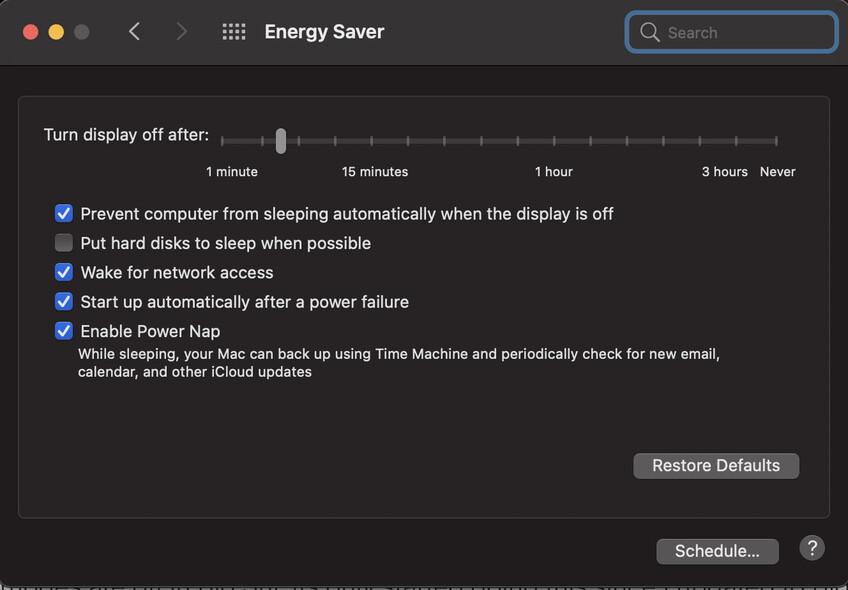
I have Plex as a start up app via Login items, scheduled for once a week restart.
This topic was automatically closed 90 days after the last reply. New replies are no longer allowed.
