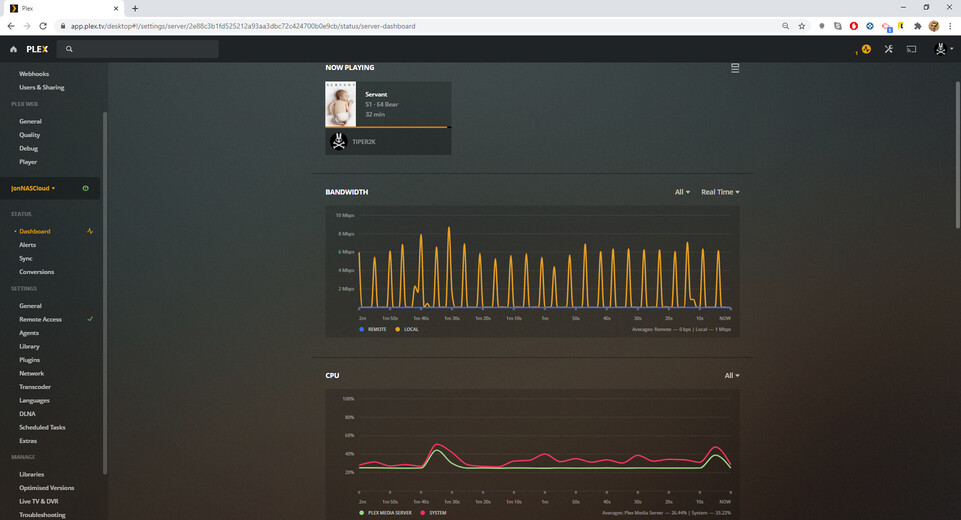
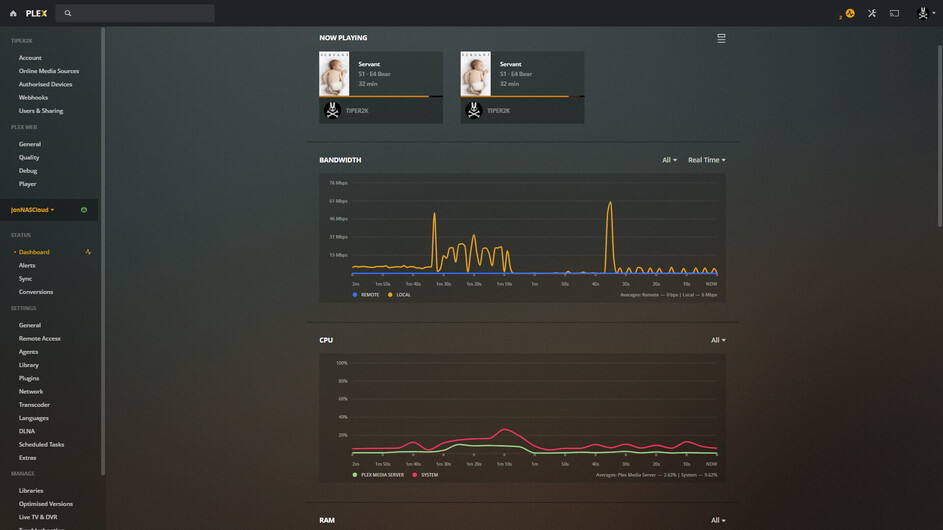
@TIPER2K
The hardware transcoding is working.
You have subtitles being used and those subtitles are being burned into the video.
Subtitles cannot be processed in hardware (Intel limitation). The CPU must burn them. The J4xxx CPU doesn’t have enough power at this bitrate to do it in real-time.
- The playback settings (based on Player and Video XML)
Feb 14, 2021 21:28:22.478 [0x7f527dfc5700] DEBUG - [Transcode] [FFMPEG] - Decode to surface 0x13.
Feb 14, 2021 21:28:22.479 [0x7f527dfc5700] DEBUG - [Transcode] Codecs: 10-bit HEVC test succeeded
Feb 14, 2021 21:28:22.480 [0x7f527dfc5700] DEBUG - [Transcode] Scaled up video bitrate to 7245Kbps based on 4.500000x fudge factor.
Feb 14, 2021 21:28:22.480 [0x7f527dfc5700] DEBUG - [Transcode] MDE: Selected protocol hls; container: mpegts
Feb 14, 2021 21:28:22.480 [0x7f527dfc5700] DEBUG - [Transcode] MDE: analyzing media item 30048
Feb 14, 2021 21:28:22.480 [0x7f527dfc5700] DEBUG - [Transcode] MDE: E4 - Bear: Direct Play is disabled
Feb 14, 2021 21:28:22.480 [0x7f527dfc5700] DEBUG - [Transcode] MDE: E4 - Bear: media must be transcoded in order to use the hls protocol
Feb 14, 2021 21:28:22.480 [0x7f527dfc5700] DEBUG - [Transcode] MDE: E4 - Bear: selected subtitle cannot be converted to a compatible format, burning into video stream
Feb 14, 2021 21:28:22.480 [0x7f527dfc5700] DEBUG - [Transcode] MDE: E4 - Bear: Direct Streaming is disabled, so video stream will be transcoded
Feb 14, 2021 21:28:22.480 [0x7f527dfc5700] DEBUG - [Transcode] MDE: E4 - Bear: no remuxable profile found, so video stream will be transcoded
Feb 14, 2021 21:28:22.480 [0x7f527dfc5700] DEBUG - [Transcode] MDE: Cannot direct stream video stream due to profile or setting limitations
Feb 14, 2021 21:28:22.480 [0x7f527dfc5700] DEBUG - [Transcode] Codecs: testing hevc (decoder) with hwdevice vaapi
Feb 14, 2021 21:28:22.480 [0x7f527dfc5700] DEBUG - [Transcode] Codecs: hardware transcoding: testing API vaapi
Feb 14, 2021 21:28:22.481 [0x7f527dfc5700] DEBUG - [Transcode] [FFMPEG] - Format 0x41524742 -> bgra.
Feb 14, 2021 21:28:22.481 [0x7f527dfc5700] DEBUG - [Transcode] [FFMPEG] - Format 0x42475241 -> argb.
- Verification the hardware is engaging to process the VIDEO (not subtites)
Feb 14, 2021 21:28:24.681 [0x7f52bc518700] DEBUG - [Transcode] Codecs: hardware transcoding: testing API vaapi
Feb 14, 2021 21:28:24.682 [0x7f52bc518700] DEBUG - [Transcode] [FFMPEG] - Format 0x41524742 -> bgra.
Feb 14, 2021 21:28:24.682 [0x7f52bc518700] DEBUG - [Transcode] [FFMPEG] - Format 0x42475241 -> argb.
Feb 14, 2021 21:28:24.682 [0x7f52bc518700] DEBUG - [Transcode] [FFMPEG] - Format 0x41424752 -> rgba.
Feb 14, 2021 21:28:24.682 [0x7f52bc518700] DEBUG - [Transcode] [FFMPEG] - Format 0x52474241 -> abgr.
Feb 14, 2021 21:28:24.682 [0x7f52bc518700] DEBUG - [Transcode] [FFMPEG] - Format 0x58524742 -> bgr0.
Feb 14, 2021 21:28:24.682 [0x7f52bc518700] DEBUG - [Transcode] [FFMPEG] - Format 0x42475258 -> 0rgb.
Feb 14, 2021 21:28:24.682 [0x7f52bc518700] DEBUG - [Transcode] [FFMPEG] - Format 0x58424752 -> rgb0.
Feb 14, 2021 21:28:24.682 [0x7f52bc518700] DEBUG - [Transcode] [FFMPEG] - Format 0x52474258 -> 0bgr.
Feb 14, 2021 21:28:24.682 [0x7f52bc518700] DEBUG - [Transcode] [FFMPEG] - Format 0x30335241 -> unknown.
Feb 14, 2021 21:28:24.682 [0x7f52bc518700] DEBUG - [Transcode] [FFMPEG] - Format 0x30334241 -> unknown.
Feb 14, 2021 21:28:24.682 [0x7f52bc518700] DEBUG - [Transcode] [FFMPEG] - Format 0x30335258 -> unknown.
Feb 14, 2021 21:28:24.682 [0x7f52bc518700] DEBUG - [Transcode] [FFMPEG] - Format 0x30334258 -> unknown.
Feb 14, 2021 21:28:24.682 [0x7f52bc518700] DEBUG - [Transcode] [FFMPEG] - Format 0x36314752 -> unknown.
Feb 14, 2021 21:28:24.682 [0x7f52bc518700] DEBUG - [Transcode] [FFMPEG] - Format 0x50424752 -> unknown.
Feb 14, 2021 21:28:24.682 [0x7f52bc518700] DEBUG - [Transcode] [FFMPEG] - Format 0x50524742 -> unknown.
Feb 14, 2021 21:28:24.682 [0x7f52bc518700] DEBUG - [Transcode] [FFMPEG] - Format 0x56555941 -> unknown.
Feb 14, 2021 21:28:24.682 [0x7f52bc518700] DEBUG - [Transcode] [FFMPEG] - Format 0x30303859 -> gray.
Feb 14, 2021 21:28:24.682 [0x7f52bc518700] DEBUG - [Transcode] [FFMPEG] - Format 0x3231564e -> nv12.
Feb 14, 2021 21:28:24.682 [0x7f52bc518700] DEBUG - [Transcode] [FFMPEG] - Format 0x3132564e -> unknown.
Feb 14, 2021 21:28:24.682 [0x7f52bc518700] DEBUG - [Transcode] [FFMPEG] - Format 0x32595559 -> yuyv422.
Feb 14, 2021 21:28:24.682 [0x7f52bc518700] DEBUG - [Transcode] [FFMPEG] - Format 0x59565955 -> uyvy422.
Feb 14, 2021 21:28:24.682 [0x7f52bc518700] DEBUG - [Transcode] [FFMPEG] - Format 0x32315659 -> yuv420p.
Feb 14, 2021 21:28:24.682 [0x7f52bc518700] DEBUG - [Transcode] [FFMPEG] - Format 0x30323449 -> yuv420p.
Feb 14, 2021 21:28:24.682 [0x7f52bc518700] DEBUG - [Transcode] [FFMPEG] - Format 0x50313134 -> yuv411p.
Feb 14, 2021 21:28:24.682 [0x7f52bc518700] DEBUG - [Transcode] [FFMPEG] - Format 0x48323234 -> yuv422p.
Feb 14, 2021 21:28:24.682 [0x7f52bc518700] DEBUG - [Transcode] [FFMPEG] - Format 0x56323234 -> yuv440p.
Feb 14, 2021 21:28:24.682 [0x7f52bc518700] DEBUG - [Transcode] [FFMPEG] - Format 0x50343434 -> yuv444p.
Feb 14, 2021 21:28:24.682 [0x7f52bc518700] DEBUG - [Transcode] [FFMPEG] - Format 0x33434d49 -> unknown.
Feb 14, 2021 21:28:24.682 [0x7f52bc518700] DEBUG - [Transcode] [FFMPEG] - Format 0x30313050 -> p010le.
Feb 14, 2021 21:28:24.682 [0x7f52bc518700] DEBUG - [Transcode] [FFMPEG] - Created surface 0.
Feb 14, 2021 21:28:24.682 [0x7f52bc518700] DEBUG - [Transcode] [FFMPEG] - Direct mapping possible.
Feb 14, 2021 21:28:24.682 [0x7f52bc518700] DEBUG - [Transcode] TPU: hardware transcoding: final decoder: vaapi, final encoder: vaapi
Feb 14, 2021 21:28:24.682 [0x7f52bc518700] DEBUG - [Transcode] Job running: FFMPEG_EXTERNAL_LIBS='/share/CACHEDEV1_DATA/.qpkg/PlexMediaServer/Library/Plex\ Media\ Server/Codecs/367b3d4-3673-linux-x86_64/' LIBVA_DRIVERS_PATH='/share/CACHEDEV1_DATA/.qpkg/PlexMediaServer/lib/dri' XDG_CACHE_HOME='/share/CACHEDEV1_DATA/.qpkg/PlexMediaServer/Library/Plex Media Server/Cache' XDG_DATA_HOME='/share/CACHEDEV1_DATA/.qpkg/PlexMediaServer/Resources' X_PLEX_TOKEN=xxxxxxxxxxxxxxxxxxxx1' '/share/CACHEDEV1_DATA/.qpkg/PlexMediaServer/Plex Transcoder' '-codec:0' 'hevc' '-hwaccel:0' 'vaapi' '-hwaccel_fallback_threshold:0' '10' '-hwaccel_device:0' 'vaapi' '-analyzeduration' '20000000' '-probesize' '20000000' '-i' '/share/CACHEDEV1_DATA/Multimedia/TV Shows/Servant/Servant (2019) - S01E04 - Bear (1080p WEB-DL HEVC 10Bit).mkv' '-map_inlineass' '0:2' '-filter_complex' '[0:0]scale=w=1920:h=960[0];[0]format=pix_fmts=nv12[1];[1]inlineass=font_scale=1.000000:font_path=/share/CACHEDEV1_DATA/.qpkg/PlexMediaServer/Resources/Fonts/DejaVuSans-Regular.ttf:fontconfig_file=/share/CACHEDEV1_DATA/.qpkg/PlexMediaServer/Resources/fonts.conf:language=en[2];[2]hwupload[3]' '-map' '[3]' '-codec:0' 'h264_vaapi' '-b:0' '5433k' '-maxrate:0' '7245k' '-bufsize:0' '14490k' '-r:0' '23.975999999999999' '-force_key_frames:0' 'expr:gte(t,n_forced*1)' '-map' '0:1' '-metadata:s:1' 'language=eng' '-codec:1' 'copy' '-copypriorss:1' '0' '-segment_format' 'mpegts' '-f' 'ssegment' '-individual_header_trailer' '0' '-segment_time' '1' '-segment_start_number' '0' '-segment_copyts' '1' '-segment_time_delta' '0.0625' '-segment_list' 'http://127.0.0.1:32400/video/:/transcode/session/d9jp4yn3zy2hjowqnrk5zoiw/ede3948f-7950-462b-b199-8976f7804b97/seglist?X-Plex-Http-Pipeline=infinite' '-segment_list_type' 'csv' '-segment_list_size' '5' '-segment_list_separate_stream_times' '1' '-segment_list_unfinished' '1' '-max_delay' '5000000' '-avoid_negative_ts' 'disabled' '-map_metadata' '-1' '-map_chapters' '-1' 'media-%05d.ts' '-map' '0:2' '-f' 'null' '-codec' 'ass' 'nullfile' '-start_at_zero' '-copyts' '-vsync' 'cfr' '-init_hw_device' 'vaapi=vaapi:' '-filter_hw_device' 'vaapi' '-y' '-nostats' '-loglevel' 'quiet' '-loglevel_plex' 'error' '-progressurl' 'http://127.0.0.1:32400/video/:/transcode/session/d9jp4yn3zy2hjowqnrk5zoiw/ede3948f-7950-462b-b199-8976f7804b97/progress'
Feb 14, 2021 21:28:24.682 [0x7f52bc518700] DEBUG - [Transcode] Jobs: Starting child process with pid 17967
Check the video itself.
- Image formats (PGS, VOBSUB, and DVDRIP MUST be burned in no matter what.
- Text based subtitles (SRT, ASS, SSA) can be overlayed - UNLESS - the player settings are to Burn subtitles (check this as well )