QNAP TS-453D HW transcoding doesn't work

Server Version: 1.24.0.4930 (QPKG)

(Some backstory that might be relevant)
I just activated the free month of Plex pass as I want to switch my home to Plex.
This far, Plex is giving me a really hard time:
My tuner (FritzBox 6591) didn’t work in either 1.24 (from plex.tv) or 1.23 (from the QNAP store). Every time I scanned for channels, all but two disappeared when the scan finished. During the scan, about 450 channels were available.
I solved this by manually installing 1.20 (QPKG from plex.tv), setting up DVR there and then upgrading directly to 1.24 (QPKG from plex.tv). I didn’t stop or remove the old PMS before installing the new version.

Now to my problem:
According to the dashboard, hardware transcoding is active but I can’t stream any of my 4K material (4K, x265, HDR, MKV).

I’d love to attach some logs but I can’t really tell which part of the Debug log is relevant for transcoding. Without debugging enabled, the log is empty.

Thank you for your help :slight_smile:

DEBUG logs ZIP (not VERBOSE) which capture the error happening are needed

Attach the ZIP, it’s much faster for us to jump to it than teach – sorry

Hi ChuckPa, thanks for your reply.
I absolutely understand, I just didn’t want to attach useless logs as I couldn’t find any mention of MDE or TPU.

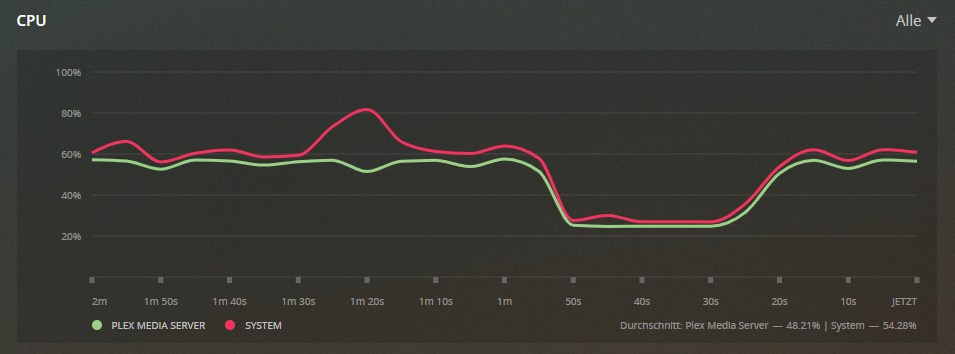
I’ve attached two images of the dashboard when trying to play the movie 1917.

Here’s the media info for the exact file I was trying to play:

Codec HEVC
Bitrate 19962 kbps
Bit Depth 10
Chroma Subsampling 4:2:0
Coded Height 1608
Coded Width 3840
Color Primaries bt2020
Color Range tv
Color Space bt2020nc
Color Trc smpte2084
Frame Rate 23.97599983215332 fps
Height 1604
Level 5.1
Profil main 10
Ref Frames 1
Width 3840
Display Title 4K (HEVC Main 10 HDR)
Extended Display Title 4K (HEVC Main 10 HDR)


Plex Media Server Logs_2021-08-15_08-34-56.zip (5.3 MB)

@leoklaus have you applied this fix? The article is for the DS920+ but its the same hardware as the 453D (I have the same NAS).

I’ve seen this but Plex staff mentioned this was fixed in the forums, so I didn’t try it.
I’ve now tried this but it didn’t help.

It won’t work as this is obsolete since PMS version 1.21.

That’s what I heard. This is so weird…

@leoklaus Yes they said it was fixed, but still didnt work for me. When I applied the fix, it was fine for me.

Did you reboot the server, and did you definitely apply the correct spacing etc.

i.e. at the end of preferences, before the />, add VaapiDriver=“i965” and then put a spaced befoe the /> at the end.

No luck. VaapiDriver=“i965” was already in the preferences though, second to last item.
I’m currently reinstalling the whole server.
Honestly the main reason I wanted to switch to Plex was I assumed it was less janky than the open source software I have been using up until now.
It’s really anything but a nice or seamless experience this far.

Edit: I’ve tried a complete fresh install with both 1.23 from the QNAP store and 1.24 from plex.tv.
Both didn’t work, even after adding VaapiDriver=“i965” to the preferences.

Please attach the XML for the file being played.
(down through </media> xml marker.)

<MediaContainer size="1" allowSync="1" identifier="com.plexapp.plugins.library" librarySectionID="1" librarySectionTitle="Filme" librarySectionUUID="7bd743ab-1b7d-48d5-92f2-f1ead43f2b6a" mediaTagPrefix="/system/bundle/media/flags/" mediaTagVersion="1628741429">
<Video ratingKey="2" key="/library/metadata/2" guid="plex://movie/5d77705edd931c001e38bde2" studio="Universal Pictures" type="movie" title="1917" librarySectionTitle="Filme" librarySectionID="1" librarySectionKey="/library/sections/1" contentRating="de/12" summary="Auf dem Höhepunkt des Ersten Weltkriegs wird Schofield und Blake, zwei jungen britischen Soldaten, eine scheinbar unmögliche Mission gegeben: In einem Wettlauf gegen die Zeit sollen sie das Feindesgebiet durchqueren und eine höchst dringliche Nachricht überbringen, die hunderte Männer retten kann – darunter Blakes eigenen Bruder." rating="8.9" audienceRating="8.8" viewOffset="2124000" viewCount="1" lastViewedAt="1629034073" year="2019" tagline="Zeit ist der Feind" thumb="/library/metadata/2/thumb/1628986882" art="/library/metadata/2/art/1628986882" duration="7139520" originallyAvailableAt="2019-12-04" addedAt="1584267216" updatedAt="1628986882" audienceRatingImage="rottentomatoes://image.rating.upright" chapterSource="media" primaryExtraKey="/library/metadata/7" ratingImage="rottentomatoes://image.rating.ripe">
<Media id="1" duration="7139520" bitrate="26182" width="3840" height="1604" aspectRatio="2.35" audioChannels="8" audioCodec="truehd" videoCodec="hevc" videoResolution="4k" container="mkv" videoFrameRate="24p" videoProfile="main 10">
<Part accessible="1" exists="1" id="1" key="/library/parts/1/1584267216/file.mkv" duration="7139520" file="/share/CACHEDEV2_DATA/Wehrfritz!NAS/Medien/Filme/1917 (2019).mkv" size="23413991115" container="mkv" deepAnalysisVersion="5" hasThumbnail="1" requiredBandwidths="41630,39395,32807,28240,27284,26477,23324,22376" videoProfile="main 10">
<Stream id="1" streamType="1" default="1" codec="hevc" index="0" bitrate="19962" bitDepth="10" chromaSubsampling="4:2:0" codedHeight="1608" codedWidth="3840" colorPrimaries="bt2020" colorRange="tv" colorSpace="bt2020nc" colorTrc="smpte2084" frameRate="23.976" height="1604" level="153" profile="main 10" refFrames="1" requiredBandwidths="39188,36961,30373,25412,24536,23731,21509,21509" width="3840" displayTitle="4K (HEVC Main 10 HDR)" extendedDisplayTitle="4K (HEVC Main 10 HDR)"> </Stream>
<Stream id="2" streamType="2" selected="1" default="1" codec="truehd" index="1" channels="8" bitrate="3810" language="English" languageTag="en" languageCode="eng" audioChannelLayout="7.1" bitDepth="24" requiredBandwidths="321,302,285,260,234,209,57,1" samplingRate="48000" title="Dolby TrueHD MLP FBA (3/4.1) + Atmos Objects [UHD Bluray]" displayTitle="English (TRUEHD 7.1)" extendedDisplayTitle="Dolby TrueHD MLP FBA (3/4.1) + Atmos Objects [UHD Bluray] (English 7.1)"> </Stream>
<Stream id="3" streamType="2" codec="dca" index="2" channels="7" bitrate="1509" language="English" languageTag="en" languageCode="eng" audioChannelLayout="6.1" bitDepth="24" profile="es" requiredBandwidths="2147483647,2147483647,2147483647,2147483647,2147483647,2147483647,199726,199726" samplingRate="48000" title="DTS-ES Discrete (3/3.1) + DTS Coherent Acoustics Core (3/2.1) [EPS]" displayTitle="English (DTS-ES 6.1)" extendedDisplayTitle="DTS-ES Discrete (3/3.1) + DTS Coherent Acoustics Core (3/2.1) [EPS] (English 6.1)"> </Stream>
<Stream id="4" streamType="2" codec="ac3" index="3" channels="2" bitrate="224" language="English" languageTag="en" languageCode="eng" audioChannelLayout="stereo" requiredBandwidths="224,224,224,224,224,224,224,224" samplingRate="48000" title="Dolby Surround AC-3 (Lt/Rt) 2.0 Stereo / 4.0 Surround Matrix [EPS]" displayTitle="English (AC3 Stereo)" extendedDisplayTitle="Dolby Surround AC-3 (Lt/Rt) 2.0 Stereo / 4.0 Surround Matrix [EPS] (English)"> </Stream>
<Stream id="7" streamType="2" codec="ac3" index="6" channels="6" bitrate="640" language="English" languageTag="en" languageCode="eng" audioChannelLayout="5.1(side)" requiredBandwidths="640,640,640,640,640,640,640,640" samplingRate="48000" displayTitle="English (AC3 5.1)" extendedDisplayTitle="English (AC3 5.1)"> </Stream>
<Stream id="5" streamType="3" codec="vobsub" index="4" bitrate="12" language="English" languageTag="en" languageCode="eng" headerCompression="1" requiredBandwidths="26,26,26,26,26,26,26,26" title="Descriptive SDH (VobSub) Centered [EPS]" displayTitle="English (VOBSUB)" extendedDisplayTitle="Descriptive SDH (VobSub) Centered [EPS] (English)"> </Stream>
<Stream id="6" streamType="3" codec="pgs" index="5" bitrate="25" language="English" languageTag="en" languageCode="eng" headerCompression="1" requiredBandwidths="53,53,53,53,53,53,53,53" title="Descriptive SDH [Original PGS UHD Bluray]" displayTitle="English (PGS)" extendedDisplayTitle="Descriptive SDH [Original PGS UHD Bluray] (English)"> </Stream>
</Part>
</Media>

Here is the XML of the file I’m trying to play.

You have VOBSUB and PGS subtitles. Both are image-based subtitles which must be burned into the image. Hardware transcoding does not work when burning subtitles because the VAAPI doesn’t support it.

Can you play something without subtitles to confirm it is OK?

Hello again,
I’ve now tried using the 120mbit HEVC version of the Jellyfish bitrate test and that worked as expected, so the subtitles do seem to be the issue.
I never had any subtitles enabled when trying to play the other movies, why are they still affected?
What is the best way to navigate around this? Would it be enough to replace the subtitles for those movies with SRT subtitles?

Thank you for your help this far, at least I know why it doesn’t work now.

I’ve tried a few other movies now, still without success.
Even when playing to my iPhone (which definitely supports PGS), I can’t get plex to transcode any 4K source material at reasonable speeds. Lower bitrate movies will play after a considerable loading time at ~60% CPU usage.
Here’s the media info to “Interstellar”, which doesn’t have any subtitles.

<Media id="533" duration="10144216" bitrate="28507" width="3840" height="2160" aspectRatio="1.78" audioChannels="6" audioCodec="dca-ma" videoCodec="hevc" videoResolution="4k" container="mkv" videoFrameRate="24p" audioProfile="ma" videoProfile="main 10">
<Part accessible="1" exists="1" id="533" key="/library/parts/533/1587141751/file.mkv" duration="10144216" file="/share/CACHEDEV2_DATA/Wehrfritz!NAS/Medien/Filme/Interstellar (2014).mkv" size="36155838763" audioProfile="ma" container="mkv" deepAnalysisVersion="5" hasThumbnail="1" requiredBandwidths="2147483647,2147483647,2147483647,2147483647,2147483647,2147483647,2147483647,2147483647" videoProfile="main 10">
<Stream id="1404" streamType="1" default="1" codec="hevc" index="2" bitrate="21110" bitDepth="10" chromaSubsampling="4:2:0" codedHeight="2160" codedWidth="3840" colorPrimaries="bt2020" colorRange="tv" colorSpace="bt2020nc" colorTrc="smpte2084" frameRate="23.976" height="2160" level="150" profile="main 10" refFrames="1" requiredBandwidths="55725,52071,43642,40549,37576,34787,26729,23706" width="3840" displayTitle="4K (HEVC Main 10 HDR)" extendedDisplayTitle="4K (HEVC Main 10 HDR)"> </Stream>
<Stream id="1402" streamType="2" selected="1" default="1" codec="dca" index="0" channels="6" bitrate="3693" language="English" languageTag="en" languageCode="eng" audioChannelLayout="5.1(side)" bitDepth="24" profile="ma" requiredBandwidths="2147483647,2147483647,2147483647,2147483647,2147483647,2147483647,2147483647,619903" samplingRate="48000" title="Surround 5.1" displayTitle="English (DTS-HD MA 5.1)" extendedDisplayTitle="Surround 5.1 (English DTS-HD MA)"> </Stream>
<Stream id="1403" streamType="2" codec="dca" index="1" channels="6" bitrate="3703" language="German" languageTag="de" languageCode="deu" audioChannelLayout="5.1(side)" bitDepth="24" profile="ma" requiredBandwidths="2147483647,2147483647,2147483647,2147483647,2147483647,2147483647,2147483647,623038" samplingRate="48000" title="Surround 5.1" displayTitle="German (DTS-HD MA 5.1)" extendedDisplayTitle="Surround 5.1 (German DTS-HD MA)"> </Stream>
</Part>
</Media>

Thank you again for your time and support.

Edit: Even 4K 120mbit/s works flawlessly with the Jellyfish test.

Subtitles are the nemesis – period.

The only Plex client which I know can handle PGS directPlay is the Shield.
Neither my iPad or iPhone app can.

Switch to SRT subtitles and you will be fine.

I’ve now completely removed all subtitles from a movie using mkvtoolnix to test with. It still won’t use hardware acceleration.
Here is the mediainfo for the file I’m trying to play:

<Media id="3288" duration="9470464" bitrate="32710" width="3840" height="1600" aspectRatio="2.35" audioChannels="8" audioCodec="truehd" videoCodec="hevc" videoResolution="4k" container="mkv" videoFrameRate="24p" videoProfile="main 10">
<Part accessible="1" exists="1" id="3288" key="/library/parts/3288/1629398475/file.mkv" duration="9470464" file="/share/CACHEDEV2_DATA/Wehrfritz!NAS/Medien/Test/2012 (2010) (No Subs).mkv" size="38722703337" container="mkv" hasThumbnail="1" videoProfile="main 10">
<Stream id="10729" streamType="1" default="1" codec="hevc" index="0" bitrate="29894" bitDepth="10" chromaSubsampling="4:2:0" codedHeight="1600" codedWidth="3840" colorPrimaries="bt2020" colorRange="tv" colorSpace="bt2020nc" colorTrc="smpte2084" frameRate="23.976" height="1600" level="153" profile="main 10" refFrames="1" width="3840" displayTitle="4K (HEVC Main 10 HDR)" extendedDisplayTitle="4K (HEVC Main 10 HDR)"> </Stream>
<Stream id="10730" streamType="2" default="1" codec="ac3" index="1" channels="6" bitrate="640" language="German" languageTag="de" languageCode="deu" audioChannelLayout="5.1(side)" samplingRate="48000" title="Deutsch Dolby Digital 5.1 (UHD Blu-ray)" displayTitle="German (AC3 5.1)" extendedDisplayTitle="Deutsch Dolby Digital 5.1 (UHD Blu-ray) (AC3)"> </Stream>
<Stream id="10731" streamType="2" codec="dca" index="2" channels="6" bitrate="1536" language="German" languageTag="de" languageCode="deu" audioChannelLayout="5.1(side)" bitDepth="16" profile="ma" samplingRate="48000" title="Deutsch DTS-HD MA 5.1 (Blu-ray)" displayTitle="German (DTS-HD MA 5.1)" extendedDisplayTitle="Deutsch DTS-HD MA 5.1 (Blu-ray)"> </Stream>
<Stream id="10732" streamType="2" selected="1" codec="truehd" index="3" channels="8" language="English" languageTag="en" languageCode="eng" audioChannelLayout="7.1" bitDepth="24" samplingRate="48000" title="English TrueHD Atmos 7.1 (UHD Blu-ray)" displayTitle="English (TRUEHD 7.1)" extendedDisplayTitle="English TrueHD Atmos 7.1 (UHD Blu-ray)"> </Stream>
<Stream id="10733" streamType="2" codec="ac3" index="4" channels="6" bitrate="640" language="English" languageTag="en" languageCode="eng" audioChannelLayout="5.1(side)" samplingRate="48000" title="English Dolby Digital 5.1 (UHD Blu-ray)" displayTitle="English (AC3 5.1)" extendedDisplayTitle="English Dolby Digital 5.1 (UHD Blu-ray) (AC3)"> </Stream>
</Part>
</Media>

This is what the dashboard displays while trying to play the file.
no subs1

I have since solved this with the help of the great Plex subreddit.

The slow transcoding was, as I suspected, not caused by subtitles but by tone-mapping for HDR content. This is why the 10bit HEVC jellyfish test ran without issues (it’s not HDR) and my 4K movies didn’t.

As I found out, the official Plex QPKG from Plex.tv does NOT do tone-mapping in hardware, disabling tone-mapping allowed me to transcode most of my movies (including those with PGS and VOBSUB subs, as long as they weren’t enabled) perfectly fine. What didn’t work (for whatever reason) was TrueHD audio. I couldn’t play any movie with the TrueHD-Track selected. At all.
All I got was a spinning wheel and about 20% CPU usage on my server.

The fix for both of these issues was setting up Plex in Docker. I used the linuxserver/plex image but I guess the official one is fine, too.
When setting up the container, include /dev/dri for hardware acceleration.
I’ve used the docker command from this post on reddit and changed it according to my configuration.

I’m now able to transcode all of my movies just like I expected :slight_smile:

This topic was automatically closed 90 days after the last reply. New replies are no longer allowed.