Plex playback error conversion failed a required codec could not be found

Server Version#:1.18.0.1944 to 1.19.4/2935
Player Version#: Using web interface on the same computer, not currently using a media player. to fix erros.

I have been steadily using Plex Media Server at home for years. Since 2015 in fact. I have noticed codec problems for years now. Your Devs have not corrected them. I notice a string of incidences both at home and in your forums where Plex fails to download codecs. I have been through your forums when I have tried anything beyond version 1.18.0. NONE of them or the soutions you people present seem to work right!

I have reinstalled Plex in the later versions… No affect! I have had Plex analyze media files and still not download the the codecs. I have changed the transcoding folder to another drive to avoid problems with permissions. Still no effect. My final solution? Uninstall the badly written newer Plex servers and install the old 1.15.1.791 and Voilà! Its alive! It’s aliiive!

By the way, it’s easy to figure out what the software is doing by how it behaves. Needless to say, I have been through the forums looking at similar issues and I see a lot of mkv files having this kind of error especially from 1.18.1 and later. It doesn’t really pay to upgrade when the software doesn’t work.

I have read all the Plex documentation like any good IT degree holding professional should do. So the question is, when are your Devs going to correct these errors in the programing. You do know that this kind of thing has caused other long forgotten programs and OSs to disappear from the scene, right? Anyone remember cyanogenmod? It was causing mounting errors on phones. It was replaced by LineageOS. Anyone remember Microsoft Works? Nuf said.

The question is when will your Devs fix these errors? Or will Plex go the way of the dinosaur? You have to know that the competition must be rubbing their hands together watching this happen.

By the way, I’m not looking for you to fix the issue on my end. I’m looking for you to fix the issue on your end. I am quite capable of fixing it myself. Do everyone a favor an remove the bugs from your coding so Plex works right. You do know that these kinds of bugs cause people to stop supporting a product? You may loose customers over this like World of Warcraft has lost subscribers by messing up their interface.
Using version 1.19.4.2935 and not having any codec problems, so without logs the problem is you and not Plex.

I can relate to ranting, I can relate to being hesitant to post logs. Where it all falls down is when you do both and post IT degree holding professional.

Here’s your logs. Went into the forums looked at the problems, applied the fixes and they didn’t work. That’s why I’m irritable about it. I had problems with pms 1.19.4 all day then uninstalled it. Plex Media Server Logs_2020-07-17_13-39-55.zip (4.6 MB) Then installed 1.15.1. Look at my problem as well as the ones in the forums and you will likely see the same problem. Your fixes didn’t work from the other threads. it got late last night and I went to bed. I figured on posting the logs today.

Two recurring issues, slow database and dns lookup failures.

Navigate to the database location cd "%LOCALAPPDATA%\Plex Media Server\Plug-in Support\Databases" and check the size as well as if backups are getting created every 3 days.

The database could have accumulated too many rows of statistics or just be cluttered, do a manual Optimize Database, Clean Bundles, Empty trash and see if the size decreases.

On the network front open a cmd window and nslookup plex.tv and pubsub.plex.tv, both should return ip addresses.

Check the event viewer for event id 4227.

Sorry It’s been busy these last few days, didn’t have time to get back to it.

Also sorry about my rant, it was a very bad day, it was that on top of everything else.

Upgraded back to 1.19.4.2935

I did as you asked optimized, bundles and trash

How big is too big for Plex’s database? Here are the database files and sizes.

com.plexapp.dlna.bd = 440 kb
com.plexapp.dlna.bd.shm = 32 kb
com.plexapp.dlna.bd-wal = 689 kb
com.plexapp.plugins.library.blobs.db = 12,211 kb
com.plexapp.plugins.library.blobs.db-shm = 32 kb
com.plexapp.plugins.library.blobs.db-wal = 0 kb
com.plexapp.plugins.library.db = 167,382 kb
com.plexapp.plugins.library.db-shm = 1,312 kb
com.plexapp.plugins.library.db-wal = 171,318 kb

Also got these responses from command prompt

Microsoft Windows [Version 6.1.7601]
Copyright (c) 2009 Microsoft Corporation. All rights reserved.

C:\Windows\system32>nslookup plex.tv
Server: UnKnown
Address: 192.168.0.1

Non-authoritative answer:
Name: plex.tv
Addresses: 99.80.242.242
99.80.231.223
99.81.213.165

C:\Windows\system32>nslookup pubsub.plex.tv
Server: UnKnown
Address: 192.168.0.1

Non-authoritative answer:
Name: pubsub.plex.bz
Address: 184.105.148.82
Aliases: pubsub.plex.tv

C:\Windows\system32>

Also did not find event id 4227, I did an exhaustive search and never turned up that ID in the event viewer.

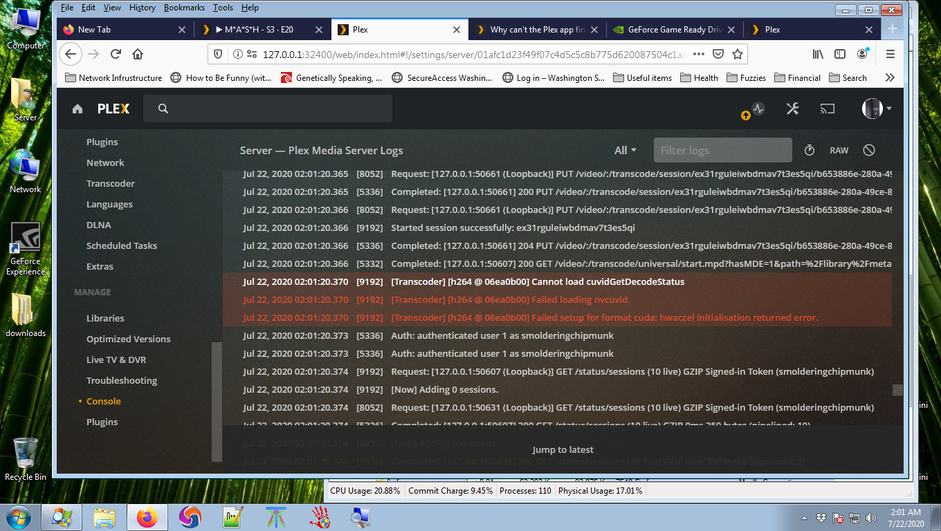
so I decided to attempt to play a file and watch the console for errors at the same time.

Watched the Log in the console while attempting to play the media file in the web interface.

I found this:

Updated NVIDIA drivers to Version 451.67 (I reinstalled the driver twice)
Driver Filename = 451.67-desktop-win8-win7-6-64bit-international-whql.exe
Direct 3d API version: 11
Direct 3d feature Level: 11_1
DIrectX runtime version 11

Continued to receive the same error even after updating NVIDIA drivers. Old driver version was version 450

Error returned in console doesn’t make any sense to me since I have the latest NVIDIA drivers for my GPU.

Played the same video file in VLC and Media player Classic via K-Lite Codec Pack. I wonder can I rename K-Lite h264 codec and place in the codec folder for Plex for a play test?

Thanks for your patients. Have a great day.

It gets even stranger than that! I just got the digital content after buying a dvd for Birds of Prey and it is also in h264 and played just fine. Not understanding Plex’s issue with other h264 files. The video files in question were nearly identical except Birds of Prey is in mp4 format.

Also found this on the NVIDIA website,

" NVIDIA Video Decoder (NVCUVID) is deprecated. Instead, use the NVIDIA Video Codec SDK."

https://docs.nvidia.com/cuda/video-decoder/index.html

Here are plex logs Plex Media Server Logs_2020-07-22_09-33-05.zip (4.4 MB)

Tried disabling English (VOBSUB) at the episode level for the video file and the episode played. So vob subs do not work. For some reason Plex transoder is unable to play the MKV files with VOBSUBs enabled, so basically there’s no vobsub support.

I got it working !!!

Please ask your devs to address the VOBSUB issue.

This topic was automatically closed 90 days after the last reply. New replies are no longer allowed.
