On my iPad Plex, I am presented with ‘Live TV’, ‘On Demand’ or ‘Discover’ on my home screen. I don’t want to have either of these, as I don’t use any of them. How can I have just my NAS libraries, as before? TIA.
If you don’t use any of the online media sources to start with… simply disable those in your account preferences.
https://app.plex.tv/desktop/#!/settings/online-media-sources
Thank you for your help. I have found and changed my settings on the Plex webpage, but the app still shows ‘Live TV’ etc. Do you know how I can change it in the app? I logged out and back in again on the webpage and the app.
Usually, signing out and back into the iPad app should do the trick. Does it persist after you force-quit the app?
Unfortunately, nothing has changed, even after force restarting the app. I was looking around my settings for something to be able to change my online source settings, like there is on the website version of Plex.
Can youvshafe a screenshot what exact online sources are left on your navigation / screens?
“Disabled for managed users” does not mean disabled for you, as the Plex Home admin.
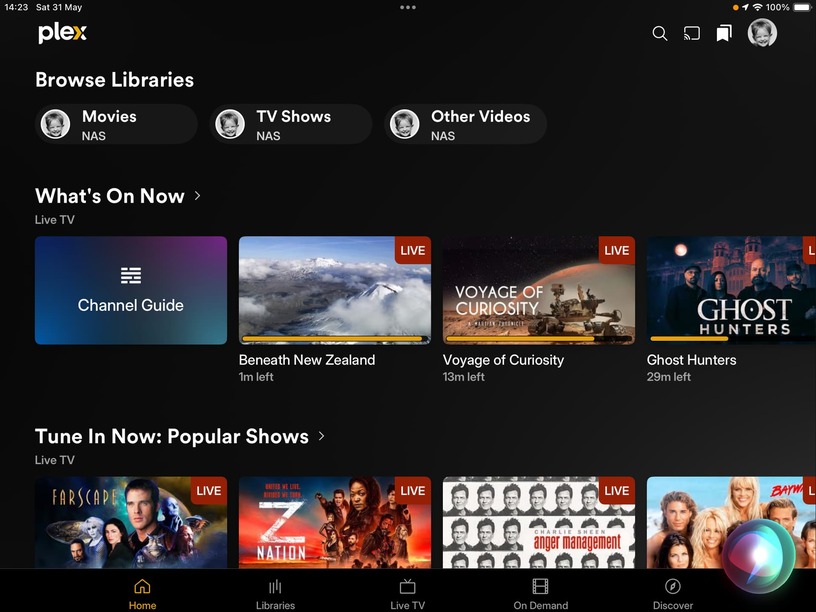
Would you mind sharing the online media sources preferences of this account?


As per Otto‘s point.
Disabled for Managed Accounts is not Disabled for you. While the sources aren’t disabled, their content will show up on the Home Screen and other sections.
I have set them all to Disabled and trued to restart the app, but there is some sort of temporary issue so I will give it some time, and post a comment when I can access Plex on my iPad again (prob tomorrow now)
That did the trick, and gave me one more string to my Plex bow if I ever need it again. Many thanks to all.
