Hey guys I am having issues getting my Plex server to setup. Bear with me I’m new. I have the ports set on my Router (Google Wifi) but Plex says it’s offline on the phone but still can be clicked on. It’s just nothing will load. Help

while you can pick a public/external tcp port for your port forward, the internal port must be 32400. From the looks you got your forward backwards 
Right, the port forwarding numbers are backwards. you are forwarding from port 32400 on the router to port 25000 on the Synology. The server is listening to port 32400 and that never changes.
Oh bloody hell hahahah! Thanks guys. I picked port 322001. And used 32200 as a internal and the one next door as external. It warns me that a direct connection is not established. Is there anyway to get a direct connection when I’m away from the house. For some.reason they put the internal on the left and external on the right. I’m a rookie at this but I “think” it’s fixed now!
Screenshot_20211020-161700|690x1571
Thanks man for the help lol. #Rookiemistake. Can you double check it’s okay now. I picked port 324001 to use and I think it’s okay now.
Any advice on helping a rookie establish a direct connection when I’m away. Sure I can access it remotely but I’m wondering if a direct connection when away from the house is possible
Screenshot_20211020-161700|690x1571

Still wrong…
| Parameter | Value |
|---|---|
| Protocol | TCP |
| External Port | a value of your choice; e.g. 32401 or 23456 or… |
| Internal IP | 192.168.86.67 |
| Internal Port |
32400 ← there’s absolutely no flexibility about this one… the internal port must be 32400
|
You’re still using a different port as the internal port

Might not work. There are two ways to forward a port from outside the house to your NAS. By default, Plex uses UPNP to automatically open a random port on your router for you to itself. You shouldn’t have to do anything more for that to work. But if your router (Google Wifi) doesn’t allow UPNP, then Plex will show as inaccessible.
Method two is to manually set the port that you want open on the router. Look at the following picture of my setup:
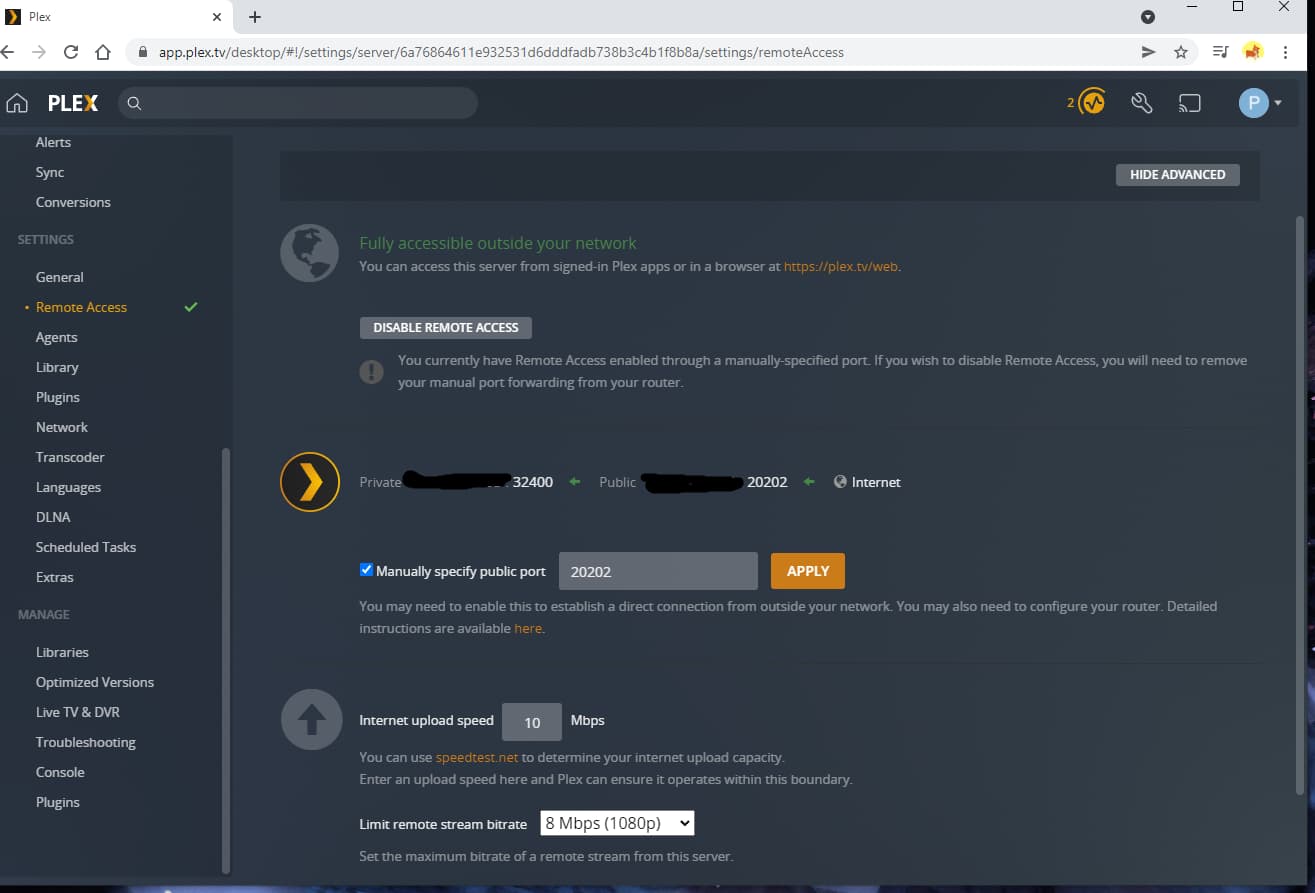
I decided I didn’t like my router allowing UPNP. So I told Plex I would handle the forwarding on my own. I went to my router, and I set a forwarding rule for my router. On the outside, if you access my IP at port 20202, it forwards ALL that traffic to my server, which uses 32400 internally. You MUST check the box there in this case, and TELL PLEX which port you are going to use.
So I see you set up a port forward of 32401 EXTERNALLY to 32400 INTERNALLY (direction doesn’t much matter. Just the internal and external label). If you want to use that port, it’s fine, but you must go to the location in my picture, check the box, and enter 32401 in that box. You can even just forward the port as-is, 32400 externally to 32400 internally.
I can get technical on WHY you have to tell Plex what your external port number is, if you want some background info.
You only need TCP and just for folks who don’t have a Google/Nest Wifi. They do oddly list the numbers in a backwards way. That chevron/arrow should point left to be intuitive but it confusingly points right. the left port is the internal and the one on the right is the external. So to me the port forward rule is fine
Fair point.
@andrewdubois26 – that direction wasn’t previously clear to me; the arrow implied the direction of the forward to me hence internal → external still seems weird.
Edit:
as per dividebyzero’s post… make sure you configure Plex to use 32401 as the public/external port under Settings > [Server Name] > Remote Access
Thanks all!! Now the hard part… Deciding what the heck to watch!
Hahaha, that’s always my problem. And I keep adding to it. There’s more content now I could probably watch just my server for 6 months straight. 24 hours a day.
Well hey it’s still adding stuff 5 hours later. Any idea how I can establish a direct connection. It said my quality would be lower since I was out of the house. How the heck do I establish a direct connection when I’m away. Is that even possible
If your remote access is working well it should already be a direct connection. If not then something is still wrong with remote access and it is using relay.
I’m not sure which external port you ended up using in port forward rule but if you go to canyouseeme.org and enter in that external port does it it show as successful? (do this while at home)
What ISP do you have?
Assuming you did the forwarding correct, then you do have a direct connection. If you are told you are using the Plex relay service, it is a kind of last resort method used to get your outside-the-house player and your in-house server to talk to eachother. This is - again - a LAST resort. Plex will try a direct connection using various methods. If you mess it up anywhere along the way, then the relay kicks in.
We need to see your port forwarding options, and we need to see what your server network settings are set to.
We got SaskTel over here guys. Network settings are left to the default ones on the server. And port forwarding is the same as it was. I’m not sure where the heck it goes wrong. Even tried with the modem and router combo my ISP gave me. I’m stumped
so you have a modem/router combo and the Google/Nest wifi both as part of the network? if so you might have a doublenat. but your first screenshot show what seems to be the correct public IP so maybe not the issue.
have you rebooted your Synology at all since trying things?
Got it back up and running but still doing the last resort stuff. Ah might just use it. But least I got my port open and stuff flowing when I’m out of the house

The “Last resort” relay service is restricted to a pretty low speed of 2 Mbps. That’s usually enough for 480p videos. It’d be greatly preferable to get the forwarding done correctly.
I’d just like to know what your server’s Remote Access page has for the port settings. Did you check that box? What number do you have in that text field next to the checkbox?

