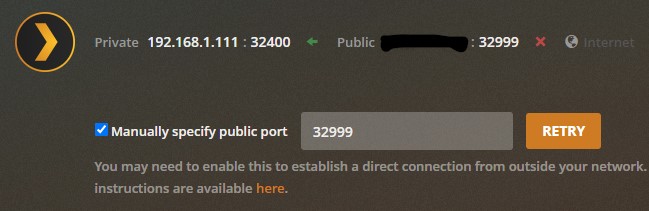
I have 2 LAN connections set up to my NAS. LAN1 is a double-NAT from my fiber provider to my own router. Remote access within Plex could be set up but would always report unreachable after a moment or two. To fix this, I added a direct connection from my fiber provider’s router to the LAN2 on the NAS. The Plex software is locally accessible via 192.168.1.111 (double-nat) as well as 192.168.3.2 (direct NAT from the fiber router).
Whether I use uPnP or whether I turn off uPnP and manually specify the port, it always assumes the redirect is going back to LAN1. And whether it’s a direct result of that or not, I keep showing as unreachable outside my network.
I’ve changed the “Preferred network interface” over to the new LAN but I can’t seem to stop the Plex install from thinking that routes end on the LAN1 IP and therefore cannot maintain direct external access.
I work from home in the area of software development and server security. I’d rather not hand over the primary routing functions of my internal network to the router supplied by my internet provider. Also there are a great many devices and servers I’d have to change to move over to the other network. Multiple LAN ports are put on NAS devices to serve this kind of exact purpose so I was hoping there was some way to get Plex to force all communication onto LAN2 so I wouldn’t have to reconfigure my entire house.
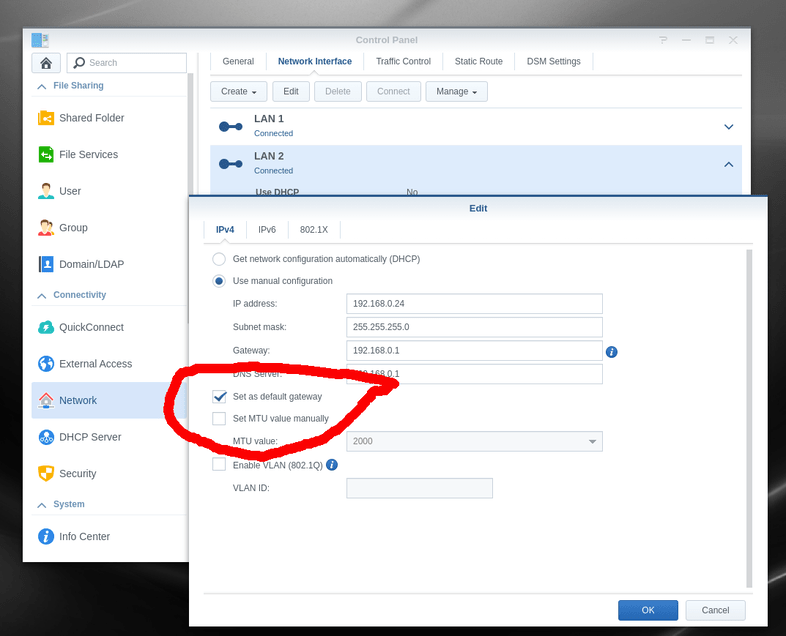
Have you tried configuring the NAS such that the gateway for LAN2 is used as the default gateway? If the default gateway is LAN1, outbound traffic will be sent from that interface. I don’t use a Synology NAS myself, but this support article suggests there’s a way to configure the gateway priority:
I don’t use the ISP provided equipment for anything else EXCEPT being a modem (when I was on DSL and even now on Cable).
I let the ISP provide the media access equipment.
I use their RJ-45 port to connect to my edge device / router (pfsense).
The pfsense performs both work and home routing functions in addition to being far more secure than anything the ISPs have ever offered.
With regard to Remote Access? Every PMS system here automatically gets Remote Access flawlessly. The pfSense UPnP / NAT-PMP service is per spectification.
The gateway thing turned out to be exactly it. I didn’t find the option to set as the default gateway right away but I found an option to allow for multiple gateways. The moment I turned that on my Remote Access appears to be staying on stable and outside connections are coming in as “Remote” rather than “Indirect”. If I get any instability with the multiple gateways option I’ll switch to setting the LAN2 as the default with the switch ChuckPa found.