In my case, 64-bit Windows 10 with a Hauppauge WinTV-quadHD
I am running Windows 10 64 bit with a HAUPPAUGE WinTV-quadHD
Confirmed same issue here - Windows 10, Hauppauge QuadHD tuner card, Server 1.15.2.793
1] Record 60 seconds of any channel (e.g KDVR Fox31 here in Denver) with no transcoding (so, raw mpeg2)
2] Then rewatch the resulting .TS file in Plex or any media player
 Recorded with 1.15.2.793 = blocky/glitchy every few seconds
 Recorded with 1.14.1.5488 = crystal clear
Recorded with WinTV 8.5 directly = crystal clear
All ^^^ on same machine/hardware.
I’ll be watching this thread for news of a fix, so I can upgrade to 1.15.xx again.
Rob
Any news on this one from the Plex team?
upgraded to version 1.15.3.876 . I am still having the same issue with liveTV.
I thought this was a ROKU issue - I am curious if others with other players see the same thing?
I am running windows 10 pro with core i7 2600 and nvidia k2200 quadro card. Same issue with latest release
Again, any input from the Plex team here? It’s been nearly impossible to watch recorded live TV for nearly 3 months now…
Same issues here… Been using homerun Tuners… Its hit or miss. We record two 30 min news shows… One show will be fine… Next show thats right on after it, on the same channel, will be impossible to watch… or just skips once in a while. Or sometimes both shows will hitch and skip once in a while, or both will be impossible to watch… Signal strength is strong and I’ve watched the channel though the turner using VLC and looks great…
@jmfolcik @warham30 @jgodfrey @tkidd @sandburner14_gmail_com @rbilodeau @Hooker
We are not getting closer to finding the issue. It was stated that the problem is on some channels but not others. Could each of you where the issue is definitely not present in 1.14.1.5488 but is present on 1.15.x, please send me by private message your DVR setup details: Post Code/Zip Code, EPG source when DVR setup and list of all channels with the issue
Thanks
Thank you @sa2000 for inviting further info via DM - I’ve sent you that info.
Here’s a copy of what I sent, in case my steps/data helps our collective crowdsource mind get to a solution!
%%%%%%%%%%%%%%%%%%
Hi there,
Thanks for digging deeper to fix this issue. I reconfirmed the issue this morning with 1.15.4.993
Your persistence here is VERY MUCH appreciated.
Firstly: It is not channel specific for me. Happens with ALL channels.
My setup:
- Windows 10
- Hauppauge QuadHD tuner card (Model 1651xx-1 & -2), Driver 1.59.36248.0 9/5/2018
- Zipcode = 80130
- EPG source = plex default (I don’t even know how to change this)
- I’ve attached images of, my DVR Setup, my Hauppauge QuadHD tuner driver
Here’s what I did this morning to confirm the issue:
A] With Server 1.14.1.5488
1] Record ~60 seconds of 7.1 KZCOLD (ABC)
2] Video/audio is perfect
3] Copy resulting .TS for safekeeping
B] Immediately upgrade to 1.15.4.993:
1] Record ~60 seconds of 7.1 KZCOLD (ABC)
2] Video/audio is BROKEN - video blocks, audio drops every few seconds
3] Copy resulting .TS for safekeeping
NOTE: A & B were done within 3 minutes of each other, on same machine, only change was the server upgrade from 1.14.xx to 1.15.xx
I’m providing the resulting .TS files from A & B, and named then with server version and “WORKING” or “BROKEN”. See this .zip file.
https://drive.google.com/open?id=1JBMwxnLgZUiZP3Deajxx03UyBTcRWzYQ
Maybe your dev team can see something in the TS stream itself that indicates the problem/fix?
Again, recorded within minutes of each other, on same machine, different server version.
Please do let me know if you need anything else. Happy to keep helping you guys fix this.
(I’ll also post this message on the thread publicly, maybe it helps others also)
Rob
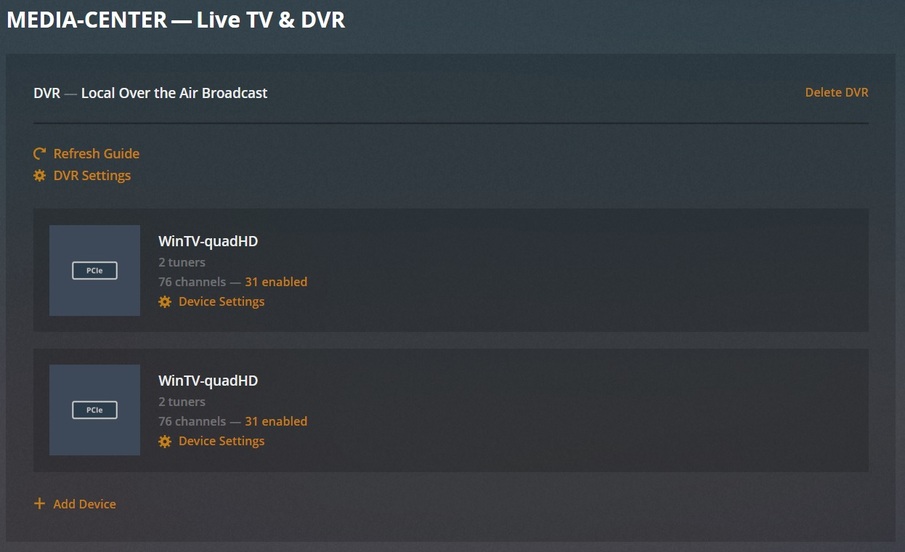
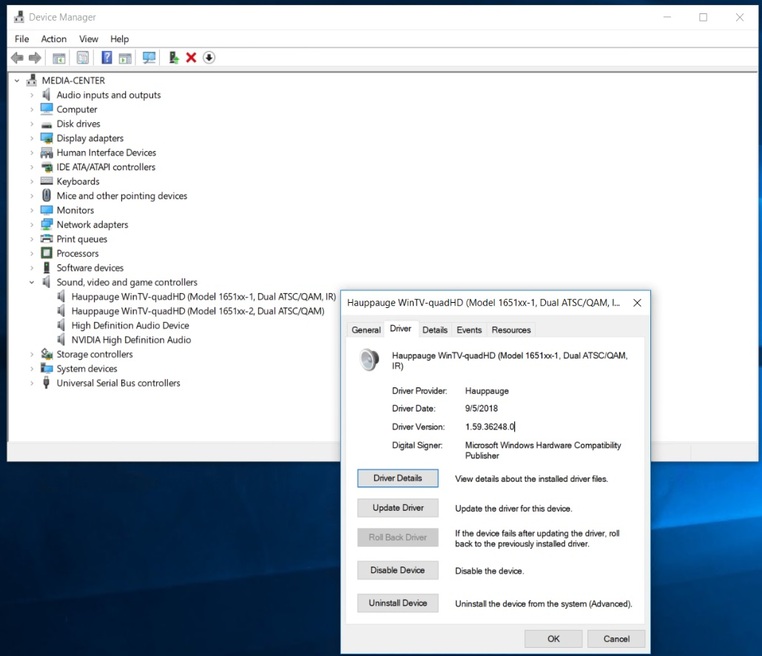
The problem I have is NOT channel dependent. It happens with the random sample of 4 channels I tested with. (perhaps my TV market has higher HD resolution / bitrate than others?) .
Just to toss it out there, since we’ve only been talking about the channels and the tuner hardware for the most part (mine is win10+i5cpu+hauppauge quadhd) Maybe some of us have similar antenna/amp hardware - my antenna is a Clearstream 2V roof mounted with a Winegard LNA-200 at the antenna, with the power injector about 3 feet from the pci card as the wire runs, no splitters. I get pretty much maximum SNR on the major networks which is 29-32.
Thank you for following up on the glitchy Hauppauge issue in 1.15.x.
I tested by upgrading to 1.15.5.994, and testing all 41 channels I catch, and was surprised to see that it’s not happening anymore. Perhaps this is because I recently upgraded from an underpowered netbook to a decent i5 laptop as my Plex Media Centre machine, though I find it strange, because I installed 1.15.xx when I got the laptop a month ago, and it was still happening. It’s all very strange.
I have a very similar issue but it’s not nearly as bad - I get the same pixelation/audio issues, but it will only happen say 2-3 times every 30 minutes. I struggled with this issue for about a year before moving my plex appdata folder and media to a different hard drive, since I did that it had been perfect! So for me it seemed to be solely down to the hard drive. Unfortunately that hard drive (a fairly old drive) failed last month. I purchased a new Seagate USB 3.0 (external) hard drive. And since then I’ve been seeing the glitches again. I would have thought a brand new USB 3.0 drive should be adequate…but the timing of the issue says otherwise!
I have similar issues with nVidia Shield as a plex server. WinTV DualHD->nVidia Shield. I have a Samsung T5 500GB set up as adopted storage. TV signal is plenty strong. Glitches when watching live TV. Same antenna signal connected directly to my TV is always perfect.
I went into settings and have specified a location for my Transcode directory, I’ve set it to be on my SSD (which runs my OS, it only has 20GB free, but that is just enough for the Transcode location). Since I made this change my recordings of live tv seem to be behaving again, which suggests it definitely was related to the USB 3.0 disk.
Hi, sorry this thread is for a different issue - related to the 1.14 to 1.15 version upgrade and certain OTA channels that is not a problem with 1.14 and not with performance but with visual artifacts and similar glitches. Not for an issue spanning over longer time than the 1.15 release date or related to disk or cpu performance.
Apologies - so it is. This was the only thread I could find that seemed to have very similar symptoms, but obviously not the same cause.
Any updates about this issue?
Thanks! 
no news ??? whats happens ?
