Server Version #: 1.13.5.5332
Player Android Version #: 7.4.0.6424 (ab172317)
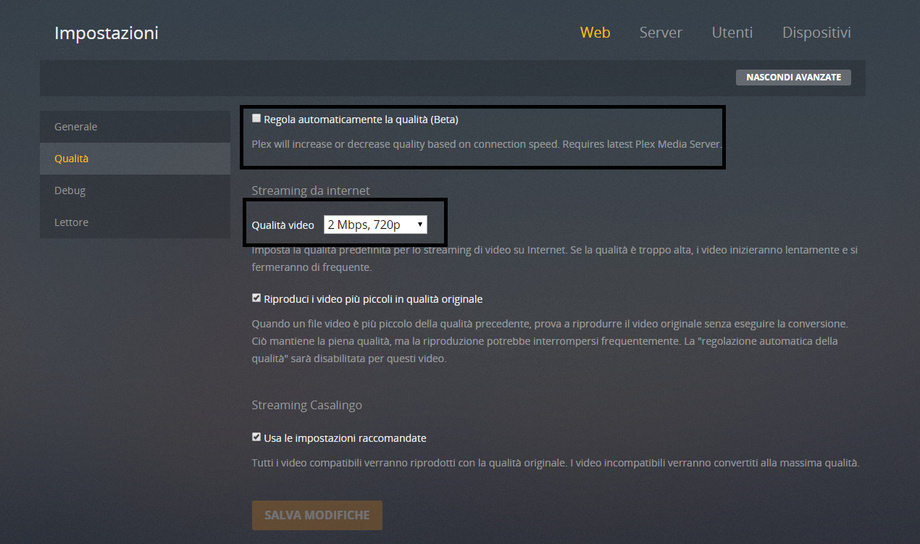
From my home when I go to “web / quality” settings and set the parameters I want, after saving them, they always come back as they were before my intervention. This thing irritates me a lot.
Then on the quality of the streaming, despite the setting on 720kb and cues the option (beta), after saving, always returns by default on 2mb and the check is deselected. Other attachment
Sorry, I’m confused. Are you saying that after you change the setting in Plex Web, it changes back to something else? Are you hitting save after you change that setting?
Hi, thanks for your support. Yes exactly. After that i save the changes they back to the old configuration. The setting “streaming from internet” change back to default every time. I changed it to 720kb and then i save it. For real this problem is for all type of setting that i will change.
I must post another thread for setting problems that will not save?
Excuse me, don’t mad me for this newbie question, but what do you mean for “web logs”: perhaps are the ? where are this? I also have a screenshot video where i try to do something but is little big, 56mb, i try to attach this, different i will try later to upload in my ftp
Plex Web Logs
Settings \ Web \ Show Advanced \ Debug \ Log Level
Set that to “Enabled”
Recreate the issue, then come back to this page. Just under the log settings, there is “You can view the debug logs here.” Click on here. You will then get a screen full of text. Save it all to a text file.