PMS Version 3.79.0
Hosted on Bytesied AppBox +Stream 2 with 5 concurrent transcoding streams
Hello All,
I am still new to PMS but I have most things set up and running.
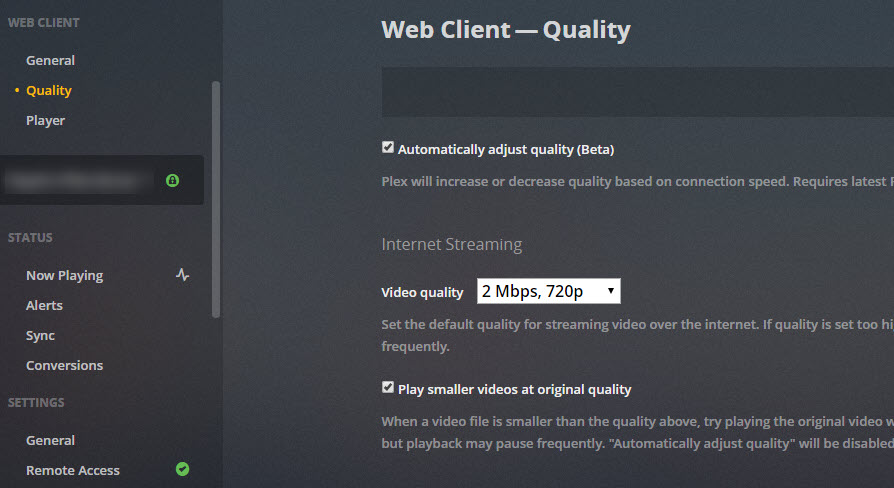
A problem that I am having is when I exit PMS and come back to it, I find the ‘Automatically adjust quality (Beta)’ setting unticked. If I select it and press save, it will remain that way while I browse other settings and content. But if I then exit out of the web browser and sign back in, the setting is unticked. All other settings that are changed and saved. It’s just only the ‘Automatically adjust quality’ setting that won’t save.
I am on ADSL2+ so I have to set the default quality speed to 2 Mbps, but other family members are on fibre connections so I just hope they are getting better quality streams.
How do I tell if Plex is using higher quality settings than the default? Should I be concerned that the box is unticked every time I open the browser and navigate to PMS?
1, Family members use a device called Telstra TV with the Plex client installed. This is connected to their TV and updated by Telstra. They have an LG TV that has Plex on it but apparently, it’s too hard to set up.
2. I mainly use a laptop with the Plex app from the Microsoft Store. and my iPad Pro with the latest version of the Plex app downloaded from the App Store.
Thank you in advance.