Server Version#:4.34.4
Player Version#:8.6.0.20351 (e97d660a)
Hello!
For some time now I have been struggling with the problem that my local PLEX server on Diskstation cannot be reached from Smart TV via cable connection.
The PLEX server runs on a Synology Diskstation which is connected to the LAN by gigabit cabling. On the PC, media on the PLEX server are available without any problems. But on the SmartTV, access to the Diskstation fails with the message “Disk station is currently not available”. Other media (e.g. live TV) are available, but my local media on the Diskstation - for which I actually installed PLEX – aren´t.
If the Smart TV is operated via WiFi instead of cable, Diskstation can be accessed in principle. But unfortunately this is not a permanent solution due to insufficient bandwidth, as the image is constantly stopping and reloading.
Does anyone have any idea which screws I have to turn so that the SmartTV can access the Diskstation via cable network?
I would like to mention that the TV has a stable Internet connection. Prime vide, YouTube etc. work well. I can even access media on Synology DS via simpleshare/DLNA. Only the connection to the Plex Server on the Synology DS is not possible.
That’s weird. I agree with MovieFan - nothing immediately obvious.
Do you have multiple Ethernet connections, link sharing, bonding, etc., configured on the Synology?
Is your router anything complicated or unusual? Do you have any other network security devices?
Do you have another device you can use to test the connection to Plex from your 2nd switch?
I’d be thinking about simple things, like … replace the cable used by the Synology and the TV. Try different switch ports. How long is the cable between the switches?
Great idea
I´ve got another SmartTV with a different OS (LG with webOS) and a different Plex Client.
This one has exactly the same behaviour as the first TV (Philips with Android):
Access to Media on Synology DS is possible via simpleshare/DLNA, but PLEX on DS is not available
I also connected the second TV to the other switch. Same behaviour.
Interesting is, that the problem seems to be dynamic:
PLEX Server on DS was available on the second TV a few days ago via WiFI. Now, even WIFI does not work, although there was no change. Also, PLAX was no more available on the PC although it worked well there a few hours ago.
I found out that there are lots of Plex Media Server processes waiting (“schläft”) on Diskstation. See attachment. I stopped PLEX and started again, and now PLEX is available again at least on the PC. On both TV sets it is still not available.
From the outside looking in… what are the addresses of the Synology, your PC, and your TV? Actually, what’s important is what’s the network address of each (and potentially the subnet or subnet mask…)? Should be something like 192.168.100.0 with a 24 bit subnet mask, and all 3 should be the same (only differing in the host address portion.) Something else that might be illuminating would be to run a tracert/traceroute from your PC to your TV. If that comes up with more than a single hop, you’re on separate networks. If you’ve enabled shell access on your Synology (telnet or SSH,) you should be able to do this test to your TV as well.
It really does sound like the switch that the TV is plugged into really isn’t a switch, but a NAT gateway with the connection to the 1st switch in the WAN port. It is rather strange that your TV can see anything else on the Synology.
subnet mask: 255.255.255.0
Synology DS: 10.0.0.102
PC: 10.0.0.4
TV: 10.0.0.142 (appears 3 times in the network view, each time with identical IP and MAC address, but with different uuid. Don´t know if this is relevant)
Both switches are unmanaged TP-Link TL-SG105
tracert from PC to TV is 1 hop <1ms
tracert from Synology DS to TV does not work, stops after 30 tries ==> hmmmm?
But: ping from Synology DS to TV works (0,4 ms)
I´d like to come back to my observation that there are multiple PLEX services running (sleeping) on the DS:
13 instances of Plex Tuner service
13 instances of Plex Script Host
13 instances of Plex DLNA
21 instances of Plex Media Server
Is this normal?
After Plex was not available on PC again, I stopped the Server and currently it´s working again.
According to Synologys Packet Center, the installed version is 1.20.1.3252-a78fef9a9
That really sounds strange, that a ping would work and a tracert fails. Usually, it’s the other way around and a tracert is used to diagnose where the ICMP traffic is failing.
Is there any way that you can drop the switch that currently bridging between your TV and your Synology, i.e by extending the cable or possibly a direct join, at least as a temporary test? My assumption is that you’ve got a physical limitation somewhere that’s preventing this.
My suspicion is that you’ve got a fundamental network issue that’s causing PMS some heartburn. Until that gets worked out, I’d ignore PMS completely.
Thanks. I already changed the connection of the TV to the second switch, shortening the route between the TV and the DS. Same problem.
If it´s really a network issue, it must be a very specific issue because I haven’t encountered any other problems so far except the non-availability of the Plex Server on the DS (and, as I wrote above, using DLNA, media on the DS is accessible)
So you only have a single switch that the Synology, PC and TV are all plugged into? And it’s still exhibiting the same symptoms & activity? That is bloomin’ weird. Beyond that, I got nothing.
Personally, I’d be starting to do a deep dive with wireshark, but that’s definitely not for the faint of heart. And unless you have a managed switch where you can mirror traffic to another port, you’ll never see the packets that you need to troubleshoot this.
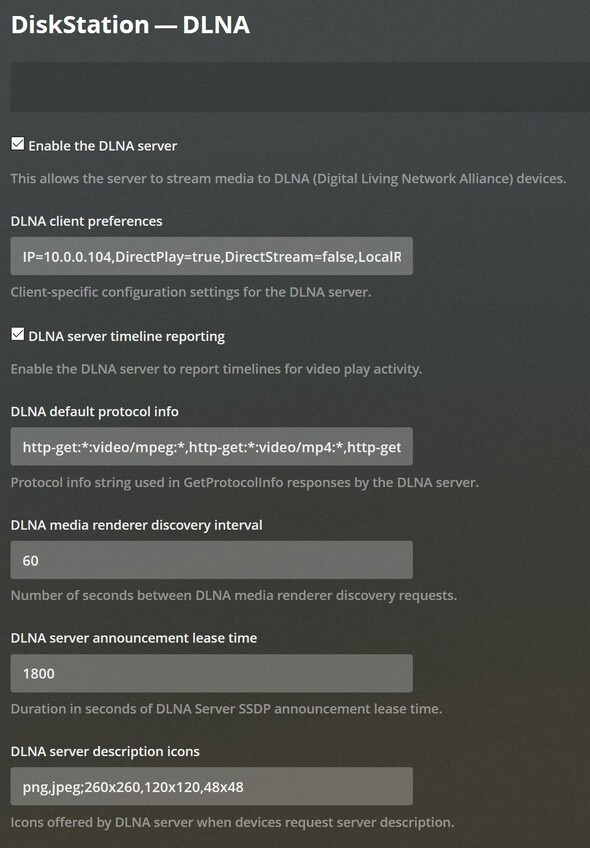
I didn´t notice that this option exists. But it is already activated
And - strange - the IP address (10.0.0.104) of the PC is configured as client.
For a test, I changed the IP address to the one of my TV, but without effect.
DiskStation still “not available” on the Plex client of the TV.
And the TV does´t recognize an additional network media server as I would expect from DLNA.
What is the effect of this field (DLNA client preferences) ?
Is it possible to enter only one client IP address here?