Plex Server / Clients Laggy

It seems that for months, my Plex experience has just been slow and unresponsive. What I mean is, browsing the entire library often fails to load, and I have to retry a few times. Or the Dashboard fails to load and I have to click Reload there, too. I see this on FireTV and Android clients. I don’t see this much on Roku Clients.

This behavior is seen on clients within my network, as well as remote clients.

I have Optimized the database manually, as well as it being a scheduled task. I have run the sql repair script as well.

I frequently find that if I close Plex Server and then launch it again, the clients seem to be responsive and working normally again. But after a while, again I find poor performance.

If you’re watching anything, during the stream, there seems to be no issues with the stream. However, I often see auto-play of the next episode sitting with a blank box where the episode should be, and a long pause before it populates and begins the countdown for playback.

It seems that if my server is performing any task, this lagginess is there. If it’s generating thumbnails, or scanning a library, or even doing a metedata update, there’s poor performance on plex navigation, menus, library listings, etc.

My libraries are currently:

Movies: 4095
TV: 7463 Episodes

My hardware specs are very high-end and I never see performance impacted on my hardware anywhere near what should cause poor performance.

My Specs:

Item Value
OS Name Microsoft Windows Server 2016 Standard
Version 10.0.14393 Build 14393
Other OS Description Not Available
System Manufacturer Dell Inc.
System Model Precision WorkStation T7500
System Type x64-based PC
Processor Intel® Xeon® CPU X5690 @ 3.47GHz, 3459 Mhz, 6 Core(s), 12 Logical Processor(s)
Installed Physical Memory (RAM) 12.0 GB
Total Physical Memory 12.0 GB
Available Physical Memory 9.19 GB
Total Virtual Memory 13.8 GB
Available Virtual Memory 10.2 GB
Page File Space 1.81 GB

With 3 concurrent viewers, transcoding, this is my workload:

The bottleneck could be your router config. Do you have ports forwarded for Plex? If you have firewalls enabled, is plex on the list to “Allow” (both router firewall and OS firewall).

Is this for any file type (MP4, Mkv…etc)? Or just a certain one?

Hard Drive info?

All of these factor in as well.

I use PFSense with Intel 4-port 1GB LAN on a quad-core Intel CPU PC that only serves this purpose. My speedtest.net is always excellent, since I have ATT Fiber 1GB Up/Down. Testing is usually in the 700-900 range on up/down.

The entire network is on a 1GB switch and nics.

I use an UniFi 1600AC AP for wireless access.

I have media on a Synology NAS using 2 1GB LAN ports, teamed. I also have an 128MB Battery-Backed-Up SAS/SATA Adapetc Hardware RAID 5 on the Plex Server itself. Also have some media on a USB3 external enclosure connected to a USB3 port.

My Plex server serves no other purpose. It does not host any other media-related apps. Only the Plex Server apps runs on this box, besides the OS itself.

Sonarr/CouchPotato/Headphones/Jackett all run on a separate server running Ubuntu Server 18.04. It directly places the media on the NAS, and the TV share on the Plex Server. I manually run a script that movies any Pre-2010 movies from the NAS to the RAID on the Plex Server itself.

Plex Movies library points directly to the 25TB Synology NAS share UNC Path and the local path on the 16TB Raid (R:).

The TV Library points directly to the TV Folder on the 14TB USB3 Drive (U:)

My Transcode Folder is on a HD that serves only as a transcoding destination. (E:)

Music is on M:

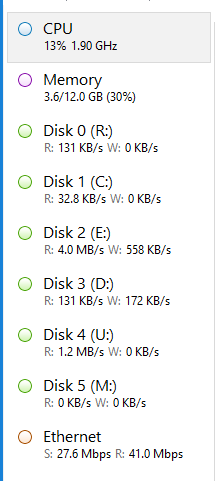
I don’t believe there’s any drive contention that is leading to any sort of issue. I can watch Task Manager and monitor the HD Performance and I don’t see any real issues with the drives reaching 100% load.

In this screenshot, I’ve got two external viewer watching movies, one on a Samsung TV Plex, and another on Chromecast, and myself watching a TV show on a Vizio’s built-in chromecast.

My Plex Server is also receiving some files that are being transferred over at this moment from Sonarr.
Capture

When the problem pops up, I see the long lag or need to click retry when choosing either the Movies or TV libraries. Both when opening the root ‘Shows’ or ‘Movies’ link and then again when I choose Browse All. This does not happen every time, but more than 50% of the time. And, as I’ve mentioned before, frequently when viewing the dashboard I see the ‘Retry’ option. The Entirety of Plex Server app is installed on the D-Drive all by itself. The App, The DB, etc. Nothing Plex is on the OS Drive C:

Any suggestions?

This topic was automatically closed 90 days after the last reply. New replies are no longer allowed.