Server Version#:1.42.1.10060
Player Version#:1.109.0.329-ea562b95
I have been running into an issue where I cannot remotely access my server anymore, it disappears off of the list of servers I have access to on all apps for all users, and does not show up under app.plex.tv.
If I directly access the instance via it’s local ip and port (192.168.1.2:32400) I can see all my content just fine, when I go into Settings → General, it shows “Server Claimed By” with my email address, occasionally it’ll show an exclamation mark on it.
I continue to have zero access to my content outside of the direct server connection until I remove and reclaim the server.
I have already tried ChuckPa/UserCredentialReset several times, but have had no luck, this issue started about a month ago, sometimes it’s a couple of days between disconnects, other days it’s disconnected multiple times in a single day.
I am running Plex on TrueNAS Scale as a Docker container (in k3s as a custom app as I haven’t upgraded my TrueNAS Scale instance yet).
@ChuckPa I messaged in a separate thread, I’ve attached my logs that happened just incase there’s something else that’s going on. But I am going to follow the same instructions on the reclaim and wait bit, also making sure all my files/folders have the correct ownership/permissions.
Plex Media Server Logs_2025-08-24_12-41-35.zip (5.1 MB)
@Destreyf
Please keep posts together. (My sanity will thank you.  )
)
Aug 24, 2025 12:41:24.182 [140373220748088] DEBUG - [Req#73bc3/HCl#1072] HTTP requesting GET https://plex.tv/api/v2/devices/a7d5bd6283da96050e291861adfeeb81a60a5832/certificate/download
Aug 24, 2025 12:41:24.344 [140373654436664] DEBUG - [HttpClient/HCl#1072] HTTP/1.1 (0.2s) 202 response from GET https://plex.tv/api/v2/devices/a7d5bd6283da96050e291861adfeeb81a60a5832/certificate/download (reused)
Aug 24, 2025 12:41:25.345 [140373220748088] DEBUG - [Req#73bc3/HCl#1073] HTTP requesting GET https://plex.tv/api/v2/devices/a7d5bd6283da96050e291861adfeeb81a60a5832/certificate/download
Aug 24, 2025 12:41:25.514 [140373654436664] DEBUG - [HttpClient/HCl#1073] HTTP/1.1 (0.2s) 202 response from GET https://plex.tv/api/v2/devices/a7d5bd6283da96050e291861adfeeb81a60a5832/certificate/download (reused)
Aug 24, 2025 12:41:26.515 [140373220748088] DEBUG - [Req#73bc3/HCl#1074] HTTP requesting GET https://plex.tv/api/v2/devices/a7d5bd6283da96050e291861adfeeb81a60a5832/certificate/download
Aug 24, 2025 12:41:26.679 [140373654436664] DEBUG - [HttpClient/HCl#1074] HTTP/1.1 (0.2s) 202 response from GET https://plex.tv/api/v2/devices/a7d5bd6283da96050e291861adfeeb81a60a5832/certificate/download (reused)
Server “Storie” has used up all its allowed certificates.
This confirms the username (UID/GID) Plex runs as does not have permission to write the downloaded certificate in Plex Media Server/Cache.
I would definitely confirm the sudo chown -R uid:gid /path/to/config
followed by
find /path/to/config -type d -exec chmod 755 {} \;
find /path/to/config -type f -exec chmod 644 {} \;
After you’ve done this, Restart PMS.
I’ve cleared plex.tv. You should now be able to obtain a fresh certificate.
Sorry about that, I was mostly just replying on the previous thread because you had tagged me instead of the OP of that post.
I will start my server back up once the chmod commands (and a chown command) complete and will follow up here if I continue to see issues.
So I did all of these, however mobile apps suddenly can’t see my server. Web and Desktop connect just fine.
I did find an interesting item in the logs:
Aug 25, 2025 15:49:49.898 [140695033391928] WARN - [CERT] TLS connection from [::ffff:46.51.207.89]:59730 came in with unrecognized plex.direct SNI name ‘136-38-13-108.c9718c5ed9c141af8660e0a5a9ba2dde.plex.direct’; using installed plex.direct cert
Aug 25, 2025 15:49:50.018 [140695035501368] DEBUG - CERT: incomplete TLS handshake from [::ffff:64.77.240.104]:63662: sslv3 alert certificate unknown (SSL routines)
Aug 25, 2025 15:49:50.131 [140694310239032] DEBUG - Request: [64.77.240.104:63663 (WAN)] GET /media/providers (13 live) #2de0b1 Signed-in Token (Destreyf)
I was able to make my mobile phone connect by going to Advanced → Allow Insecure Connections (Always).
Any guidance on this would be helpful!
Plex Media Server Logs_2025-08-25_15-51-08.zip (5.4 MB)
That’s PMS telling you the “SNI” (Server Name Identification) tag the app is sending doesn’t match.
This is geek for “the app is using the old server certificate”.
Force stop the player app then restart it.
When it starts, it will download the current certificate for your server.
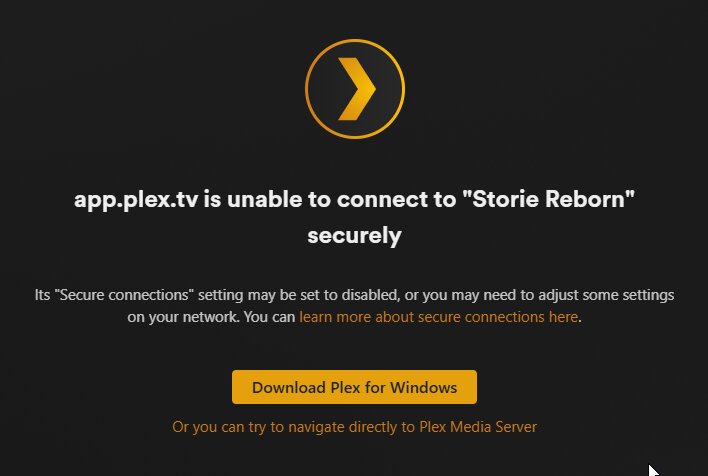
Unfortunately, I am still running into issues, it appears to likely still be related to SSL somehow. I can’t access from web or mobile, but desktop works fine, this is while I am on the same network as the server, but accessing via app.plex.tv.
Web Interface shows this
Mobile just says unavailable.
Fresh logs just downloaded. I do see a bunch of EAE errors which I know is related to an audio codec. Going to double check my max_user_watches just in case.
Plex Media Server Logs_2025-08-27_16-18-03.zip (4.8 MB)
- This is a
fs.inotify.max_user_watches table size insufficient error.
Aug 27, 2025 15:14:25.000 [140694106889016] ERROR - [Req#83516c/Transcode/9f4b807a-1fc6-46a4-bb65-0513df3e4cb3/05693795-9f72-4fb2-a031-897ea699f058] [eac3_eae @ 0x7f8ec9856940] EAE timeout! EAE not running, or wrong folder? Could not read '/tmp/pms-70d9b21d-a792-464d-acf3-c7f3e0f78f1e/EasyAudioEncoder/Convert to WAV (to 8ch or less)/9f4b807a-1fc6-46a4-bb65-0513df3e4cb3_103824-0-1285.wav'
Aug 27, 2025 15:14:25.000 [140694827416376] DEBUG - Skipping over directory 'Box Car Racer/Box Car Racer (2002)', as nothing has changed; removing 13 media items from map.
Aug 27, 2025 15:14:25.000 [140694827416376] DEBUG - Activity: updated activity 9847d57f-239e-4740-92db-a24536bd9f84 - completed 66.8% - Scanning Music
Aug 27, 2025 15:14:25.000 [140694827416376] DEBUG - Scanner: Processing directory /data/audio/music/Sugarcult (parent: yes)
Aug 27, 2025 15:14:25.001 [140694132046648] ERROR - [Req#83aef5/Transcode/9f4b807a-1fc6-46a4-bb65-0513df3e4cb3/05693795-9f72-4fb2-a031-897ea699f058] [eac3_eae @ 0x7f8ec9856940] error reading output: -5 (I/O error)
Aug 27, 2025 15:14:25.001 [140694036138808] ERROR - [Req#83aefb/Transcode/9f4b807a-1fc6-46a4-bb65-0513df3e4cb3/05693795-9f72-4fb2-a031-897ea699f058] Error while decoding stream #0:2: I/O error
I bumped that value up to 8,388,608 (it was 1,048,576), however I am still seeing EAE errors even after restarting the plex container, and the whole system.
Just as a confirmation, the system is registering the new value:
root@storie:~# sysctl fs.inotify.max_user_watches
fs.inotify.max_user_watches = 8388608
Additionally, the mobile app and app.plex.tv are back to “Unavailable” state and I can only access it from the ip address directly, however like before the desktop app has no problem connecting, which is on the same remote network as affected users.
I do see more of those SSL errors, but those actually make sense as I have some other tools connecting to plex via http that might have been getting upgraded to https because of the required flag being set.
And of course right as I said that, it came back on both mobile and web.
I still don’t understand why it continues to be intermittently inaccessible. and the weird part is when this happens it is still accessible from the desktop app, even a fresh install.
@Destreyf
Which server? Storie or Plexy?
Neither has contacted Plex.tv within the past few hours.
This implies you have a networking problem between the server and apps.
When unavailable, did you restart the app? (force kill then restart)
Storie, the other one was a temp server that o haven’t shut down.
I have killed the mobile app, and cleared cache, if stays offline. The web also stays down this whole time, but desktop works flawlessly. Same network in the instance this morning.