For the past few weeks I have been unable to get Plex Server to run on my Synology NAS. I have uninstalled and reinstalled the latest two versions from plex.tv without any luck. The application installs as normal but does not run automatically or manually after installation.
The media server log file is showing:-
Dec 24, 2018 17:11:31.412 [0x7f15e2b68700] INFO - Plex Media Server v1.14.1.5488-cc260c476 - ubuntu PC x86_64 - build: linux-ubuntu-x86_64 synology - GMT 04:00
Dec 24, 2018 17:11:31.413 [0x7f15e2b68700] INFO - Linux version: 4.4.59+ (#23824 SMP PREEMPT Fri Oct 12 18:31:34 CST 2018), language: en-US
Dec 24, 2018 17:11:31.413 [0x7f15e2b68700] INFO - Processor Intel® Celeron® CPU J3455 @ 1.50GHz
Dec 24, 2018 17:11:31.413 [0x7f15e2b68700] INFO - /var/packages/Plex Media Server/target/Plex Media Server
Dec 24, 2018 17:11:31.411 [0x7f15ef260800] DEBUG - BPQ: [Idle] -> [Starting]
Dec 24, 2018 17:11:31.416 [0x7f15ef260800] DEBUG - FeatureManager: Using cached data for features list
Dec 24, 2018 17:11:31.417 [0x7f15ef260800] DEBUG - Opening 20 database sessions to library (com.plexapp.plugins.library), SQLite 3.13.0, threadsafe=1
Dec 24, 2018 17:11:31.419 [0x7f15ef260800] ERROR - SQLITE3:0x10, 26, file is encrypted or is not a database
Dec 24, 2018 17:11:31.421 [0x7f15ef260800] ERROR - Database corruption: sqlite3_statement_backend::prepare: file is encrypted or is not a database for SQL: PRAGMA cache_size=2000
Dec 24, 2018 17:11:31.421 [0x7f15ef260800] ERROR - Error: Unable to set up server: sqlite3_state
Would you please open File Station,
Navigate to the Plex share,
(If you don’t see it, Go to Control Panel - Shared Folders - Edit the Plex share - Permissions - Add your username with R/W)
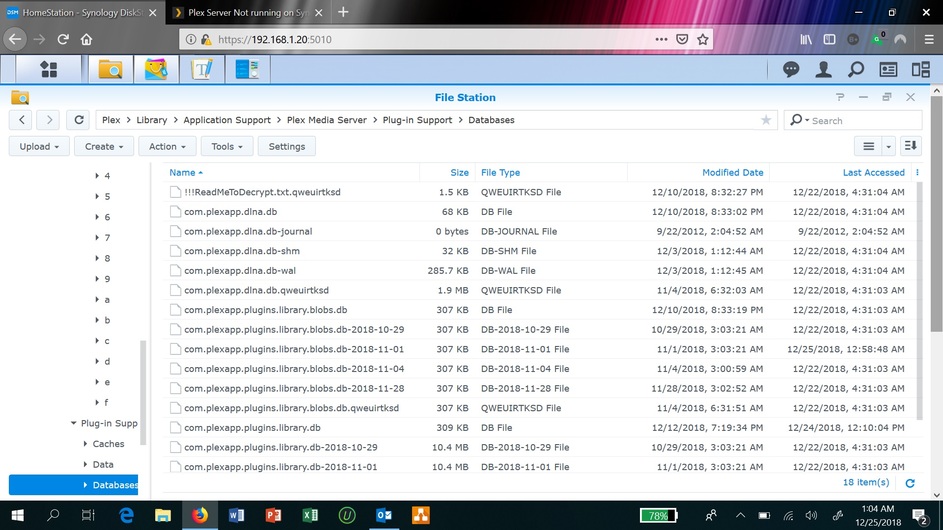
Drill into the Plex / Library / Application Support / Plex Media Server / Plug-in Support / Databases
FileStation will show you the sizes of each of the files.
Please take a focused screenshot of the FileStation window and post it so I can help you figure out the best next step to take.
Should I just delete the Plex Folder and do a fresh install of the Plex Server? I know that it may need to index my files, but wouldn’t it be a cleaner way?
You are right, I appear to have been hacked. I found a text file named “ReadMetoDecrypt!!!” appearing all the sub-folders in Plex. The content of this file is shown below. The file creation is dated Dec 10, so I guess that is when it happened. I am concerned if he was able to get into any other folders, but so far I did not see this txt file in other folders.
I guess, deleting the Plex folder and server and then doing a clean install is probably the best way. What do you suggest?
Attention, all your files are encrypted with the AES cbc-128 algorithm!
It’s not a virus like WannaCry and others, I hacked your computer,
The encryption key and bitcoin wallet are unique to your computer,
so you are guaranteed to be able to return your files.
But before you pay, you can make sure that I can really decrypt any of your files.
To do this, send me several encrypted files to ann4.orlova.89@yandex.com , diana.portnova.01.11.1987@mail.ru, a maximum of 5 megabytes each, I will decrypt them
and I will send you back. No more than 5 files. Do not forget to send in the letter bitcoin address 1FTLGb8bMxQ8KZgHwpMyCNBMzMbvbiHqe5 from this file.
Do not complain about these email addresses, because other people will not be able to decrypt their files!
After that, pay the decryption in the amount of 500$ to the bitcoin address: 1FTLGb8bMxQ8KZgHwpMyCNBMzMbvbiHqe5
After payment, send me a letter to ann4.orlova.89@yandex.com , diana.portnova.01.11.1987@mail.ru with payment notification.
Once payment is confirmed, I will send you a decryption program.
Go to Plex.tv , into your Account, and change every password
FORCE DISCONNECT all logged in clients.
On the Synology
a. Plex share
b. Rename Library to Library.problems
c. Start fresh
d. Give it a new “Friendly” name so you can identify the old one (to be deleted)
I just deleted the sub-folders in Plex and did a clean install of Plex. The server runs now. logged into Plex.tv, changed password and disconnected devices from there and reconnected to my server,
The is a shock. Would definately like to know if they accessed/locked other stuff and how to prevent this in future.