I have a WD My cloud which is hosting my Plex Server.
I have recently just switched ISP and they have supplied me with their own router (Vodafone)
Before i was just able to plug the Server into the router and it would work with no issues.
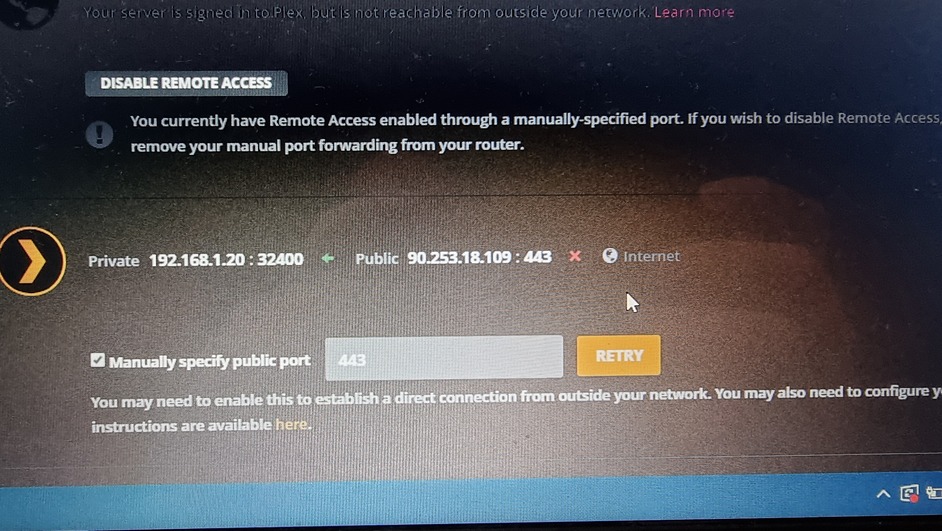
Now when i have it plugged in I cannot view any of my content outside of my network. Plex has a green tick saying private is connected but public is not.
Your old router was probably setup to auto-forward the ports. You need to enable this functionality in your new router or, better still, forward the ports manually.
Do you have a manual for the router and is there a “port forwarding” option?
In your Plex screenshot, you can set a manual port. Don’t use 443 (that’s reserved for other things). Plex’s default is 32400, so you can use that one if you like.
So, you want to set the public port to 32400 and the local port to 32400:
the internal one must be 32400
the external one can be any obscure number you like, but must match the number you tell Plex as per the screen shot below.
The IP address needs to be the machine your Plex server is on.
Once you have done that, it should all work again.
Note: if the computer your Plex server is running on does not have a static IP, it’s IP will change after it is switched off and on (as the router will allocate a new one to it). In this case, you need to modify the IP address to match the new one in the router’s Port forwarding rule that you have set up.
If you can, set the Plex Media Server’s computer to have a fixed address.
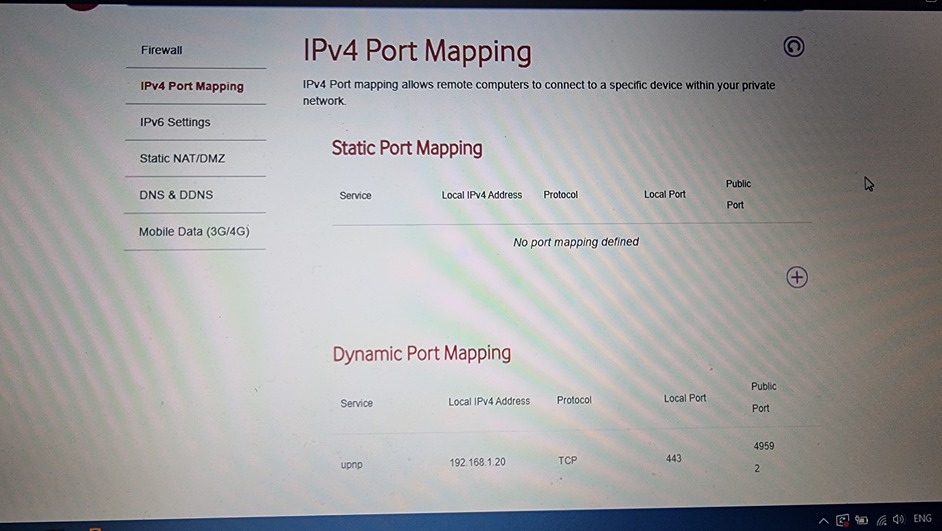
So the bottom one is Pl3x and the top one is another app. Port 443 is typically https.
This is why uPNP is not great as we don’t know what app has opened that port and why.
OK, at least we know port mapping isn’t the problem, so maybe it is Vodafone. Worth checking on their forums,
Meanwhile, I’d remove uPNP now, delete both those auto-generated rules (may need to restart the router for them to clear), and redo the manual port-forward for Plex.
Good luck!
Maybe someone else on this forum also uses Vodafone and can advise.
I switched ISPs and they have sent me a new router, UPnP is turned on, i have tried port forwarding too and i still cannot connect from a outside connection.