
REQUEST FOR SUPPORT
Problem 1: The Plex Service occasionally crashes or aborts. The server shows as offline. Windows O/S shows the Plex App is no longer running.
Relaunch the app and the service continues to run until the next crash or abort.
Problem 2: The Server settings show the server to be ‘unavailable remotely’ (red indicator), even though it is being accessed remotely (dashboard shows streaming activity). - see screenshot.
Both Server Logs and Databases attached.
<< Update >> : Cannot find facility to attach files within the post. Please advise how logs and database should be provided.
Environment:
Plex Server
Plex Version: 4.84.1
Platform: Windows 10, 19044.1766
Hardware: CPU - Intel Core i9-9900K @ 3.6GHZ (Coffee-Lake S)
GPU: NVidea Geforce RTX 2060 Ventus XS 6G
RAM: 64GB - 4 x DDR4-2666 / PC4-21300 - Corsair CMK32GX4M2A2666C16 [16GB]
Motherboard: MSI MPG Z390M Gaming Edge AC (MS - 7B50)
DISKS ACCELORATION:
NVME - Intel Optane MEMPEK1W032GA - 32MB
SATA SSD: 5 x CRUCIAL 500GB CT500MX500SSD1 configured with PrimoCache L1 & L2 software - 3 layer caching (L1 - RAM, L2 - SSD, L3 - HDD)
DISKS:
NVME - Samsung SSD 970 Evo Plus 500GB (Windows O/S & Apps)
SATA HDD - 3 x 8TB Toshiba HDWG180
SATA HDD - 3 x 6TB Ironwolf ST600VN0033
Plex Media Server Logs_2022-06-25_12-32-55.zip (4.4 MB)

UPDATE: 28/06/2022. PROBLEM RESOLUTION
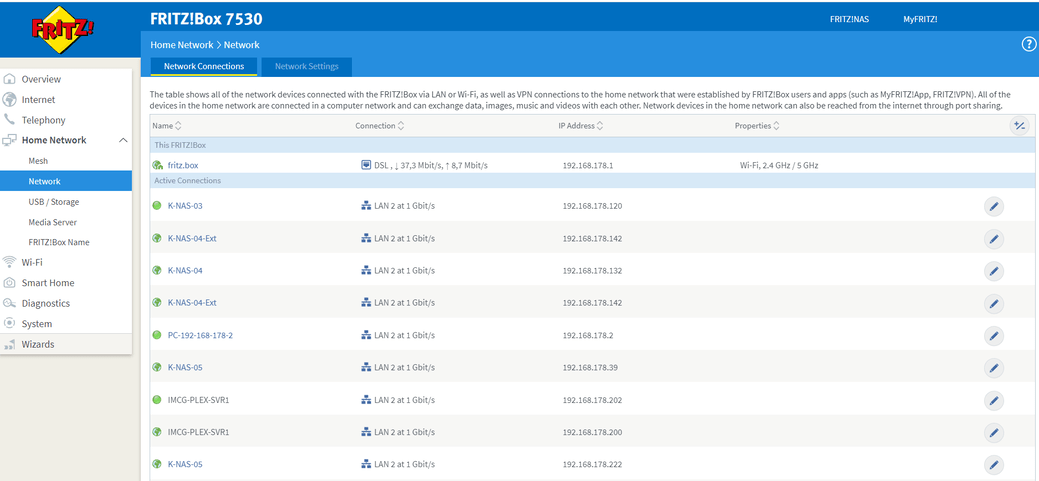
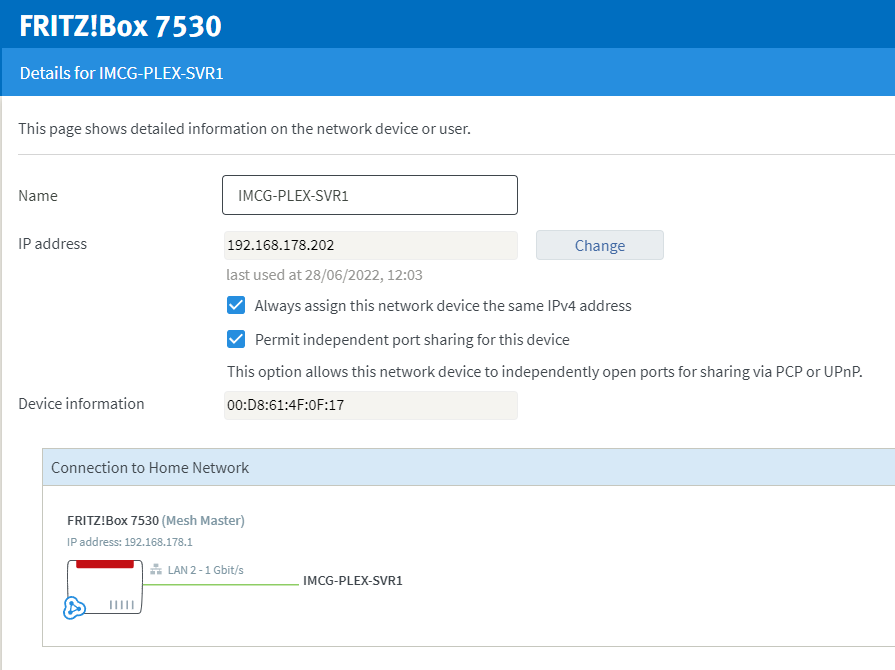
The problem of remote access was caused by the Internet Router being used, this was a Fritzbox 7530 ADSL Router provided by Zen Internet. Support had stated that upnp was enabled by default, however, after some digging around within the configuration, it transpires that upnp is disabled by default and that it has to be enabled on a per device basis.
The Solution:
Step 1: Log into the Fritzbox
Step 2: From the main menu, select Home Network → Network
Step 3: From the list of devices, select the device running Plex
Step 4: Select Edit
Step 5: Select Permit Independent port sharing for this device.
Step 6: Select Ok
