Plex starts, but isn't discoverable by any devices after server restart

Server Version#: 4.47.3
Player Version#: Any of my devices

I have Plex server running on a dedicated high end Windows 10 PC, and for the most part it works very well.

However, I’m encountering an issue where whenever Windows decides to reboot itself for any reason (usually a Windows update), upon starting back up Plex isn’t automatically available to any of my streaming devices.

Just to be clear, Plex is starting up ok after each reboot (it shows the Plex taskbar icon as expected), but here’s the weird part…

I have to open a browser, and browse to Plex’s home page http://127.0.0.1:32400/web/index.html to get it working again.

As soon as I do that (just load up the home page, nothing else), Plex becomes available to all of my devices again.

Has anyone come across this issue before?

Any help greatly appreciated.

I’ve answered my own question and managed to get this working properly, so I’ll post my steps below to maybe help anyone else having a similar issue.

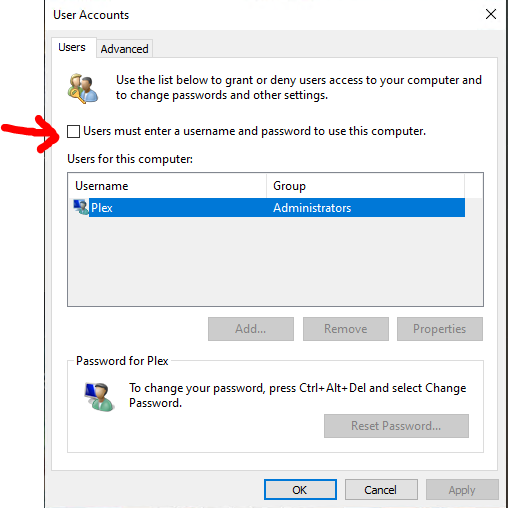
  1. I followed the steps in this guide to automatically login and bypass the login prompt whenever the Plex server PC restarts.

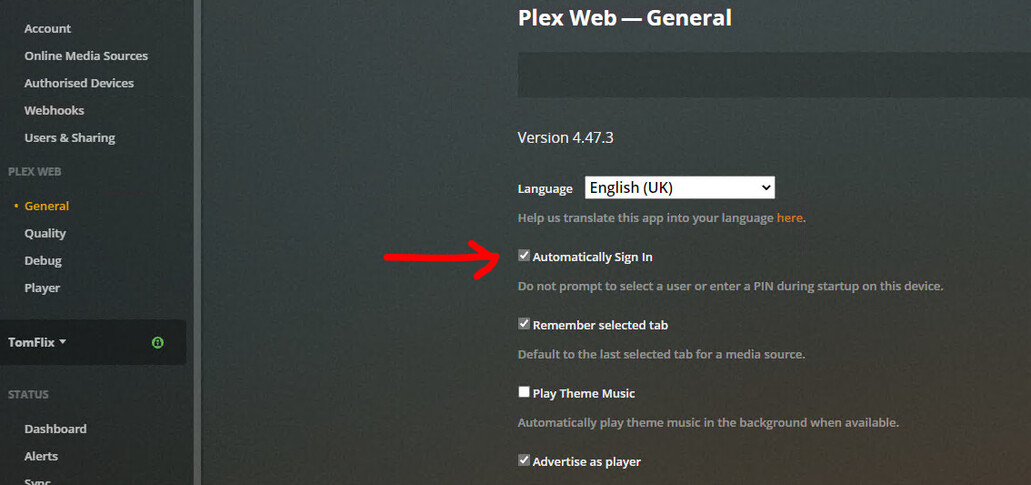
  1. I then enabled the Automatically Sign In option in the Plex Web—General page:

  1. I then added an Edge browser shortcut to the current user startup folder in: C:\Users\Plex\AppData\Roaming\Microsoft\Windows\Start Menu\Programs\startup.
  1. I then added the relevant URLs to Edge’s On-start-up section:

I’ve tested this by restarting the Plex server PC multiple times and it works perfectly every time.

Now if my Plex server PC gets rebooted for any reason I no longer have to remote onto it to get Plex working and discoverable again. :smiley:

I’m happy it works but you shouldn’t have to do all of that.

I agree, but I’ve no idea why it’s happening or how to properly fix it, so this’ll have to do for now.

1 Like

This topic was automatically closed 90 days after the last reply. New replies are no longer allowed.
