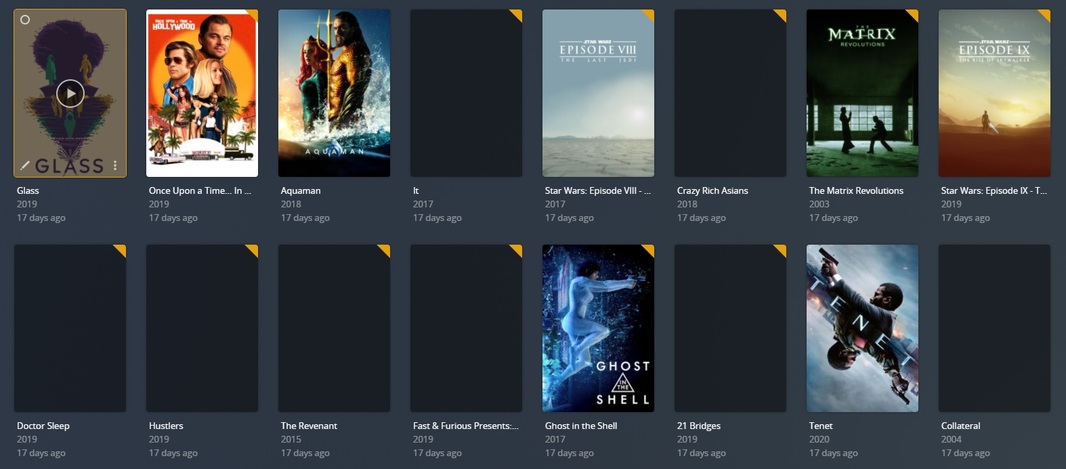
Server Version#: 1.25.3.5409
Player Version#: 4.72.1 WEB (Issue present on all players, Android phone, Nvidia Shield, MacOS, Win10 player)
I have had intermittent problems but recently plex is repeatedly dropping 75%+ of the posters and refusing to display them. Sometimes I can edit the movie and select an alternate and it is seemingly fixed. Sometimes the alternate does not work. Issue was originally present only on the Movie library but has now migrated to happening on TV and music libraries. I have tried
Force metadata refresh for complete library
Manual metadata refresh for individual files
Optimized database
Cleaned bundles
Changed Agent (from Plex Movie to The Movie Database and back again)
Changed Scanner (From Plex Movie to Plex Movie Scanner and back again)
Created a new library
Restarted server and Plex server
This has happened once before and I corrected it by manually changing all the poster images again, but now it’s seemingly a daily problem and with nearly 700 movies in the library now I can’t easily go in to fix it by hand. Does anyone have any idea what might be happening? Which log file should I upload that might help? I have just tried changing one of the missing ones and found it’s not even allowing it, with it spitting an error after hitting save.
Adding an extra note, in further testing I found that refreshing metadata has started for some reason detecting everything as being Danish, and selecting oddball matches that were not previously a problem.
I think I am going to try downgrading my PMS version as looking back at it it seems like most of my problems started around the time I upgraded to the most recent version (or shortly after)
Are the affected movies MP4s with embedded movie posters?
Is the library configured to prefer local metadata?
Possible workaround #1:
Delete the embedded artwork from the MP4 file, then re-scan the library and refresh the metadata for the file (or library).
Possible workaround #2:
Disable “Prefer Local Metadata” for the library, then refresh the metadata.
Plex will re-scan the library and download posters and other metadata from the online sources.
Not sure what will happen to any custom posters you have picked, custom sort names, etc.
I ran into this problem with some of my MP4 files with embedded artwork. Not sure why it was happening. I just used the workaround.
Deleting the embedded artwork pushed Plex to pull down posters from its online database. However, it can be a laborious task. Windows: Mp3tag. Mac: Subler. I’m sure there are other tools as well.
Configuring Plex to ignore embedded metadata also worked. There was nothing in the embedded metadata that I cared about, so ignoring all of it did not matter.
Suggest you try this with a subset of files first, so you’ll see if/how it works on your system. If it works, then you can try on a larger set of files/libraries.
To change Plex to not look at embedded metadata, edit the library, choose Advanced, deselect Prefer local metadata, save, then refresh the metadata for the library.
i’ve only seen this happen when randomly switching agents back and forth because the languages available for agents are not the same and it just picks in think the next one in list then when you switch back it keeps that new but wrong language because it does exist in both. Like there are three versions on English in new scanner but In think only 1 in old.
would probably be helpful to see the media xml info for one of the affected movies while it is having the issue
Sorry if this isn’t the format you want it in, but not sure how exactly to upload an XML as plex sees it so I dropped it into notepad. This is an example of a movie that has
A: No poster selected
B: Match corrected to Danish when it should be english
When I try selecting a poster from the edit menu, I get “an unexpected error occurred”
I’ve also tried creating a new library with one of the movie folders, setting it with local asset options both toggled off it pulled in 69 movies (nice.) but only 1 of them has poster data attached.
Sorry I didn’t respond earlier but the vast majority of my libraries are MKV files for video and FLAC for MP3. The weird metadata/poster issue seemed to be somehow hitting the whole lot. I actually went ahead and uninstalled Plex, and downgraded from 1.25.3.5409 to 1.25.2.5319 as I don’t remember having any issues in December.
Since downgrading 5 minutes ago it immediately loaded up with all posters and metadata intact and working. I’m going to run it on this version for a bit and see if anything crops up or if it just plugs along without complaint.