Server Version#: 1.41.8.9834
I am pulling my hair out trying to solve this issue and would appreciate any help or guidance. I was previously using Nginx Proxy Manager as my reverse proxy and was able to get this working (not sure what I did differently) but now I am on Traefik and can’t figure out how to get the real client IP address to show in Plex dashboard. But for some odd reason, my Apple TVs show up correctly.
Here is a screenshot:
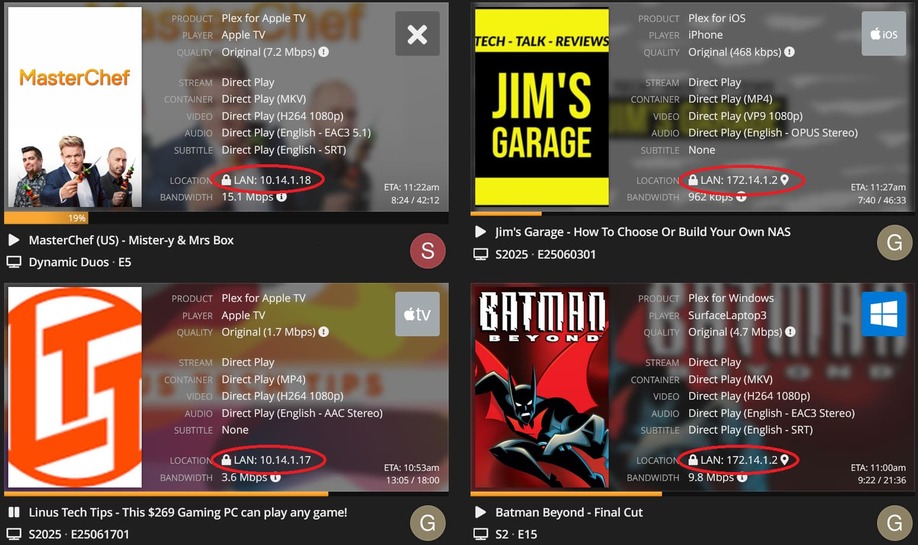
My current setup:
- Plex’s remote access disabled
- Plex’s LAN networks field:
10.14.1.0/24,172.14.1.0/24 - Traefik handling domain certificates
- Traefik labels:
- "traefik.enable=true"
- "traefik.docker.network=proxy"
- "traefik.http.services.plex.loadbalancer.server.port=32400"
- "traefik.http.services.plex.loadbalancer.serversTransport=default@internal"
- "traefik.http.services.plex.loadbalancer.server.scheme=https"
- "traefik.http.routers.plex-external-secure.service=plex"
- "traefik.http.routers.plex-external-secure.entrypoints=websecure-external"
- "traefik.http.routers.plex-external-secure.rule=Host(plex.${DOMAIN_NAME})"
- "traefik.http.routers.plex-external-secure.tls=true"
- "traefik.http.routers.plex-external-secure.middlewares=websecure-external-middlewares@file"
- Already have
forwardedHeadersset toinsecureto allow all headers to pass through while I try to debug this.
  websecure-internal:
    address: ":443"
    forwardedHeaders:
      insecure: true
