Server Version#: 1.41.4.9463
Player Version#: 10.26.0.2578
- Platform: Android
- Product: Plex for Android (TV)
- Player: SHIELD Android TV
- Device: NVIDIA Shield Pro 2019
Issue
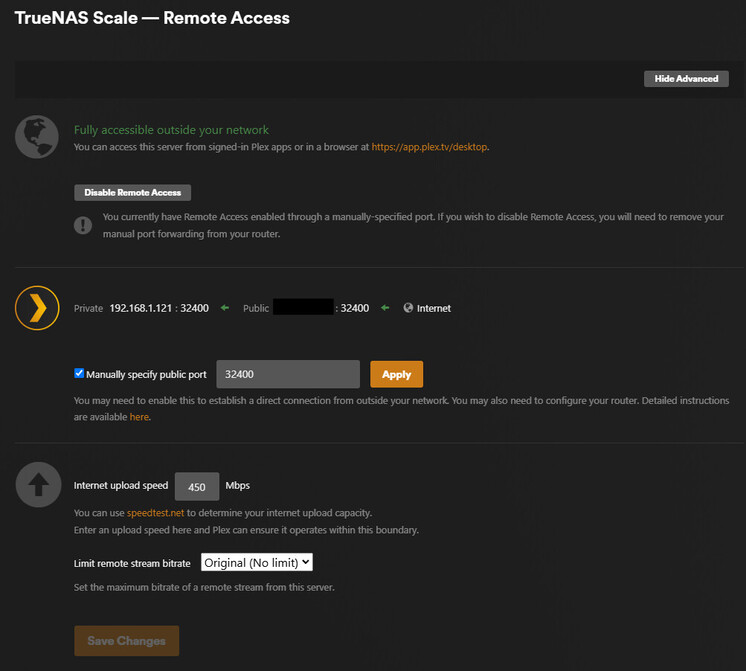
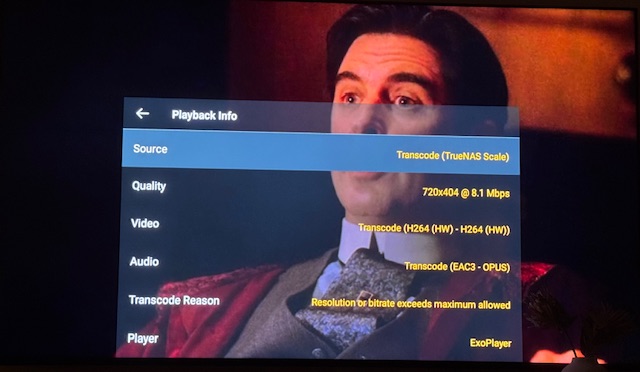
Often (but not always), when transcoding, my bitrate will be throttled to 2000kbps. I have checked what I think are the obvious things (PMS limits on remote stream bitrates, player home streaming settings, etc.) but I can’t find the source of the throttling. Additionally, the stream is being detected as LAN (which it is) so none of the remote streaming settings should even apply here (but I have included them anyway).
Now, I understand that the audio stream is transcoding because my player/tv doesn’t support 6-channel EAC3. I think the the video stream is only transcoding because of the bitrate limitation, but what I don’t understand is where that bitrate limiting is coming from. Here are some applicable settings:
Hardware
- Intel Core i3-14100
- Hardware Transcoding enabled with iGPU (Intel Quick Sync)
- 32 GB DDR4 RAM
TrueNAS Scale Container Settings:
- Image: Plex Official Image
- Local Networks: 192.168.1.0/24
- Host Network: Checked
PMS Settings:
- Enable Server support for IPv6: Disabled
- LAN Networks: 192.168.1.0/24
- Treat WAN IP As LAN Bandwidth: Enabled
- Enable Relay: Disabled
Plex App Settings:
- Home streaming: Maximum
- Quality Suggestions: On
- Maximum Remote Quality: Unlimited
Transcoding
Network Topology
The NVIDIA Shield and the TrueNAS Scale server are both on the same subnet. The Plex container on TNS is configured to use the host network. Both remote streaming and local streaming work fine (except for the occasional throttling on the Shield).
Here is the Plex Media Server log containing the stream in question. If you need more logs, I can provide them. But this specific stream starts around the Feb 20, 2025 20:06:57.047 mark.
One Interesting Log Entry
Feb 20, 2025 20:06:57.146 [140250809899832] DEBUG - [Req#17bf07/Transcode] Streaming Resource: Calculated bandwidth of 6934kbps exceeds bandwidth limit. Changing decision parameters provided by client to fit bandwidth limit of 2000kbps
Plex Media Server.log (5.6 MB)
Any ideas on what could be causing this throttling?
Edit: realized I didn’t reply directly to this response
Thank you very much for replying to my post. I spent some time looking into this before I responded. I read through the article you linked. I had already turned off DNS rebinding protection on my router. My specific router enforces the feature through the ISP’s DNS which I overrode with custom upstream DNS servers. According to the ISP’s documentation, this should be all that’s required to disable the rebinding protection.
Is there something in the logs that seems to indicate that my connection was not able to be established securely? I tried searching for terms like ‘secure,’ ‘insecure,’ ‘dns,’ etc. but didn’t find anything useful (though, I’ll admin I don’t know exactly what I’m looking for).
Additionally, if I understood the article correctly, the potential issue is that when DNS rebinding protection is enabled, my streams may be treated as remote, thereby enforcing remote streaming limits:
Warning: When working around DNS rebinding protection this way, your apps and Plex Media Server will typically treat the connections as being from a “Remote” source. This can affect which streaming qualities are used, as well as trigger Remote-applicable server bandwidth and transcoding limitations.
However, I have my Limit remote stream bitrate setting set to Original (No limit) and my Internet upload speed setting set to 450Mbps. Similarly, on my client, I have Maximum Remote Quality set to Unlimited. So even if the stream was treated as remote, it still shouldn’t be throttling to 2000kbps, right? I frequently transcode remote streams that exceed 2000kbps for some of my remote users.
Please open a web browser and open the hosted web app in it.
Open the server Dashboard (do NOT use Tautulli)
Recreate the issue with your phone.
Look at the Dashboard (enable the Detail view)
What is shown for the phone client? “local”, “remote”, or “indirect”?
I have the same issue as the OP. My clients (iPhone & LG TV) all only connect indirectly.
@OttoKerner, unfortunately, I can’t replicate the exact issue with my phone because it only happens when I’m using my NVIDIA Shield (so far at least) and even then, the issue is transient. After making the original post, I went back and watched the exact same episode without any throttling. That’s what makes this even harder to troubleshoot.
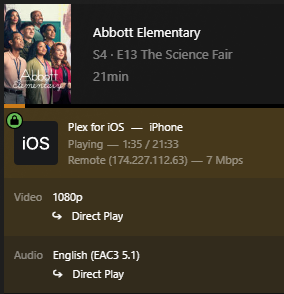
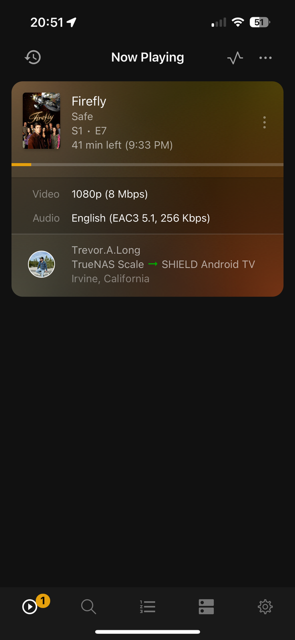
That being said, though, I did play the episode on my mobile phone while disconnected from my network. All remote clients show up as remote, I’ve never had anything show up as indirect. All of my LAN devices show up as Local and all WAN devices show up as Remote:
@Kvanrooyen, my issue is actually different. None of my devices show up as indirect. I would recommend you look into disabling Enable Relay in PMS > Settings > Network. I would also recommend populating the LAN Networks field on that same page, if you haven’t already done so.
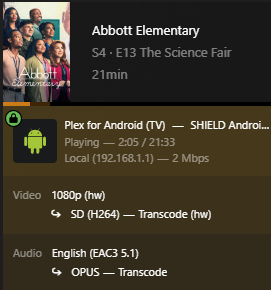
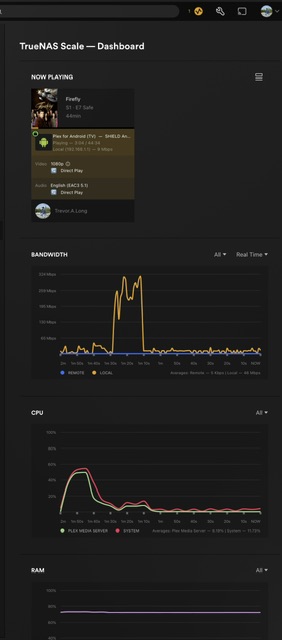
@OttoKerner, additionally, here is a screenshot of the Plex Dashboard from the original problematic stream. I didn’t post it the first time because the forum only allowed 5 embedded media pieces. It correctly indicates the stream type was Local as the Shield is on my LAN.
I just noticed this. On the original problematic stream, the IP address for the local play is showing up as Local (192.168.1.1) which is the IP address for my router. I tried playing a different piece of media for comparison and it correctly shows up as Local (192.168.1.153) (my shield’s actual IP address).
I don’t actually know what this implies, but it certainly seems applicable.
@Trevor_A_Long I’ve tried both of those and nothing changed unfortunately.
Edit:
It wasn’t super clear in my original comment but the issue of the stream being limited to 2000kbps is the issue I’m having that is the same/similar to you. Just the root cause seems to be different.
This could mean that your server is intermittently not available.
Did you follow best practises?
- give the server a fixed local IP
- only use wired network connections for server and data storage
- disable any power saving tricks on the network adapters of server and network storage, like “Power-Efficient-Ethernet”, or switching link speed to a lower standard when idle
@OttoKerner, sorry for the late reply.
- Yes; the server has a static IP address assigned (192.168.1.121)
- Server/storage is connected via Ethernet.
- I checked my mother board (ASUS PRIME H610I-PLUS D4) and didn’t see any settings related to EEE for the onboard Ethernet adapter. Max Power Saving is/was disabled.
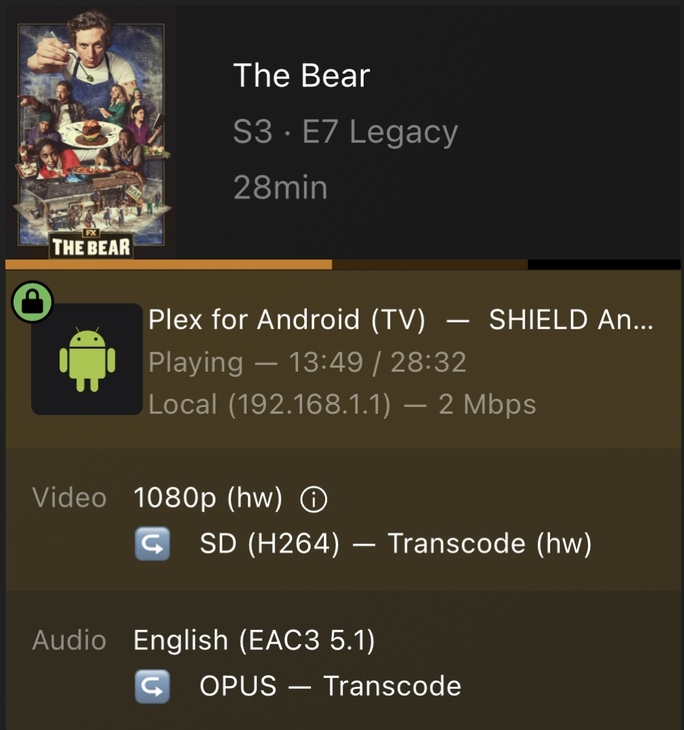
The issue presented itself again today (actually multiple times). I took a few more screenshots of the plex dashboard:
It’s the exact same file, just a few minutes apart. All I did was hit the back button on the remote and then play the episode again. Here is a log file that contains both the throttled and the successful stream (E7 - Legacy):
Plex Media Server.log (4.9 MB)
One more thing that’s interesting to note. This time, both the throttled and the successful stream showed as Local with an IP address of 192.168.1.1 (my router) instead of 192.168.1.153 (my NVIDIA Shield). So now I’m not sure if the IP address showing up wrong is an actual issue or just a red herring. My shield direct played video and audio in full quality (same file) while showing my router’s IP address. Definitely weird, but related to the issue I’m this thread?
Please disable “verbose” logs.
Stop and restart the server.
Recreate the issue.
Fetch the logs.
@OttoKerner, I was curious why verbose logs were still showing up. I disabled the setting a while ago but missed the step where I needed to restart the server. I have done that and duplicated the issue with a new piece of media titled “E10 - Forever”. Here are the logs from the first (throttled) stream and then I hit the back button to terminate the stream and restarted the same piece of media only for it to immediately direct play:
Plex Media Server - 2025-02-26.log (802.1 KB)
It definitely applies a bitrate limit of 2mbps.
This jumps out
Request came in with unrecognized domain / IP '136.52.21.36' in header Host; treating as non-local
Do you find that IP anywhere in your settings of plex server, VPN, or router?
Is your local network fragmented in some way, by usage of additional “router”-type devices as wireless access points, or wireless range extenders?
@OttoKerner Yeah, that’s my current WAN IP from my ISP. Any reason why a local stream might be picking up the WAN IP address but still show up as Local/LAN?
Also, none of my actual remote streams have that limit enforced. Any reason why it would be enforcing that limit here and not on any normal remote stream?
That comes back to my initial suggestion: DNS rebinding protection.
What are the quality settings in the app? Looks like the limit is coming from there.
@OttoKerner, sorry for the delayed response (again) but the issue wasn’t occurring for a while. What I did in the meantime, based on this suggestion: I changed all of my DNS info to hardcode 8.8.8.8 and 8.8.4.4 (client, server, and router). I have a Google Fiber router and followed this support article: DNS rebinding protection - Google Nest Help
I set the DNS servers as described and then I restarted the router, client, and server. From what I can tell, there’s no reason why DNS rebinding should be enabled at all at this point. For a while, I wasn’t noticing the throttling issue (but I was watching plex significantly less so that could be why). But I noticed it again last night and grabbed some more screenshots:
Throttled Stream
Direct Stream
Plex Logs
Here are the logs (episode title is “E7 - Safe”):
Plex Media Server-03-06-2025.log (1.3 MB)
@MovieFan, here are the settings from my plex client (NVIDIA Shield):