Server Version#: Version 1.31.3.6819
I’ve been running Plex Media Server for years, but recently it’s been using 100% CPU constantly with no files streaming. I’m having to end the program and restart, it’ll work for a viewing and then the issue will happen again. Once it happens, I cannot connect to the server any longer. It’s an older PC, but still i7 with 16 GB ram, and again has been running flawlessly for a long time.
I’ve tried uninstalling and reinstalling PMS, with no luck. I haven’t changed any settings on PMS or the PC. Any ideas?
Thanks
Settings - ‘Show Advanced’ - Server - Library - “Generate credits video markers” ← Disabled
Save Changes,
restart Plex server
See if the issue continues.
Thanks, I’ll try that. What about intro video markers? I’ve had those before with no issues. Did something change recently?
Credit markers vs. intro
I’m guessing the credit detection is probably more cpu intensive since it’s analyzing the video. The intro markers just analyze the audio.
Besides that, the intro markers get done during maintenance or when you add new content so it’s been happening slowly over a long period of time
The credit detection has never been done before so all the content on your server is getting done at one time
That would make sense. I have a ton of files, and if it’s doing the whole server… Thanks!!!
The issue is still continuing. Any other thoughts?
The issue is still happening. Any other suggestions?
Log files attached. After restarting Plex, it works for a bit, had some usage yesterday, then when I checked this morning, it was at 100% CPU usage, and impossible to do anything on the PC. Perhaps it happens overnight during the Plex maintenance cycle…
Thanks in advance.
Plex Media Server Logs_2023-03-29_09-16-00.zip (2.9 MB)
When did you tell the server to perform its maintenance? Are you trying to use the server during the maintenance?
I didn’t, I thought it does so every night automatically.
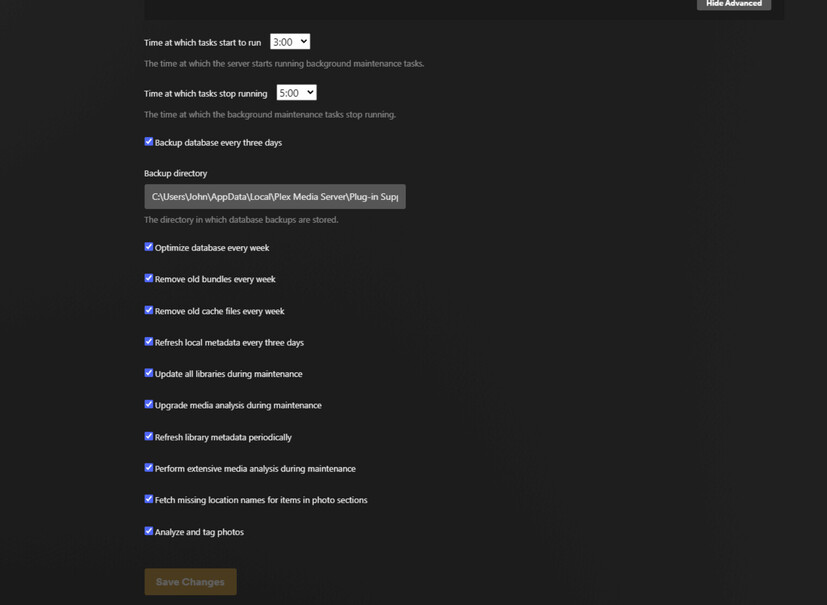
The scheduled tasks is what I was referring to. Should I uncheck all these below? This setting has always been this way, and I haven’t had any issues. Just recently it started.
Disable “Update all libraries during maintenance”
Leave the rest as it is.
Why did you put the Plex program files outside of the general Program folder?
Please determine which of the devices in your local network has the IP 192.168.1.70
(your router should have a list)
You are not adhering to the recommended naming and folder structure:
It looks like you have no folder per show, no subfolder per season, but one subfolder per episode. All wrong, and it will cause problems.
I:\Downloads\TV Torrents\Power.2014.S02E07.720p.HDTV.x264-KILLERS[EtHD]
After the server has scanned through this mess, it is spamming the logs with
Mar 29, 2023 03:15:40.079 [15372] WARN - SLOW QUERY: It took 2125.000000 ms to retrieve 1 items.
And this is continuing from there. It spends the majority of its time waiting for the database.
How much free space is left on drive C: ?
If it’s an SSD, how old is it?
After watching the plex periodically throughout the day, I see that the CPU usage gradually increases the longer it’s been running until it gets to 100%. With no usage. I just restarted it, as it was already at 68% cpu usage after I restarted it earlier today, with no usage or tasks running.
My responses are in bold below.
Why did you put the Plex program files outside of the general Program folder?
**Not sure what you mean, C: Plex Media Server - VS. C:ProgramFiles/PlexMedia Server?
Probably when I uninstalled and reinstalled, I just clicked thru without thinking.**
Please determine which of the devices in your local network has the IP 192.168.1.70
(your router should have a list)
I believe it to be a TV in our Kids Game Room
You are not adhering to the recommended naming and folder structure:
It looks like you have no folder per show, no subfolder per season, but one subfolder per episode. All wrong, and it will cause problems.
I:\Downloads\TV Torrents\Power.2014.S02E07.720p.HDTV.x264-KILLERS[EtHD]
I wasn’t aware of the naming and folder structure, but have used Plex for years with no issues.
After the server has scanned through this mess, it is spamming the logs with
Mar 29, 2023 03:15:40.079 [15372] WARN - SLOW QUERY: It took 2125.000000 ms to retrieve 1 items.
And this is continuing from there. It spends the majority of its time waiting for the database.
How do I fix this?
How much free space is left on drive C: ?
If it’s an SSD, how old is it?
** C: Drive is a brand new SSD, with 813GB of free space left available. **