Server Version#: 1.19.4.2935
Player Version#: 1.19.4.2935
Using Plex web player in Chrome on MacOS and casting to TV via Chromecast. It used to automatically play the next episode by default, but since a recent upgrade it no longer does this. When an episode ends, it starts to load the next one, but the loading aborts and I just see a blank screen. I have to start the next episode manually from the web app. Can’t find anywhere in settings where this can be configured. Seems like a bug, because I haven’t changed any config settings since the last time this worked correctly.
Ws there a reason you are running that old server version? are you using app.plex.tv or the local one? You can view the web player version in General settings under Plex Web
Using app.plex.tv. Looks like plex web version is Version 4.50.1. The other number (1.19.4.2935) must be server version. Can’t remember last time I upgraded, but the issue with queueing started recently, in the last couple of weeks.
I am getting the same thing when I am trying right now. Thanks for reporting. I’ll make a bug report
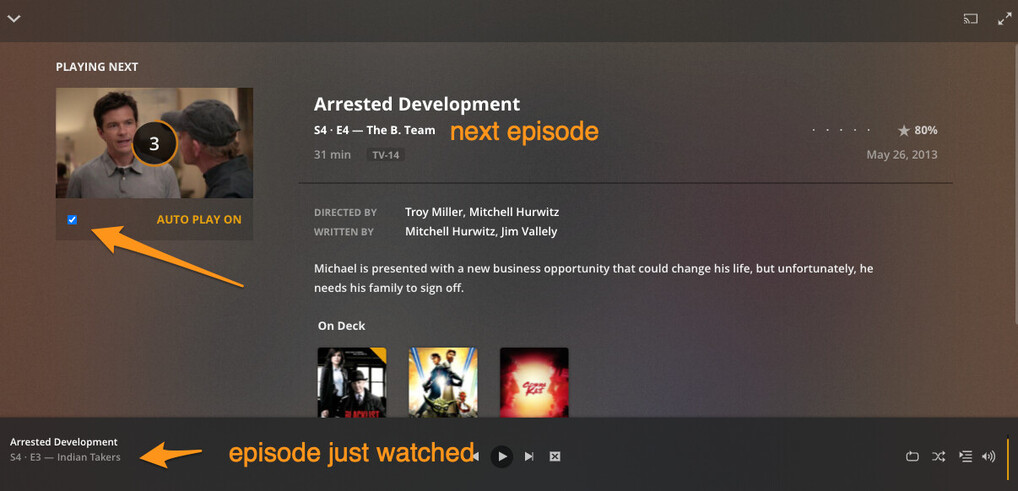
The post play screen is not showing for some reason when connected is why. if you disconnect from your chromecast and wait til the end of episode you will see the post play screen with the 10second timer before next episode starts. that has the Autoplay enable checkbox.
BigWheel, can you clarify that last part? Where is the autoplay checkbox and how do I access it? Is it a “sticky” default setting, or does it need to be checked each time?
I only ever watch on Chromecast, so if I have to disconnect from it to queue up the next episode each time, that’s not much of a workaround. But if the setting stays checked, that would be good.
Disconnect from the chromecast and just play it in the browser. at the end you will see the PostPlay screen. For me when connected to chromecast the mini player was still there and I could hit the next track arrow to skip to the next episode.
Thanks, BigWheel. I see the checkbox when I disconnect from Chromecast just before the end of an episode, and it is checked, so I can confirm the setting is enabled. But if I don’t disconnect from Chromecast, the next episode does not auto-start.
I’ve been having the same problem. When I use the mobile app to cast videos, the autoplay works great. But, when I use the app.plex.tv to cast videos, at the end of a video the countdown timer starts. After about two seconds of the countdown timer, it just goes back to the Plex screen. I definitelky have autoplay checked, and it looks like it is going to do it for the first two seconds and then fails. Server 1.22.0.4163. Plex Web Version 4.52.1.