I have been successfully running Plex on a Windows machine for a few years now. I recently got a F4-220, and was able to move all of my media to it and point the server to look at the network hard drive without a problem.
But, I figured since the F4-220 is supposed to be able to run Plex, I could load plex on it, and repurpose the media server to another function and get it out from under my desk.
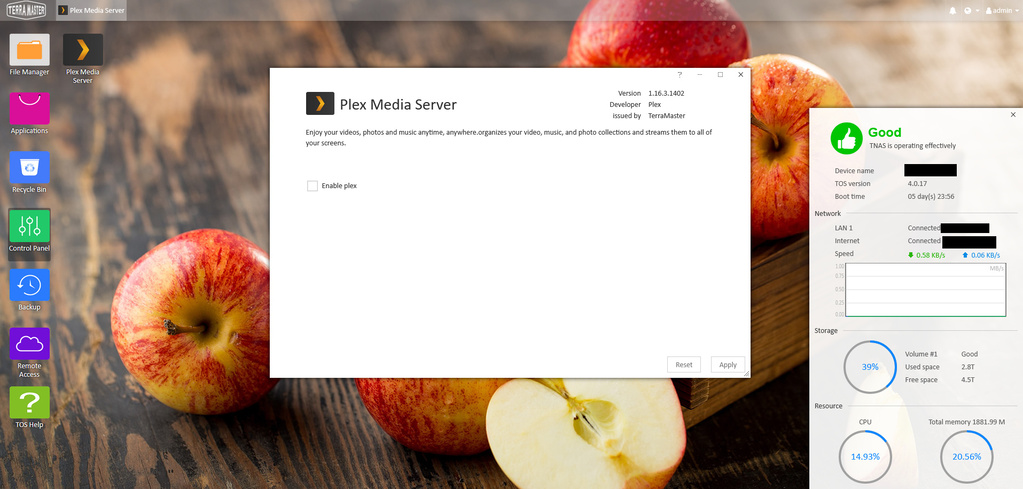
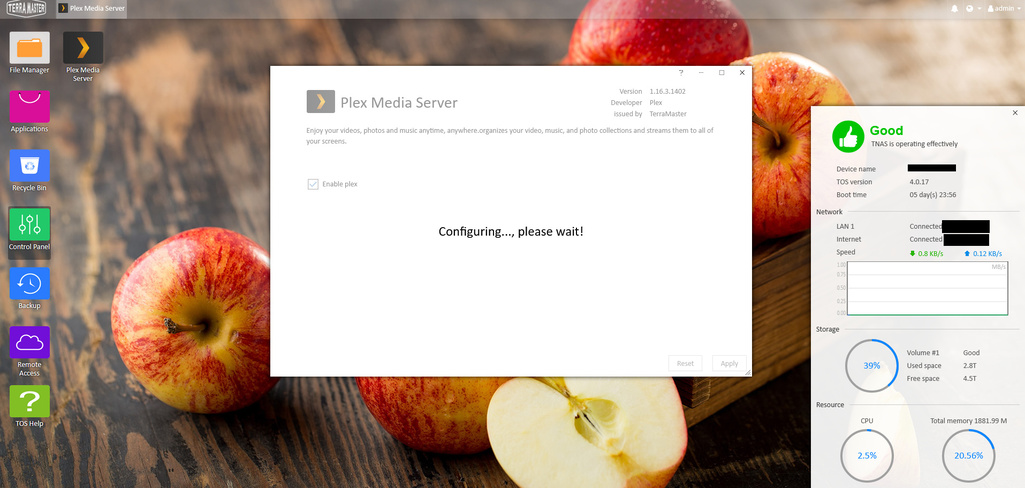
Plex installs on the F4-220 just fine. I’ve installed it and uninstalled it a half-dozen times. The problem: When I open Plex on the NAS, I get the “Enable Plex” screen. I check the checkbox, click “Apply”, and wait for the configuring screen to finish.
When it’s finished, the “Enable Plex” screen is back, and the checkbox is unchecked. Trying to browse to the NAS via port 32400 returns a server timeout. Plex doesn’t appear to be starting or enabled.
Hi, there should be a button “Enter Plex” under “Enable Plex”. please advise your browser, and try the following:
1 change for a different browser such as Fire Fox, Google Chrome
2 please click reset and enable Plex again.
There was an update today, which strangely didn’t change the version # of plex. It’s still 1.16.3.1402, but there’s a release date of Aug 27, 2019, 6:55am.
I’ve uninstalled Plex (again) and reinstalled. The new release did not fix the issue.
Got Terramaster support on the line. These are the steps they went through to try to solve the problem.
In UI, attempt to start plex (replicating the problem).
In UI, go to applications folder, find plex, and uninstall it. This won’t remove all the files on the drives. Use SSH to do that manually.
ssh root@[my NAS ip] -p 9222 (note: SSH has to be enabled on your NAS under Control Panel -> Telnet & SNMP) (note2: Had to type “yes” to allow, and type my admin password)
cd /usr/local/pkgs/ (go go the packages directory)
ls (to make sure the plex directory is there)
md5sum plex.bz2 (check md5 checksum of the plex package)
mv plex.bz2 plex.bz2.back0828 (made backup of package by changing name)
rm -fr plex/ (remove plex installation directory)
Go back to UI. Click “applications”. Find plex and reinstall it.
md5sum plex.bz2 (check md5 of new package. It is the same as old package)
Once plex is installed, go back to UI and double click desktop icon. Click enable. “Enter Plex” does not appear. Click Apply. “Enter Plex” does not appear. Problem remains.
Summary: Completely wipe and reinstall of plex does not solve problem.
Email from support this morning asks me to update plex.
Log in to TOS, see an update icon on the applications folder. Looks like they rolled something back. Release date now shows as July 30, 6:01 am
Update plex. No change.
Go through above steps to completely wipe plex and reinstall. No change. Problem remains.
Read through some forums, where some people have solved this problem after a hard system shutdown. I shut down the box via the admin->shutdown menu. Restart box with the power button. Log into to TOS, and double click the plex icon. “Enter plex” appears!
Problem solved
(it’s worth noting that I tried the hard shutdown on the prior version, without success).
I’ve got an e-mail from Terra Master support this morning saying that they will update Plex today and will let me know when I can update. I’ll let you know if I hear back from them.
I’m confused. You said a hard restart fixed the problem and you marked it as solved.
Then you said an only updating the app fixed the problem. Would you clarify please?
Take a look at the user name who posted. Someone else said only updating the app fixed the problem. That wasn’t me.
To be clear, and it wasn’t noted at the beginning of the topic, but I did try to hard restart several times prior to contacting support. So that wasn’t the ultimate solution. I assume that updating the app followed by a hard restart is what did the trick.