I’m having this same issue with Plex app on Windows. So it’s not just Roku. I’ve also noticed it doesn’t happen with every file - but it isn’t about the format. I have one mp4 showing this issue, but other mp4 files don’t. This one is different because I didn’t follow my normal workflow. I used a couple utilities to split and then rejoin parts of this file. I’m wondering if something about the way this was done is causing problems for Plex.
This longstanding bug is slowly driving me insane.
In my case it affects movies and short TV episodes as well. Some files are affected, some aren’t. I haven’t been able to figure out any common elements between those that work well and those that restart.
What can we do to help troubleshoot this issue further?
This is affecting me as well, on a Roku streaming stick.
I’m not clear who is having problems with live TV and who is having problems with regular files in their library they would be separate issues.
Are you expecting a live rewind? the time line slider just goes back til you hit play. been trying to reproduce it starting from the beginning for the last hour and seems to work fine.
I’ve not personally seen this happen with live TV. Only with files that exist in my library.
Any new information?
This is happening to me as well. Running plex from Roku , watching a movie trying to seek back a few scenes and it starts at the beginning. Frustrating to say the least. Never had this problem before. What’s the point on being a Lifetime plex pass owner when they cant even resolve something as basic as this.
I tested this on WMP and VLC and I’m able to rewind and FF. Money well spent 
still have not been able to reproduce this.
If there are mkv files can any of you try mkclean
if that does not work can you please turn on network logging on your Roku then reproduce issue.
Me too. Here is a detailed breakdown.
With Direct Play…attempting to scrub or resume a partially played video makes the video jumps to beginning.
Plex on Roku Premier+
PMS 1.18.6.2368 on Synology 918+
Playing a 1080i mpeg2video in a TS wrapper, recorded by Plex, via HDHomeRun Quattro.
In order to have the audio Dolby Digital+ (superior multi channel audio over regular surround sound) I set Direct Play to “forced”. The video plays fine from the beginning. Attempting to scrub or resume a partially played video makes the video jump to the beginning.
How do I fix this?
is everyone here doing this?
We were able to repo this using a Roku Premiere+, seeking does fail when forcing directPlay, but I have just one question to make sure u guys see the exact same behaviour!
So, when I let it play say “20 sec” and then seek forward (say to 2mins) it doesn’t go to the begging it feels as if the progress had just continued (meaning it will feel has if I seeked to 22secs or so… and I get the same if I try to go back!
tl;dr is that it feels like seek was ignored, and progress continues to be reported back and hence when u press play it just continues from there!
Is this what you guys experience to? Just want to be super sure its the same issue!
So this seems to be a limitation of the firmware, it can’t DP this properly hence why in the app we prefer transcode (if DP=auto) but we do copy the audio, so its only Direct Streaming not full transcode!
Can you try to set to original quality and allow direct stream, DO NOT force direct play and see if you achieve the same end result?
P.S. Also make sure volume modes are NOT set, this will force a down conversion during transcode as it sets the roku output to 2ch (See: https://support.roku.com/article/226802507-how-do-i-use-volume-modes-on-my-roku-streaming-device-)
The key attribute to this behaviour is that it’s a video, recorded via the DVR, in a “TS” wrapper.
Sorry, but the wording in your reply was a bit confusing.
The video jumps to the beginning, no matter where I start from if Direct Play set to Forced.
Inversely (to answer your question), if Direct play is set to “allow” or “off” this behaviour does not happen. Unfortunately, I then lose out on the, superior, Dolby Digital+ audio.
Video has always been set to original quality. Direct stream has always been checked/on.
Roku info: Model 4630x (Premier+), software version 9.2.0, build 4807
Roku audio settings are:
- Mode = auto (Dolby Digital Plus, DTS)
- HDMI = auto (Dolby Digital Plus, DTS)
- Volume Mode = off
I understand its with mpeg2 in a ts container which is the same I have for my own recordings! My audio however in my case is mp2 2ch only!
What audio do you have in the recorded files? If Direct Stream is on, DirectPlay is auto/allow (don’t set it to off as you will ofc need it for other cases) you should get the ORIGINAL audio!
If this is not the case then please post a screenshot of the Dashboard (web app) while this is happening!
If the roku supports the audio we should copy (Direct Stream) if not (has in web) it will fully transcode as I see here:
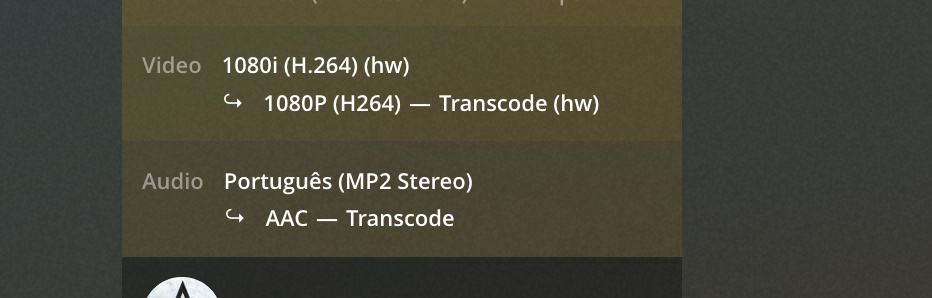
If that’s the case and if its truly a codec that is not supported than I’m afraid you are out of luck as this is a firmware limitation, and forcing DirectPlay is always a gamble , not just in roku!
However if the audio is also being transcoded but SHOULDN’t than that might be our bug! So please post that screenshot so we can understand it better.
Also,
This I can’t repo, but the way it behaves might be slightly different, we definitely have an internal issue logged about seek not being supported for a ts container (which was why it was decided not to use DP automatically), in fact they don’t even list this in the support codecs/formats but unofficially my understanding is it does work in some cases… but anyway, regardless of if it jumps to the begging, or if its like in my case where it jumps to where it was + a few secs (as if progress never stopped in the background) the fact is this is not fully supported by the firmware!
In any case if you can provide the screenshot we can learn a bit more.
The audio in my recorded file is AC3 6-channel (5.1), 384kbps, sample rate 48k
Here are two screenshots: This first is DP on auto. .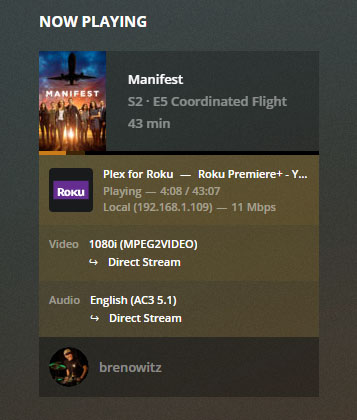
the next is DP on forced
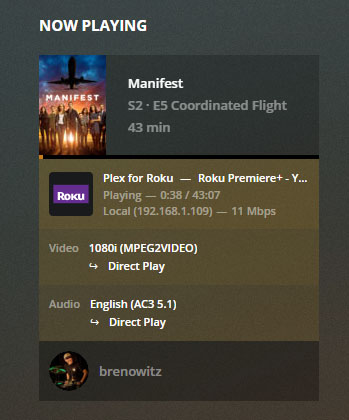
Again… when forced, the better quality, Dolby Digital+ audio is passed to my receiver. It’s a big difference in channel separation and clarity.
But this is not EAC3 (Dolby Digital Plus) its AC3 and in both cases it seems the audio is indeed AC3-5.1 so Direct Stream is working fine and copying the audio track.
This just started happening to me about a month ago. Plex will not allow me to fast forward or rewind random MKV files without restarting the movie. Also, when I go back to watch a movie after pausing it, it restarts from the beginning. This seems like a pretty serious bug, any updates?
Just started having same problem. Wife was watching a tv show, a SD Mkv file. She turned it off and when she came back to resume, it restarted. No amount of fast-forwarding worked as it kept restarting the file. This is on the TCL roku tv.
Ok her iPhone she can move forward and back without a problem.
On roku everything is direct stream, no transcoding. On her phone everything is direct stream except container which says transcode (MKV > MPEGTS)
This is quite annoying and with all the recent server crashes it seems things are getting worse overall not better.
Anyone know a fix?
I am also experiencing this issue. I can’t get Dolby Digital to work on Roku without Force enabled on Direct Play but then FF/RW don’t work, it snaps to the beginning. If its on auto the controls work but it transcodes the audio down to 2-chan, video direct streams. I first noticed it on DVR recordings but it happens on literally every container type I have tried. This thread from last year has a good break down of the problem Fast forward or skipping forward on recorded tv doesn't work. For now I just deal with lower quality audio because resetting video back to the beginning is a huge hassle. Sometimes I will change it back to force just for a single stream to watch a movie with better audio quality.
There are a few known reasons why this would happen. All of which should be fixable.
-
If this is local media in an MKV container, not sourced from DVR: It’s most likely an issue with the container that the Roku is being picky about. You should be able to run your media through
mkcleanand replace the file with the output. -
DVR sourced media in a TS container. This should be transcoded/remuxed to fix any seek issues. If you have chosen to force direct play, then it should direct play, however you will most likely notice seeking issues. The Roku should be set to
AutoforDirect Play. If you are forcing direct play for other reasons, then let’s tackle those separately.
I can’t get Dolby Digital to work on Roku without Force enabled on Direct Play but then FF/RW don’t work, it snaps to the beginning.
This should not be required, nor is it the correct fix as you noticed it may cause other issues. Forcing direct play will bypass media compatibility checks, potentially rendering a less than ideal playback experience. Please make sure you have these three Roku setting set properly
Roku Audio Settings:
- Mode = auto
- HDMI = auto
note: you should see Dolby Digital mentioned above if it’s detected in the auto mode.
Roku Volume Mode (can be set during playback)
- Volume Mode = off
