Hi
I am using Plex with my WD My Cloud Home and a Sonos speaker with Alexa. I have set up the music sharing folder and copied folders with music into the Plex folder. The albums are show
ning up on the Plex desktop app. I ask Alexa to tell Plex to play the album (name) and it works fine. The next day i do the same and Alexa says 'Playing the album (name), but there is no sound. I deleted everything, disabled the skill, re-installed everything and exactly the same thing happens. When the albums are first copied and recognised they work fine. the next day nothing. Any ideas?
Alexa is a cloud based system and it must be able to find your server remotely over the internet. Double check that your remote access is working properly in Plex.
Also check if your server is set to use a static IP address. It could be that your router has given your server a new IP which effects your remote access.
Hi. Thanks for the reply.Ii have my WD My Home connected to my Virgimedia Super Hub3. I have reserved the IP address for the My Home, I have read that Virginmedia do not allocate static ip addresses. Could this be the issue?
No, not having a static public IP is normal. That would only impact you remote access. Plex will check for this and update every couple of hours. For your case, it’s internally so it’s your private IP that is important.
Can you restart PMS, wait 3 minutes, then get me the log? Next time you fail to connect, follow this guide, https://support.plex.tv/articles/200250417-plex-media-server-log-files/, to grab the logs manually and provide me those. Then I can check the difference to see what changed.
Did not know if you wanted the zip file or extracted files for the ‘working’ logs so sent this as well.Plex Media Server Logs_2020-09-16_20-23-49.zip (935.0 KB)
The zip is better/easier to download for me. No need for both so I deleted the first batch.
Tried playing an album this morning. Alexa says playing album but again no sound. I have attached the zip file as requested. CheersPlex Media Server Logs_2020-09-17_07-49-17.zip (1.0 MB) for all this.
Is this issue with Alexa? That’s a totally different thing.
Ignore. I was thinking I was in another thread.
Looks like your remote access stopped working. You appear to be using the automatic UPnP option. I would suggest changing that to manual and setting up a port forward in your router. UPnP can be flakey for remote access.
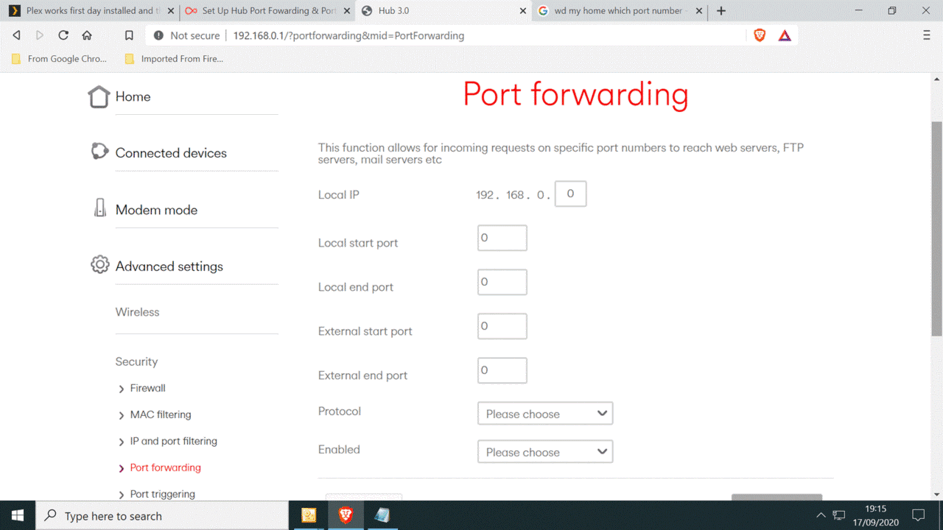

local ip - 192.168.0.75
local start - 32400
local end - 32400
external start - pick a number, I suggest something above 10000
external end - same as the start
protocol - tcp/ip
enabled - not sure what this is
Then you need to go into PMS and set the manual option and enter the same number as the external above.
Hi
OK I did a new install of Plex and have managed to do all of the above on my router. Alexa plays the album I ask for and I will check tomorrow to see if she is still working for me!!
Thanks for your help and hopefully it all works.
Good Morning. Last night I put one folder containing three albums into my Plex Shared Music folder. When I asked Alexa to to play them she obliged. This morning, I asked Alexa to play the same album, nothing! I asked Alexa to open Plex, she did. I asked her to change my server and she confirmed I had only one, My Cloud Home which was the default. I then went to PMS and added another folder containing one album. When I asked Alexa to play that album she did!! When I asked her to play one of the albums I inserted last night nothing.
So it seems if I put an album into PMS one day it plays but the next day that album does not! Weird!!
Any ideas?
Update:
Just tried something!. I removed the folder containing the 3 albums I put into PMS last night as they did not play this morning. I then copied them back into PMS and they played!!! Totally weird.
Tried something last night. I changed the time for the Scheduled Tasks from the default to 09.00 - 10.00 This morning Alexa plays the album selected. So I think the issue is with this. I will wait till after 10.00 and if the album does not play I will have been correct. If it is the case that this is the issue what can I do? Can I disable this or perhaps set the start and end time as the same?
The problem was definitely to do with the Scheduled Tasks. I un-ticked all the boxes and only had the Scheduled Tasks running for one hour and for two days now PMS works fine with Alexa. Don’t know what effect one of the tasks was having but it seems all is fine now. Well worth making a note of this in case someone else has the same issues. Thanks for your help.
