Server Version#: 1.20.1.3252
(WD MyCloudED2 Ultra)
Player Version#: 2.2.0.0 (May 28 2019) on PS4
My Plex server works on ALL my devices (tablets, phone, laptops, Rokus both old and new), etc but it will not play ANY of my music in my library on my PS4
I keep getting the “Not Enough Disk Space to convert this item” error message
see screenshot below).
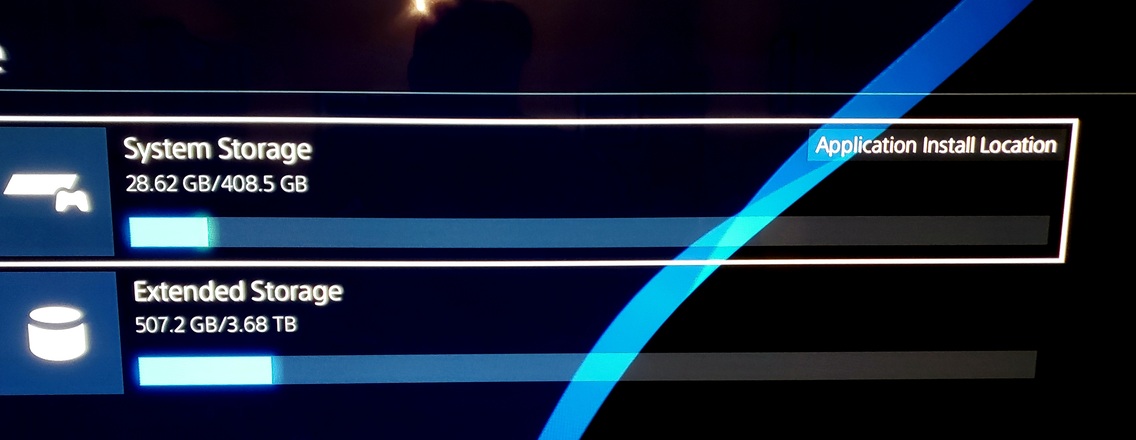
This is not true as I have PLENTY of space on both the internal PS4 drive and the external HDD that is attached. (See screenshot below).
On the internal PS4 drive I am only using about 29 GB of space out of the 498 GB drive, and on the external drive I am using 507 GB of space out of the 3.7 TB drive. So this should be plenty.
I offloaded all of the games and apps as neeed to the external HDD to save the most space alread.y.
I tried the Plex app on both the internal and external HDD and it didnt help fix this error.
Most of my music files are in FLAC format but even the files I have in small 128k or 192k MP3 format get the same error.
My Plex server is running from my Western Digital MyCould EX2 Ultra with two 10 TB drives with only 2 TB used so far for my music files. The server on my NAS is version : 1.20.1.3252 *[edit: recently updated to version *
1.21.1.3830 but same issue still applies ]
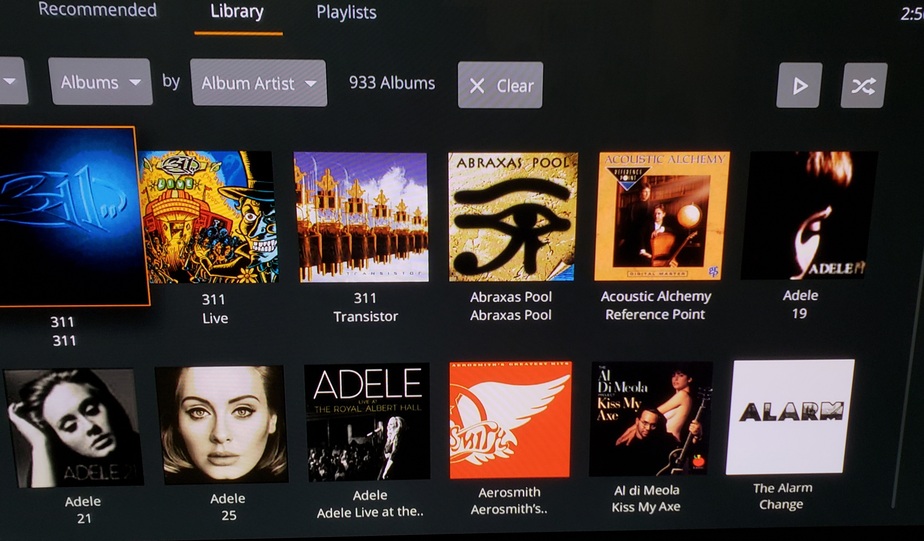
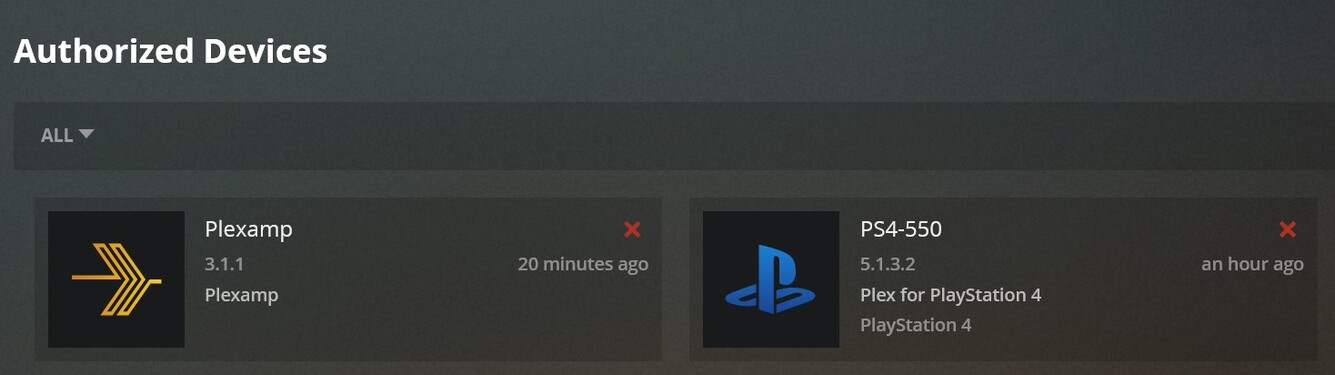
I can see all my albums and artists in my library on Plex in the PS4 app (see screenshot) but it wont play anything. And yes my PS is an authorized device (see screencap below).
Any ideas?
My PS4 hardware OS version is v 7.55 (latest)
(see screenshot below)
The Plex app running on the PS4 seems old though (May 2019??) is there a newer version?
The PS4 didnt show any updates.
Thanks for any help
![Plex version on PS4|690x198]
That error is coming from your server not the PS4. Can you recreate the issue and provide the log from PMS? Plex Media Server Logs | Plex Support
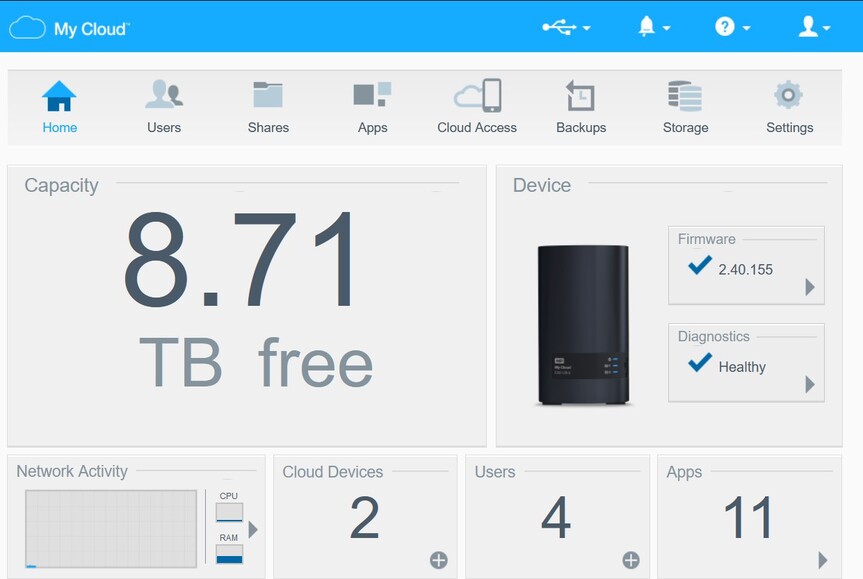
As I stated I have 8.71 TERRABYTES free out of 10 TB total on my Server/NAS (WD MyCloudEX2 Ultra). so I have plenty of space available. (See screenshot below for NAS homescreen)
BTW, how do I get the logs from my WDMyCloudEX2? Ultra since my music files for my Plex PMS are located on my NAS shared directory not my laptop.
PMS runs on the devices internal storage, not the storage on the NAS. The internal space is limited. I’m not sure if Plex’s data can be moved to the NAS storage itself. I’m not familiar enough with the internal workings of a NAS to help with this. If possible, you woul dneed to SSH into the NAS and either modify the preference.xml file to point the Plex data folder to another location or you’ll need to move the Plex folder to the NAS storage then create a symlink pointing to this new locaiton to replace the old one.
I dont see how it works on ALL my other devces including my cell phone/tablet which has a LOT LeSS storage space available (like 16 or 32 GB), but cant work on the PS4 which has a LOT of space (hundreds of GBs) free and available??
“PMS runs on the devices internal storage, not the storage on the NAS.”
- when you say “device” which device are you referring to in my situation? the PS4 or my MyCloud EX2 Ultra NAS??
“If possible, you woul dneed to SSH into the NAS and either modify the preference.xml file to point the Plex data folder to another location or you’ll need to move the Plex folder to the NAS storage then create a symlink pointing to this new locaiton to replace the old one.”
- You’re talking gibberish to me now. I have no idea how to do that. Also sounds like it could easily break the link or screw up my whole PMS Media server after spending MONTHS ripping my THOUSANDS of albums and setting up my media server.
“If possible, you woul dneed to SSH into the NAS and either modify the preference.xml file to point the Plex data folder to another location or you’ll need to move the Plex folder to the NAS storage then create a symlink pointing to this new locaiton to replace the old one.”
Not sure why I would need to move my Plex folder as its already installed on the NAS !!??
I have the Plex Media Servia .bin file installed on the MyCLoudEX2 Ultra as an app so my Plex media server for music is running from the NAS not a PC, although I do have the laptop also running PMS but thats only as a secondary not the primary and I hardly ever / never use the laptop to do the “serving”. as its NOT an always on device, where the NAS is.
Which section of the log file (there are a TON of different files for different sections) should I be looking at that will help me decipher where (what directory) its trying to use to code/cache from so that I can confirm its using a wrong location?
thanks
The PS4 has very limited file and codec support as Sony does not let third party apps play as much as their native app. The server converts (transcodes) the file to something that is compatible. The space is referring to the space needed to store the temp file chunks that it creates before the server sends the converted chunks to the player. When playback finishes those temps chunks are deleted. Most modern phones have more playback support for more file types than a Playstation and can likely play the file natively as is without needing the server to transcode/convert which is called Direct Play.
The Plex Media Server.log should have the info. The newest one will be the one without a number at the end. (Plex Media Server.5.log is the oldest) After reproducing then looking a the server log, search for “not enough” in logs to find the error and it should have the directory that it is using in that line.
@BigWheel
Yeah that sucks the PS4 cant play FLAC files natively and my NAS doesnt transcode very well (MyCludEX2 Ultra).
im getting an NVIDIA Shield soon but…
My Phone (Galaxy S9+) direct plays the FLAC files perfect which is my main player I use with the fantastic PlexAmp app
the Alexa Skill also fails to play FLAC and will only play mp3s but all my music is in FLAC and I will not have 2 copies of each song of my 3000+ albums.
I will try and find the logs to see if I can find the log file and error location but most likely you are correct
Also can you tell me the correct folder naming convention to use in the settings area to tell Plex which directory to use as the TEMP area to transcode (if it can)
If Im using the NAS shares area and have created a Temp directory there, what would I enter into the Plex settinsg area if my Temp location on my actual netowkr is for example:
" \192.xxx.x.xx\Plex\Temp "
The \Plex\Temp folder is actually under the structure of this if I look in the NAS direvtory tree
Shares > Plex > Temp
so how does the Plex settings field want it entered?
With one or 2 backslashes " \ " or none or what?
thanks
@BigWheel
-
Ok I found the latest log file
here is what it shows:
Note this happend when playing these files using my LAPTOP not the PS4. Never had an issue with playing on my laptop. For some reason 2 of the Cranberries albums that I havent RIPPed to FLAC format yet wont play now and they are only in MP3 ?? whats up?
I have all my settings to DIrect Play and Quality Original and 99% of my songs play just fine.
Strange
-
Also I noted the directory format for the transcode / temp area is weird as it has BOTH forward and backward slashes, which I dont believe is allowed.
What is the correct format to use in the settings area?
-
Also if I have 8 TERRABYTES free on my NAS drive why is there not enough disk space to convert?
-
I will try and do it from my PS4 and get the logs for that test as well and post here
2021 04:04:45.161 [0xae60f440] DEBUG - [Transcode] Starting a transcode session kt5sql0wkdquq5o6qle8xmdf at offset -1.0 (state=3)
Jan 03, 2021 04:04:45.162 [0xae60f440] DEBUG - [Transcode] [Universal] Using local file path instead of URL: /shares/Plex/Music/The Cranberries/To the Faithful Departed/01 Hollywood.mp3
Jan 03, 2021 04:04:45.162 [0xae60f440] DEBUG - [Transcode] TPU: hardware transcoding: final decoder: , final encoder:
Jan 03, 2021 04:04:45.163 [0xae60f440] WARN - [Transcode] Low disk space: 7.13MB source file, 54.23MB capacity, 19.51MB available on "\192.xxx.x.xxx\Plex\Temp/Transcode/Sessions"
Jan 03, 2021 04:04:45.163 [0xae60f440] WARN - [Transcode] TranscodeSession: inadequate disk space for transcode
Jan 03, 2021 04:04:45.163 [0xae60f440] DEBUG - [Transcode] Streaming Resource: Terminating session 0xb23cc768:arc42jsvgaaervkesd81c6n1 which is using 320kbps of WAN bandwidth. Used is now 0kbps
Jan 03, 2021 04:04:45.163 [0xae60f440] DEBUG - [Transcode] Streaming Resource: Terminated session 0xb23cc768:arc42jsvgaaervkesd81c6n1 with reason Not enough disk space to convert this item.
Jan 03, 2021 04:04:45.163 [0xae60f440] ERROR - [Transcode] Failed to start session.
Jan 03, 2021 04:04:45.163 [0xacf0f440] DEBUG - [Transcode] Killing job.
Jan 03, 2021 04:04:45.163 [0xacf0f440] DEBUG - [Transcode] Job was already killed, not killing again.
Jan 03, 2021 04:04:45.163 [0xacf0f440] DEBUG - [Transcode] Stopping transcode session kt5sql0wkdquq5o6qle8xmdf
Jan 03, 2021 04:04:45.163 [0xab52f440] DEBUG - [Transcode] Cleaning directory for session kt5sql0wkdquq5o6qle8xmdf (\192.xxx.x.xxx\Plex\Temp/Transcode/Sessions/plex-transcode-kt5sql0wkdquq5o6qle8xmdf-729500a1-c489-4b3c-984f-a8cc025a8864)
Jan 03, 2021 04:04:45.165 [0xacf0f440] DEBUG - [Transcode] Transcoder: Cleaning old transcode directories.
Jan 03, 2021 04:04:45.165 [0xacf0f440] DEBUG - [Transcode] Whacked session kt5sql0wkdquq5o6qle8xmdf, 0 remaining.
Jan 03, 2021 04:04:45.165 [0xacf0f440] DEBUG - Cleaning directory for session kt5sql0wkdquq5o6qle8xmdf (\xxx.xxx.x.xxx\Plex\Temp/Transcode/Sessions/plex-transcode-kt5sql0wkdquq5o6qle8xmdf-729500a1-c489-4b3c-984f-a8cc025a8864)
Jan 03, 2021 04:04:45.165 [0xb2cff440] DEBUG - Completed: [192.168.1.204:62716] 404 GET /music/:/transcode/universal/start.mpd?hasMDE=1&path=%2Flibrary%2Fmetadata%2F10485&mediaIndex=0&partIndex=0&musicBitrate=320&directStreamAudio=1&mediaBufferSize=12288&session=kt5sql0wkdquq5o6qle8xmdf&protocol=dash&directPlay=0&Accept-Language=en (9 live) TLS GZIP 41ms 458 bytes (pipelined: 13)
Jan 03, 2021 04:04:46.458 [0xb1d0f440] DEBUG - Push: Waiting for refresh queue of 1 items to quiesce.
Jan 03
@BigWheel
Also another thing:
Why is it telling me that Direct Play is “Disabled” when its not?
I thought i had all my settings set to Direct Play and MAX quality
Im able to play FLAC files just fine on my cell and laptop but all of a sudden one or two songs/albums cant?
why?
they are all the same either MP3 format or FLAC rips
See log section below
NOTE: IP address xxx’ed out to protect privacy
03, 2021 04:05:27.783 [0xaaf4f440] DEBUG - Request: [192.xxx.x.xxx:xxxxx (Subnet)] GET /music/:/transcode/universal/decision?hasMDE=1&path=%2Flibrary%2Fmetadata%2F27550&mediaIndex=0&partIndex=0&musicBitrate=320&directStreamAudio=1&mediaBufferSize=12288&session=z0wpsjmiyaysdvqdvwj9f79t&protocol=dash&directPlay=0&Accept-Language=en (8 live) TLS GZIP Signed-in Token (sjsoukup)
Jan 03, 2021 04:05:27.783 [0xaaf4f440] DEBUG - [Transcode] Found session GUID of z0wpsjmiyaysdvqdvwj9f79t in session start.
Jan 03, 2021 04:05:27.784 [0xaaf4f440] DEBUG - [Transcode] TranscodeUniversalRequest: using augmented profile Firefox
Jan 03, 2021 04:05:27.784 [0xaaf4f440] DEBUG - [Transcode] Downloading document http://127.x.x.x:xxxxx/library/metadata/27550?includeBandwidths=1&offset=-1&X-Plex-Incomplete-Segments=1&X-Plex-Session-Identifier=arc42jsvgaaervkesd81c6n1
Jan 03, 2021 04:05:27.785 [0xaaf4f440] DEBUG - [Transcode] Auth: authenticated user 1 as xx>username<xx
Jan 03, 2021 04:05:27.796 [0xaaf4f440] DEBUG - [Transcode] We’re going to try to auto-select an audio stream for account 1.
Jan 03, 2021 04:05:27.796 [0xaaf4f440] DEBUG - [Transcode] Selecting best audio stream for part ID 35200 (autoselect: 0 language: en)
Jan 03, 2021 04:05:27.796 [0xaaf4f440] DEBUG - [Transcode] Audio Stream: 52777, Subtitle Stream: -1
Jan 03, 2021 04:05:27.797 [0xaaf4f440] DEBUG - [Transcode] MDE: Selected protocol dash; container: mp4
Jan 03, 2021 04:05:27.797 [0xaaf4f440] DEBUG - [Transcode] MDE: analyzing media item 24714
Jan 03, 2021 04:05:27.797 [0xaaf4f440] DEBUG - [Transcode] MDE: All Over Now: Direct Play is disabled
Jan 03, 2021 04:05:27.797 [0xaaf4f440] DEBUG - [Transcode] MDE: All Over Now: container is unavailable for analysis
Jan 03, 2021 04:05:27.797 [0xaaf4f440] DEBUG - [Transcode] MDE: All Over Now: media must be transcoded in order to use the dash protocol
Jan 03, 2021 04:05:27.797 [0xaaf4f440] DEBUG - [Transcode] MDE: All Over Now: no direct play music profile exists for http//flac
Jan 03, 2021 04:05:27.797 [0xaaf4f440] DEBUG - [Transcode] MDE: Cannot direct stream audio stream due to codec flac when profile only allows aac
Jan 03, 2021 04:05:27.797 [0xaaf4f440] DEBUG - [Transcode] MDE: All Over Now: selected media 0 / 24714
Jan 03, 2021 04:05:27.797 [0xaaf4f440] DEBUG - [Transcode] Streaming Resource: Calculated bandwidth of 591kbps exceeds bandwidth limit. Changing decision parameters provided by client to fit bandwidth limit of 320kbps
Jan 03, 2021 04:05:27.797 [0xaaf4f440] DEBUG - [Transcode] Streaming Resource: Determining preferred transcode encoders through transcode only decision.
Jan 03, 2021 04:05:27.798 [0xaaf4f440] DEBUG - [Transcode] Streaming Resource: Reducing playback quality for 304kbps stream bitrate
Jan 03, 2021 04:05:27.798 [0xaaf4f440] DEBUG - [Transcode] MDE: Selected protocol dash; container: mp4
Jan 03, 2021 04:05:27.798 [0xaaf4f440] DEBUG - [Transcode] MDE: analyzing media item 24714
Jan 03, 2021 04:05:27.798 [0xaaf4f440] DEBUG - [Transcode] MDE: All Over Now: Direct Play is disabled
Jan 03, 2021 04:05:27.798 [0xaaf4f440] DEBUG - [Transcode] MDE: All Over Now: container is unavailable for analysis
Jan 03, 2021 04:05:27.798 [0xaaf4f440] DEBUG - [Transcode] MDE: All Over Now: media must be transcoded in order to use the dash protocol
Jan 03, 2021 04:05:27.798 [0xaaf4f440] DEBUG - [Transcode] MDE: All Over Now: no direct play music profile exists for http//flac
Jan 03, 2021 04:05:27.798 [0xaaf4f440] DEBUG - [Transcode] MDE: Cannot direct stream audio stream due to codec flac when profile only allows aac
Jan 03, 2021 04:05:27.799 [0xaaf4f440] DEBUG - [Transcode] MDE: All Over Now: selected media 0 / 24714
Jan 03, 2021 04:05:27.799 [0xaaf4f440] DEBUG - [Transcode] Streaming Resource: Adding session 0xabf7a0e0:arc42jsvgaaervkesd81c6n1 which is using 320kbps of WAN bandwidth. Used is now 320kbps
Jan 03, 2021 04:05:27.799 [0xaaf4f440] DEBUG - [Transcode] Streaming Resource: Added session 0xabf7a0e0:arc42jsvgaaervkesd81c6n1
Jan 03, 2021 04:05:27.799 [0xaaf4f440] DEBUG - [Transcode] Streaming Resource: Reached Decision id=27550 codes=(General=1001,Direct play not available; Conversion OK. Direct Play=3000,App cannot direct play this item. Direct play is disabled. Transcode=1001,Direct play not available; Conversion OK.) media=(id=24714 part=(id=35200 decision=transcode protocol=dash streams=(Audio=(id=2147483634 decision=transcode bitrate=304 encoder=aac channels=2 rate=96000))))
Jan 03, 2021 04:05:27.801 [0xb2a0f440] DEBUG - Completed: [192.168.1.204:62822] 200 GET /music/:/transcode/universal/decision?hasMDE=1&path=%2Fli