Plexamp Release Notes

Version v4.8.2

With this release we’re excited to announce that Plexamp is now called X, and we’re pivoting to become a payment processor or something idk :person_shrugging:

Here are some important fixes and a couple of nice improvements for your enjoyment.

Added

  • Android: Enable previously disabled blur effects for Android 12+ devices.
  • Add an ‘Edit Sonic Adventure…’ menu item for Recent Plays.

Fixed

  • Make Mix Builder actions on artist/album pages more clear.
  • Mix Builder items in Recent Plays had Grant Access action.
  • Mix Builder items in Recent Plays were missing edit action.
  • Clarify Recent Play Mix Builder items with second text line.
  • When replaying out of Recent Plays, time didn’t update.
  • Long press play button to stop when using driving mode.
  • Car: Inability to access artists in some cases.
  • The ‘add to home screen’ button was visible for free users.
  • Free users saw custom home sections they’d previously added.
  • Collection grid item subheadings were missing.
  • Home screen error wasn’t vertically centered when MiniPlayer is open.
  • Soundtracks in the library view weren’t sorted correctly.
  • Android: Fix Reported crash.
  • Update translations.
19 Likes

Version v4.8.3

While we’re busy behind the scenes building out some exciting new shiny stuff for the next big release (get hyped, it’s going to be awesome), here’s a smaller update with some important bug fixes…

:boot::beetle:

…and a couple of neat additions.

Added

  • Android: Enable backup/restore of app data.
  • Android: Make our modals prettier with some background color.
  • Remove ‘Colorize player elements’ setting and always enable.
  • Upgrade Mix Builders with new grid and zero state.
  • Added Polish translations :poland:.

Fixed

  • Android: Fix wonky overlapping on Mix Builder and library filter screen.
  • Downloading Mixes for You didn’t work.
  • DJ Contempo would bring in tracks too far in the future.
  • Shared servers couldn’t be found during setup in some scenarios.
  • Setup colors could be incorrect after signing out with light theme enabled.
  • Updated server icon image.
  • Show a badge for Plex Pass holders under account settings.
  • Mobile: Track duration filter wasn’t using a numeric keyboard.
  • Improve search (de)activation behavior in Mix Builders.
  • Prefer selected server for playlist creation vs current play queue source.
  • Make sure Mix Builders are available for shared users in all cases.
  • Improve appearance of Home Screen editing description text.
  • Fixed possible crash in Filter builder.
  • Reset audio device harder after failure.
  • A few cases of new screens appearing twice when tapping multiple times to navigate.
  • Downloading artist/album collections could fail in some cases.
  • Fixed some assorted reported crashes.
  • Updated translations, with many thanks to our community of translators :heart:.
23 Likes

Version v4.8.4

A few quick bug fixes for you.

Fixed

  • Crash when browsing by folder.
  • Update EQ presets.
7 Likes

Version v4.9.0

In our inexorable march towards Plexamp v5.0 (what could it be???), we’re pleased to announce Plexamp v4.9.0 :partying_face:

This release brings a few heavily-requested features (custom artwork upload! new sort and filter criteria!), as well as a bevy of fixes. In particular, this release brings a lot of love to our Android users, with performance improvements across the board.

v4.9.0 features an upgraded Electron for security and performance improvements across Mac, Windows, and Linux. Unfortunately this also means support for older operating systems has been dropped. See the note below regarding compatibility.

Added

  • Upload custom cover art for your playlists and collections.
  • Shared playlists now have play queue actions.
  • Add “unlistened” badge to shared playlists.
  • Increase playlist thumbnail size on pre-play pages.
  • Add media bitrate and codec as new filter criteria.
  • Allow sorting by track bitrate in library.
  • Allow customizing name of downloaded items.
  • Improve speed on artist and album screens by loading less data.
  • Tap on home screen header to quick-switch between libraries.
  • Long press on play/pause in cast dialog stops remote playback.
  • Long press on next button in cast dialog skips to next album.
  • Raise limit from 50 to 100 when expanding search results.
  • Show track number and last played date in player menu.
  • Sonic Sage: Use the new GPT-4 turbo model if available.
  • Linux: Track system dark theme preference based on xdg settings portal.
  • Android: Use clickier, more satisfying haptic feedback.
  • Android: Add native ripple effect to some touchable elements.
  • Android: Improve scrolling performance and speed up navigation.
  • Android: Improve modal performance.
  • Android: System navigation bar now behaves more natively when modals are open.
  • Added Finnish translations :finland:
  • Added Korean translations :south_korea:

Fixed

  • DNS related connectivity issue on cellular networks.
  • Setup: Improve screen layout at smaller vertical heights.
  • Setup: Tap selected library to proceed to the next screen.
  • Android: Crash on some One Plus devices.
  • Accessibility: Add accessible labels to bottom tab bar.
  • Library tab could be blank or overly refreshed with TIDAL.
  • Shared playlists might not show up.
  • Shared playlist count didn’t update.
  • Expand clickable region in cast dialog.
  • Fix broken invalid token detection.
  • AutoPlay wasn’t always enabled right after launch.
  • AutoPlay “Artist Mix” option wasn’t available.
  • Browsing nested folders could lead to a crash.
  • Remove unnecessarily verbose console logs from early startup.
  • Some layout jank occurred when zero state messages popped into view.
  • Upgraded electron to latest release.
  • Update AutoEQ presets.
  • Updated translations.

A note on compatibility

Due to the upgrade of Electron, Plexamp on desktop now requires a minimum of Windows 10 or macOS 10.15 (Catalina). Other platform minimum versions remain unaffected.

17 Likes

Version v.4.9.1

A few small but important fixes for your Plexamping pleasure!

Fixed

  • Android: Improve haptic feedback quality for Library list JumpBar.
  • Switching libraries on the same server didn’t update library tab.
  • Soundtracks weren’t showing up on library tab.
  • Rating filters couldn’t be saved.
  • Use the latest GPT 3.5 model if available.
  • Sonic Sage would only generate a few tracks in some cases.
  • Improve Sonic Sage obeying requests for a specific number of tracks to generate.
  • Updated translations.
8 Likes

Version v4.9.2

Quick fix, iOS only.

Fixed

  • Regression signing in on iPad.
1 Like

Version v4.9.3

We have a last release of 2023 for you to crank up at all your holiday parties! We much appreciate all the love you’ve given us this past year, and we have some great stuff in store for you for 2024.

Added

  • Desktop: Show tab labels at larger display sizes.
  • Desktop: Transition smoothly between screens.
  • Android: Navigation between screens is snappier and follows system transitions.

Fixed

  • iOS: Improve reliability of first voice command in some cases.
  • Possible crash related to EventSource processing.
  • CarPlay: Re-enable library switching.
  • Speed up loading albums on artist page.
  • When TIDAL is source, search result categories couldn’t be expanded.
  • Minor improvements to Sonic Sage sample prompt generation.
  • Speed up first network-related actions when starting the app on a new network.
  • Fixed a visual glitch on the player screen for Android 10 devices.
  • Improve styling and accessibility of badged tab icons.
  • Navigating quickly between settings pages could cause issues.
  • Updated translations.
18 Likes

Version v4.9.4

New year, new Plexamp :champagne:

We have a shiny new release for you to start your year right, featuring some long-requested additions, as well as a surprise new feature or two. We have big plans for 2024, so stay tuned for more updates!

Added

  • Add your OpenAI API key to generate custom playlist and collection art using DALL-E.
  • Support for track collections.
  • Desktop: Added an option to enable the system title bar and window controls.
  • Text on artist/album review screens can be copied.
  • Allow sorting tracks based on last rating date.
  • Add track genre as a filter option.
  • Playlist pre-play screen now updates automatically when server-side changes are made.
  • Show a toast when adding/removing from My TIDAL.

Fixed

  • Apply/Discard buttons on cover art screen weren’t translated.
  • Improve reliability of shared link metadata unfurling.
  • Some TIDAL library sort options were incorrect.
  • Properly show context line when sorting in TIDAL library.
  • Fix album count showing as “compilations” in TIDAL library.
  • Source picker menu height did not react to window size adjustments.
  • Fixed an occasional crash when using Android Auto.
  • Fix a reported crash on library screens.
  • Fixed occasional crash in the player screen menu.
  • Download page section headers weren’t translateable.
  • Desktop: Downloads screen ZeroState could become unreasonably wide.
  • Android: Improve scrolling performance of artist page carousels.
  • Android: Fix a crash that occurred occasionally during early startup.
  • Android Auto could switch libraries unexpectedly.
  • Android: Improve tab bar appearance.
  • Android: Improve header opacity interpolation.
  • Update translations.
18 Likes

Version v4.9.5

Quick followup with a few surgical fixes.

Fixed

  • In some rare cases, the home screen failed to load.
  • Player menu was not displaying last play time or track number.
7 Likes

Plexamp v4.10

Whew. What a long development cycle. Marathons not sprints, am I right?

Plexamp v4.10 represents a colossal undertaking to upgrade and replace many of our core building blocks, bringing bug fixes, performance improvements, and laying a strengthened foundation for the future of Plexamp. Even software needs an oil change and a tune-up sometimes, and in this case, we upgraded nearly 80 core packages (and that’s not even counting all of their dependents).

That’s enough nerd talk, how about some new features?

With Plexamp, we are trying to build a music player which is great at exploration (in your own personal collection) and discovery (finding new music), and we’ve added a powerful and fun new tool for the latter: A new Guest DJ — DJ Doppelgänger — expands your play queue (and your mind) by inserting the closest sonic twin from TIDAL after each track, taking care to not add something already in your library.

We’ve discovered so much new music already while building this, and we think it’s a game changer for TIDAL subscribers. If you were looking for a sign to try TIDAL + Plexamp, consider this your sign. (note: requires Sonic Analysis on your server). Along with the new DJ, you’ll also see Sonic suggestions from TIDAL for artists and albums. Have fun discovering great new music!

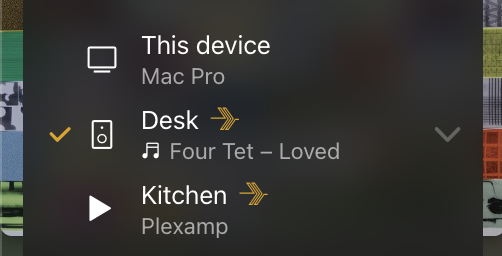
Next up, a simple solution for an occasionally vexing problem. Have you ever wanted to start playback on another Plexamp (headless, say) but you don’t want to lose your current play queue? Well, now you can; simply tap or click the icon of the player you want to send play to in the cast dialog (it changes to a play icon), and the very next thing you play will be sent over.

We’ve also added a way to change artist and album posters inside the app, to address a very common use case, and in addition done a bunch of work to ensure you can see the image resolution of each poster!

Oh, by the way, thanks to the aforementioned performance improvements, we were able to bump up the limit for each downloaded item to 3 days!

Added

  • Introducing our new Guest DJ, DJ Doppelgänger :mirror_ball:
  • Sonic artist/album suggestions from TIDAL :tidal:.
  • Increase downlimit limit from 24 to 72 hours per item.
  • Allow downloading all albums from an artist with a single action.
  • Ability to send playback to a different player than we’re connected to.
  • Quickly search and filter your playlists when adding items.
  • Fetch new album and playlist artwork for downloaded items when refreshing.
  • Added a new artwork picker for artists and albums which shows resolution.
  • Player large poster updates if changed elsewhere.
  • Update Sonic Sage to the latest GPT models for improved reliability and reduced cost.
  • Improved design and visual consistency of assorted menus.
  • Android: Show overscroll feedback on the Player screen.
  • Linux: Updated launcher icon.
  • Upgrade React Native.
  • Upgrade Electron.
  • Upgrade Node (see note below).

Fixed

  • In some cases, the artist page was missing sections.
  • After deleting a shared playlist, it could come back from the dead :skull:.
  • The list of users to share items with could be incorrect.
  • Playing collections from the library grid screen wasn’t working.
  • Improve reliability of downloads when switching networks.
  • Error message when failing to load playlists was placed incorrectly.
  • Make sure the keyboard is dismissed when opening the full-screen player.
  • Android: Improve library switching reliability with Android Auto.
  • Android: Make headers sticky on filter rule editing dialog.
  • Android: Downloads could fail after an SD card was removed.
  • Android: Further fixes to prevent visual glitches on older Android devices.
  • Missing right margin on downloaded items.
  • TIDAL: In some cases the home page could fail to load.
  • TIDAL: In some cases, speaker icon didn’t appear on currently playing tracks.
  • Desktop: Long form seek bar was broken.
  • Don’t attempt to use DALL-E 3 if it’s unavailable.
  • Disabled Guest DJs weren’t visually distinguished.
  • In some cases, Guest DJ selections were added multiple times.
  • Fixed a rare crash when using DJ Groupie.
  • Fixed a reported crash when switching players.
  • Fixed a crash that occurred when attempting to gracefully handle crashes. Yes, really :person_facepalming:.
  • Update translations.

Note: Plexamp Headless now uses NodeJS v20, replacing the now unsupported v16. Before updating Plexamp, be sure to download and install the latest Node JS first. Using a Node version manager like NVM makes this much easier.

25 Likes

Plexamp v4.10.1

Hot on the heels of v4.10 comes v4.10.1, featuring a nice collection of small improvements and fixes. In particular, a number of our menus received some love and attention, we cleared out a few infrequent but annoying crashes, and we fixed an issue that could result in incorrect tracks when repeating long play queues.

While I’m here, I’d like to drop a quick thanks to everyone for your feedback following v4.10. Many of the below fixes are for issues raised here in the forums. You’re helping make Plexamp the best music player on the planet :plexheart:

Added

  • Allow writing Mix Builder mixes to NFC tags.
  • Moved playlist edit menu items to nested sub-menu.
  • Added Ukrainian translations :ukraine: (thanks Saenko & michaelvelosk)

Fixed

  • In some cases with a repeating long play queue, the wrong track could play.
  • Improve visual consistency of buttons throughout the app.
  • Mix Builder recent item menus had some incorrect actions.
  • Sharing menu wasn’t always correctly nested.
  • Allow download popup to get smaller.
  • Allow Grant Access popup to grow a little taller.
  • Renamed ‘Background’ settings to ‘Appearance’.
  • Don’t exclude other Various Artists tracks from sonic similarity.
  • Clean up punctuation a bit harder when performing searches.
  • Make sure downloads of Recent Play library filter shows popup.
  • Album list placeholders’ border radii didn’t perfectly match album art border radii.
  • Some settings strings weren’t translatable.
  • Poster Picker: Some resolutions were missing.
  • Poster Picker: Improve sizing of items with long titles.
  • Desktop/headless: Make sure volume changes without play queue are saved.
  • Desktop/headless: Starting without a play queue reset volume to 100%.
  • Android: Further fixes for graphical glitches on very old devices.
  • Fix a number of reported crashes.
  • Desktop: Upgraded Electron.
  • Update translations.
12 Likes

Plexamp v4.11.0

We have a huge release for you today!

Lots of really good stuff in here, we’ve been hard at work adding commonly requested features and fixing a ton of reported issues. We hope you enjoy it!

Added

  • Allow context menu for Up Next items as well.
  • When 1-Tap playback is disabled, show a confirmation dialog when performing destructive queue actions.
  • Play count in player menu top area.
  • Add an “Add to Queue” action which always adds to end for smaller non-radio play queues, and rename “Add to Queue” action to “Add to Up Next”.
  • Move hemisphere preference to the charts context menu.
  • Headless: New /image endpoint for IoT.
  • Basic multiuser support when casting to Plexamp.
  • Refresh home screen after creating new playlist so it shows up.
  • Seeking in Opus files before they’re completely buffered.
  • Settings: Minor facelift.
  • Settings: Move the cheese. Consolidate Device settings under Experience and Playback, redesign debug.
  • Don’t show “Add to Up Next” when there is no Up Next region.
  • Remove Chart Length preference and always show 100 items.
  • Sonic Sage: Upgrade to the new gpt-4o model for faster and cheaper results.
  • At larger screen sizes, show Previous track button on miniplayer.
  • Links to ToS and privacy policy on About page.
  • Mesh: Clicking on album browses into album (needs updated mesh nodes).
  • Added Bulgarian translations :bulgaria:

Fixed

  • Ensure there are 5 tracks in Related after clicking More.
  • Play queue item menu could incorrectly show “Play Track Radio”.
  • Show DJ generated icon in Back To as well.
  • Initial click/tap on rating stars could lead to incorrect ratings.
  • Writing files could fail (e.g. seekprint cache).
  • On rare occasions, upcoming tracks could disappear.
  • Stop applying +6 dB gain to DSD files in the player.
  • When starting app on settings tab, navigating from player didn’t work.
  • Improve reliability of broadcast player discovery.
  • Improve short time duration formatting (time track last played).
  • Stopping playback didn’t always clear the seesion on the server.
  • Don’t stop or skip to next album on right click, only long press.
  • Resuming transcoded playback in the middle would start at the beginning.
  • When cache metadata read fails, reset underlying cache file.
  • Improve search term clean-up.
  • In some cases, caching MP4 tracks could result in erroneously huge files.
  • In some (rare!) cases, a track could fade in prematurely.
  • Crash in rare cases when stopping playback.
  • Navigating quickly into collections or genres and then a specific one could fail.
  • Take into account about-to-be-cached file size when checking cache.
  • Edit in Mix Builder action didn’t work for Album Mixes.
  • Make PIN button background stand out more.
  • Rename 1-Tap Track Plays to 1-Tap Playback.
  • Adding to existing play queue didn’t kick off pre-caching.
  • Disk cache low-space threshold was too low at 16 MB, changed to 1 GB.
  • Filter rule popup wasn’t centered in some cases.
  • Player menu wasn’t showing poster for offline tracks.
  • Keyboard could reappear incorrectly after returning to search screen.
  • Performance issue when switching types in playlists.
  • When showing playlists as albums, show artist title as well.
  • Don’t show play icon in menu if the item has not been played.
  • Use library sort order for album/artist lists (genre, mood, record label, etc).
  • Setup titles could be blank on some screens.
  • Improve the consistency of some of our icons.
  • Use the same menu for Related tab as Up Next and Back To.
  • Some screen navigations were subtly broken in French.
  • In some cases, incorrect byte sizes could be shown.
  • Make Visualizer menu more consistent with other menus.
  • Show confirmation when track is playing from large play buttons on details screens.
  • Poster Upload/Edit buttons could be cut off by long titles.
  • Raise size of lookahead when skipping albums to 50 tracks.
  • Jump bar in Library > Playlists was broken.
  • Album and Artist radio buttons on preplays didn’t honour 1-Tap preference.
  • Make swipe detection on Miniplayer more robust.
  • Fixed a reported crash when generating a background gradient for Sonic Sage prompts.
  • Recently played carousel item was missing on artist preplay after a recent server update.
  • Mix Builder screen didn’t indicate it’s a Plex Pass feature.
  • Scrolling down on Player could incorrectly trigger a swipe gesture on the Visualizer.
  • Move chart context menu to top right.
  • Move downloads context menu to top right.
  • Improve appearance of Plex Pass upsell cards.
  • Make it easier to hit ‘x’ button in lists.
  • Show loading indicator for lyrics.
  • Next button was disabled under mini-controls for This Device.
  • Entering spaces in codec filter could break library display.
  • Offline: In some cases after deleting an item, it could continue downloading.
  • Offline: Show album title above album artist.
  • Offline: Improve status text when an item has nothing downloaded.
  • Offline: Downloads could complete but fail to show any tracks until refreshed.
  • Offline: Incomplete downloads could fail to complete after startup.
  • Offline: Incomplete items could show as downloaded and not complete properly.
  • Mobile: Pop to top of library/home tabs when switching libraries.
  • iOS: Downloading > 2GB files would result in re-downloading.
  • iOS: More reliable resuming of playback using e.g. Bluetooth.
  • iOS: Some lists (e.g. Style Radio) were loading with duplicates.
  • iPad: Alignment of refresh button in cast dialog.
  • iPad: Some newer models had cramped tab bars.
  • Android: Low-level audio crash.
  • Android: Resolved shadow glitch when closing player menu.
  • Android: Touch feedback was missing in some places.
  • Android Auto: Toggling shuffle had no effect.
  • Linux: Higher network speed limits were not being respected.
  • Linux: Improve network precaching speeds.
  • Linux: When transferring in-progress paused track, audio system wouldn’t quiesce.
  • Desktop: Right clicking on some … menus could result in multiple menus.
  • Desktop: Mix Builders have extra space with bouncy scrolling off.
  • Desktop: Improve spacing in Mix Builder grid.
  • Desktop: Some shortcut keys didn’t record correctly (e.g. numpad keys).
  • Desktop: In some cases, play queue wouldn’t pre-cache correctly.
  • Desktop: Improve memory usage during caching.
  • Desktop: Toggle component disabled state looked funky.
  • Desktop: Upgrade Electron.
  • Browser: Don’t show font size setting.
  • Browser: Web UI now scales correctly in mobile browsers.
  • Browser: DJ Doppelgänger didn’t work.
  • Browser: Poster resolutions didn’t show.
  • Mesh: Don’t try to connect on cellular or offline.
  • Mesh: Make sure we’re connected when foregrounding app.
  • Mesh: Improve reliability of upgrade script.
  • Mesh: Prevent simultaneous installs.
  • Mesh: Improve update icon.
  • Update translations.
25 Likes

Plexamp v4.11.1

On the heels of a large release, we always like to follow up quickly with another one focused mostly on fixes. Hopefully you’ll enjoy these (and a reversion to earlier behavior for confirming playback, based on community feedback).

Rock on! :musical_note:

Added

  • Tapping track on album screen always jumps to track if in play queue.
  • Mobile: Keep search page visible until there is a typed search query.
  • Desktop: Play button for albums, artists and playlists confirm when appropriate.
  • Show visual feedback when clearing Plexamp’s cache.
  • Default 1-tap playback to on.

Fixed

  • Desktop: Show Play Queue action was broken.
  • Don’t show tracks from downloaded albums which aren’t available.
  • Make sure to complete incomplete playlists when startup refresh is enabled.
  • Improve accounting for offline items and ensure it matches reality.
  • Refreshing offline items could lead to missing content.
  • Don’t allow editing offline album posters.
  • Improve offline memory usage during refresh.
  • Expanding “Recently Played” on an artist page was broken.
  • In horizontal player layout mode w/o play queue, rating clicks were incorrectly offset.
  • Reported crash seeking when playing Chromecast.
  • Don’t show confirmation modal on details pages for play/shuffle/radio buttons.
  • Rare hang returning from background.
  • Reported crashes.
  • Revert queue protection menu.
  • Give up after retrying some network operations after 10 tries.
  • A rare app hang after starting playback.
  • Tapping on next-to-last track with 1-tap enabled could result in wrong track playing.
  • Chart header layout at larger font sizes.
  • Fix centering on playlist new/edit modal.
  • Rare case where a track could appear to be playing but not (time snapping back to 0).
  • Rare crash when stopping playback.
  • Use a visually distinct icon for Add to Up Next.
  • When using network speed limits, only apply unlimited exception to initial buffer.
  • Mesh: Don’t show sources without active sinks.
  • Update translations.
14 Likes

Plexamp v4.11.2

[NOT available on Android yet because Google Play review is slower than drying paint]

It doesn’t sound like that big of a jump, but there are some new things in this release worth highlighting:

Android Bit-perfect Playback: When you enable sample rate matching in settings (Playback > Audio Output), Plexamp will output the media’s original sample rate and no longer downsample. In some cases (e.g. Android 14 Pixel with USB DAC and some FIIO devices, this will result in the DAC switching rates, and bit-perfect output. We’re marking this as experimental for now as we get more feedback on it.

Fast remote control switching: Since launch, the cast dialog has always moved playback with selection, acting like a speaker selector. However, in many cases you might just want to remote control another player, and not actually fling the content. The best example of this might be your mobile device, which could have an active play queue, but you’re looking to control another device in your home.

We’ve added a new setting in Remote Control > Move Playback With Selection; when disabled, it allows instantly changing the player targeted for remote control without moving playback around. N.B. Chromecast devices don’t support this modality, so if you primarily use those, you’ll want to leave this enabled. With the new mode, you can transfer playback by long-pressing a player instead of tapping it.

Sexy new seek print style: Check out the new “bars” style in Experience > Player > Seekbar style.

Complete downloads setting: If for whatever reason you have loudness analysis disabled, you’ll see that on startup, your downloads will appear to refresh as it attempts to grab the missing loudness data. You can now disable this check with Downloads > Complete Downloads.

In summary, besides a really good handful of fixes, we’ve been working hard to let you customize Plexamp in the best possible ways to fit your needs!

Added

  • New style option for seekprint (curve, bars, and line).
  • New “Complete Downloads” setting to avoid any download activity on start when disabled.
  • When playback is paused, “long form” playback controls show elapsed and remaining time.
  • A ‘Show Chromecast Players’ setting to allow hiding.
  • A ‘Move playback’ setting in the cast dialog to allow quickly controlling different players.
  • Android: Enable sample rate matching on Android (limited support).

Fixed

  • Skip time setting text shows the actual skip times.
  • Shuffling an offline play queue was broken.
  • Casting a paused track to headless could result in a failure.
  • In some rare cases, clicking on an album track could result in delayed playback.
  • Remote player connection could appear to succeed but fail to play.
  • When a track was in queue multiple times, tapping on it in the queue could play the wrong one.
  • Adding a filtered library view to playlist would add the whole library.
  • Upgrade Google Cast libraries to fix a few issues.
  • Restored chart size setting.
  • Smoother player volume control in some cases.
  • Crash when opening player menu with a track number of 0.
  • Close share menu once share is complete.
  • Tapping on album track respects 1-tap playback setting again.
  • When controlling in an A ⇢ B ⇢ C scenario, moving playback from B to C could stop playback.
  • Revert upgrade to Google Cast.
  • State of next button for local player in cast dialog could be incorrectly disabled.
  • Remove ‘temp play’ action in cast dialog.
  • Show source in mesh dialog if it has sinks or a play queue.
  • In some cases Chromecast devices wouldn’t show play session in cast dialog.
  • Improve tap target for cast dialog player details button.
  • Improve tap target for +/- sleep timer buttons.
  • In the cast dialog, tracks shown playing on a Chromecast could blink in and out.
  • Debounce network changes to avoid switching WiFi networks triggering things.
  • Improve tap target of remote players (allow tapping icons).
  • Browser: Show relevant remote control settings.
  • Desktop: Alignment of DJ dialog with wide window.
  • Desktop: Selecting a star rating in filter rules was broken.
  • Android: Framework updates to comply with Google Play requirements.
  • Android: Rare player crash when stopping playback.
  • Android: Cast devices could disappear after app returned from the background.
  • Android: Reported crash.
  • Update translations.
22 Likes

Plexamp v4.11.3

We wanted to push one more :gift: for you before :christmas_tree:! This one has a few great fixes and improvements.

It might be a bit quiet for the next few months as we’re going to be heads down on the near-mythical v5.0 release, but of course still active in the forums.

Added

  • Editing existing downloaded playlists and stations.
  • Setting downloaded amount to “maximum” for playlists.
  • Adding tracks to track collections.
  • New DJ Friendgänger.

Fixed

  • Rare cases in which tracks could play simultaneously.
  • When stopping playback (holding stop) the next track could appear for a split second.
  • Avoid adding signed in user when offering to grant access to playlist.
  • High CPU/battery usage after switching view type in playlist.
  • Unexpected network usage on cellular.
  • Allow refreshing download items while downloads are in progress.
  • When refreshing all downloaded items, make sure to complete incomplete items.
  • Make track artist display check case insensitive.
  • Made download limit slider non-linear for improved control.
  • Allow editing downloaded stations and artist shuffles.
  • In some cases downloads could occur on cellular even when setting disallowed.
  • Library screen didn’t filter playlists by selected library.
  • When losing and regaining network, CarPlay/Android Auto wouldn’t reload properly.
  • Top crash when audio streams are being closed.
  • Manual collections can be used in filters.
  • Android: In some cases, the app could delete recently accessed media cache files.
  • iOS: Control Center track progress could be incorrect.
  • iOS: Occasional crash when player state is updating.
  • iOS: Crash when first opening cast menu.
  • iOS: When doing quick player switching, music could start playing on device.
  • iOS: Possible layout issues on iPhone 16s.
  • Mesh: Improve reliability of player startup.
16 Likes

Plexamp v4.11.4

:bug: :skull_and_crossbones:

(Waiting for Google to review, other platforms released)

Added

  • New ‘Show Playlists from All Libraries’ experience setting.

Fixed

  • iOS: Local play state could toggle between playing and paused when controlling remote player.
  • Downloaded albums incorrectly limited to one hour (refresh will add back missing tracks).
  • Text truncation in DJ options text.
  • New DJ was always unavailable.
10 Likes

Plexamp v4.11.5

After extensive egg nog testing, we managed to fix the issue preventing the new DJ from showing up. It’s unclear if we saved Christmas or just our inboxes, but either way, you’re welcome.

17 Likes

Plexamp v4.12.0

It’s been a minute, and we had hoped to get this out sooner with a bunch of fixes, but what can I say, we were inspired to keep going!

One of the big focuses time-wise for this release was making sure Opus playback (in downloads and streaming conversions) was truly and perfectly gapless. We had heard the occasional report that this wasn’t the case, so assisted by @SE2Dev (who spent more time looking at zoomed in audio recordings in Audacity then either of us would care to admit), @tgp-2, and Brian M, a bunch of small issues were fixed, and we can now say for certain that Opus is sample-accurate gapless :woohoo:

(If nothing else, this should go to show you how much time we spent on the very little things—in this case, literally milliseconds or dozens of audio samples to bring you the most perfect player possible.)

We’ll now get back to working on v5.0.

Added

  • Disable Sweet Fades when strict sample rate matching and tracks have different sample rates.
  • New ‘Show Playlists from All Libraries’ experience setting.
  • /open-app as universal link for opening Plexamp on mobile.
  • 32-bit FLAC support.
  • Second read head to cache to speed up playback start and improve caching.
  • Use IPv6 connections to server when possible.
  • Opus playback is truly gapless.

Fixed

  • When stopping playback, the next track could appear for a split second.
  • Small title scrolling twitches in player.
  • Rare crash when last track finished.
  • Detection of caching completed for a file not always correct.
  • Chromecast devices could go missing.
  • In rare cases, playback could stop between tracks.
  • Spurious playback failure toasts on slow networks.
  • Seeking in transcoded Opus files could result in failures or incorrect behavior.
  • Rare crash when stopping playback.
  • Upgrade audio libraries.
  • Android: Rare reported crash.
  • Android: Blur library upgraded.
  • Android: Upgrade Google Cast library.
  • Android Auto: Searching respects “all libraries” preference.
  • Android Auto: Show artists, albums and playlists in search results.
  • Android Auto: Fix playback occasionally not working from search.
25 Likes

Plexamp v4.12.1

As usual with a .0 release, some bugs crept in that we wanted to fix as quickly as possible. We really appreciate all the help in the forums (and Reddit!) with reporting issues, sharing logs, and in some cases, verifying they were fixed :heart:

Could we limit ourselves to just fixing bugs? Well of course not, silly! One of the issues people have reported for a while was the duplication of downloads, and we had a :light_bulb: moment around at least alleviating the issue. If you’re running Plexamp on filesystems capable of hard links, any new downloads which overlap existing ones won’t use extra disk space (and will complete super quickly).

We also have some newer testers who have a focus on making sure Plexamp is great for audiophiles, so you’ll find new settings around sample rate conversion quality and DSD gain.

We hope you enjoy the new release!

Added

  • When downloading media, don’t duplicate existing downloads.
  • Long press on library tab refreshes screen.
  • When using track from “prefer downloaded media”, don’t copy it to cache.
  • Setting for sample rate conversion quality (Plex Pass only).
  • Setting for DSD gain.
  • Consolidate loudness leveling settings.
  • Link loudness leveling setting to enable/disable others to clarify behavior.
  • plexamp:// scheme for iOS/Android.

Fixed

  • In some cases, player codec display could be missing.
  • In some cases, offline plays could be reported multiple times to the server.
  • Enhance mesh volume control to match the main player’s.
  • Add a bit of spacing to the codec text.
  • Make sure we’re not opening a stream while reconfiguring audio output.
  • Avoid tracks playing simultaneously in some cases with strict sample rate matching.
  • Rare issue where playback could fail after device error.
  • Race condition with Opus seeking which could lead to track ending.
  • DSD bitrate display now displays correctly.
  • Phrasing in remote quality setting text.
  • Improve alignment of some settings text.
  • When ducking audio, lower the volume a bit more.
  • In some cases looping an Opus track would fail.
  • Desktop: Prevent electron from displaying dialogs about unhandled errors.
  • iOS: Reset the audio device a bit harder when resuming in some cases.
  • Android: Crash opening FLAC-in-MP4 files in some cases.
14 Likes

Plexamp v4.12.2

A few more fixes for you, with much love to everyone giving us great feedback and helping us track down issues, especially to Matt, who responded thusly when we reached out and offered to help figure out why he was having playback issues.

Fixed

  • Improve reliability of sending offline plays/ratings to server.
  • In some cases, transcoded Opus playback could end a track prematurely.
  • Occasional crash when starting playback.
  • Lack of explanation for sample rate quality setting.
  • Update translations.
  • Update EQ presets.
  • Android: Fix playback of DSD, AAC.
21 Likes